


Tarun Singh Rawat
Enpass team member
-
Joined
Everything posted by Tarun Singh Rawat
-
The technical team is currently working on the issue with the Linux version. I will keep you updated and reach out as soon as I receive any progress or updates. #SI-4133
-
Please ensure you're using the latest version of the Enpass app. Outdated versions may cause syncing issues. You can download the latest version from Enpass website To assist you more effectively, could you please provide the following details? Enpass Version: Which version of Enpass do you currently have installed? Device Details: Specifics about your device model.
-
I've reported this issue to the technical team. They are currently investigating it, and I will reach out to you with updates as soon as I receive them. #SI-4148
-
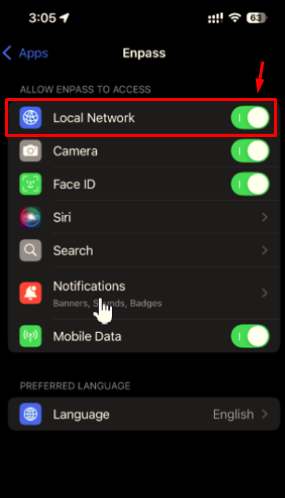
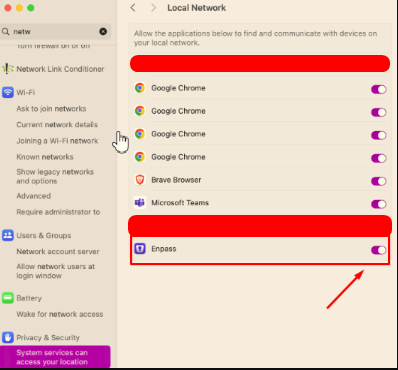
It seems the problem is related to the "Local Network Privacy" permission settings introduced in recent versions of macOS and iOS. To resolve this, please follow the steps below: Enable Local Network Access For macOS: Open System Settings > Privacy & Security > Local Network. Locate Enpass in the list and enable access. Restart the Wi-Fi sync server and Enpass app. For iOS: Go to Settings > Privacy > Local Network. Find Enpass and toggle access to "On." Restart the Enpass app Once done, try syncing again using Wi-Fi sync to verify if the issue is resolved.
-
Could you kindly provide the following information: The total number of items and attachments stored in your Enpass vaults. Additionally, for testing purposes, please try the following: Disable your internet connection and use the Enpass app to check if the freezing issue still occurs. Alternatively, let us know if the app only freezes or gets stuck when syncing is triggered.
-
When an item is shared via PSK (Pre-Shared Keys), the recipient must copy the link, open it in a browser, and then Enpass will automatically launch to add the item. However, by enabling the "Check Clipboard for Shared Items" option in MacOS, you can skip the browser step. Simply opening Enpass will automatically add the item to the app without needing to open the link in a browser first.
-
This is part of the sync process for Enpass on OneDrive. If multiple users have access to the same Enpass folder, they will be able to view the same entries across both of your OneDrive accounts.
-
I've reported this issue to the technical team. They are currently investigating it, and I will reach out to you with updates as soon as I receive them. #SI-4137
-
I've reported this issue to the technical team. They are currently investigating it, and I will reach out to you with updates as soon as I receive them. #SI-4136
-
Thank you for your feedback. We have noted your concern and will share it with our internal team for further review.
-
The technical team is investigating the issue and working on a solution. We appreciate your patience and understanding as we work to resolve it.
-
-
Please follow these steps to troubleshoot the issue: Open Enpass, go to Enpass > Security, and disable then re-enable "Pin" Restart your device and share your feedback Note: Unlocking Enpass using the PIN only works when the app is running in the background. Otherwise, the master password will be required.
-
Enpass does not provide an option to select a specific folder in OneDrive for storing its data. By default, the app syncs with OneDrive and stores its data in the Apps folder.
-
Could you kindly provide the complete details regarding the item and send an email to support@enpass.io?
-
Please install the latest version of the Enpass app (version 6.11.5) on your device. Once done, please share your feedback with us.
-
The technical team is investigating the issue and working on a solution to resolve it. We appreciate your patience and understanding as we work to address this.
-
The website you're trying to sign in to, "https://mas.to," does not support the credential manager. As a result, password managers are unable to set up the passkey for this site on mobile devices. If you're encountering this issue on other websites as well, please provide a list of those sites so we can further investigate.
-
Please provide the below details: On which website(s) are you experiencing the issue? What is the creation date of the passkey you are using to sign in?
-
I've reported this issue to the technical team. They are currently investigating it, and I will reach out to you with updates as soon as I receive them. #SI-4128
-
We are aware of the issue and are actively working on a fix, which may take some time. In the meantime, here are a couple of workaround you can try: If the Enpass app appears to be stuck or off-screen on an extended display, you can resize the app by dragging its corners to adjust its size. If the Enpass mini window opens outside of view, simply click on the extension button in your browser or the assistant button in your system menu bar to restore access. We appreciate your understanding and patience as we work on resolving this issue.
-
If Enpass has been inactive on a device for an extended period, you will see a session expired pop-up when unlocking the app, prompting you to reauthenticate.
-
A stable version of the Enpass app has been released, which fixes the OneDrive sync issue. Please download and install the latest version, and let us know your feedback.
-
We have released a stable version of the Enpass app that resolves the OneDrive sync issue. You can download the latest version from the following sources: iOS App Store Google Play Store Windows Store Enpass website
-
We have released the stable version of the Enpass app for Windows (version 6.11.5 (1823)) and macOS (version 6.11.5 (1819)), which includes the fix. You can download it from our official website.

