Tarun Singh Rawat
Enpass team member
-
Joined
Everything posted by Tarun Singh Rawat
-
I've reported this issue to the technical team. They are currently investigating it, and I will reach out to you with updates as soon as I receive them. #SI-4117
-
Our technical team is working on this feature, and it's planned for an upcoming release. While we don’t have a specific timeline yet, it’s definitely on our development roadmap.
-
-
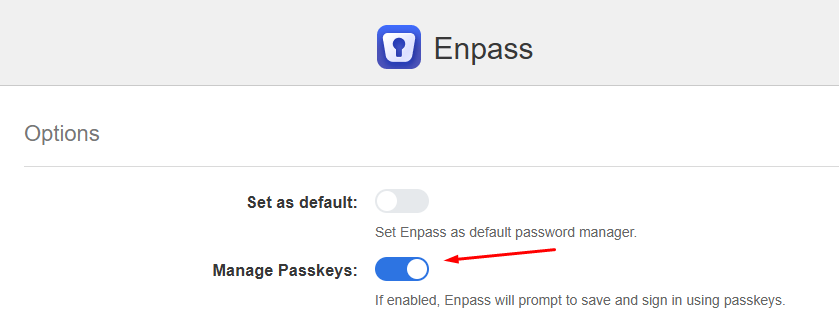
Please ensure sure the "Manage Passkey" option is enabled in the Enpass extension settings. Additionally, could you provide the following details: The URL of the website you're using The version of Enpass you're using, and whether it's the website or store version Are you experiencing this issue in all browsers or only in a specific one? Please specify the browser.
-
I've reported this issue to the technical team. They are currently investigating it, and I will reach out to you with updates as soon as I receive them. #SI-2080
-
We have submitted the request to our technical team for evaluation as a potential feature in future updates. Please note that several factors will be taken into account during the decision-making process. #SI-4114
-
I've reported this issue to the technical team. They are currently investigating it, and I will reach out to you with updates as soon as I receive them. #SI-4113
-
We have released a new version of the browser extension for Microsoft Edge to address the issue. Please install the latest version from here and share your feedback with us.
-
I've reported this issue to the technical team. They are currently investigating it, and I will reach out to you with updates as soon as I receive them. #SI-4101
-
-
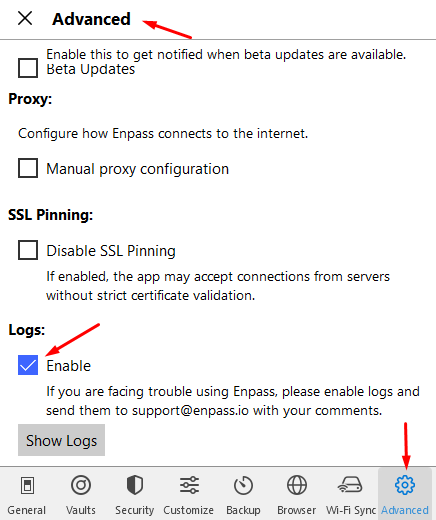
Please confirm if you are using Enpass on any desktop devices. If so, we recommend connecting your vault to that OneDrive account on your desktop. If the problem persists on your desktop, please enable the Logs feature in the Advanced settings of Enpass. After enabling the logs, try syncing again. Once the sync is complete, check the Show logs and copy them into a text editor. Please share the logs with us for further analysis. Please note that the Logs feature is only available in the Enpass app website version on your desktop.
-
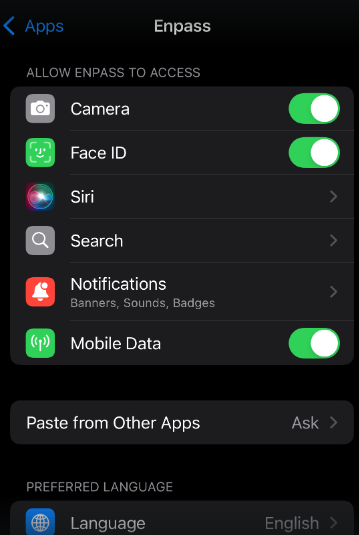
Please verify if the Face ID option for Enpass is enabled in your phone’s settings. You can do this by going to Settings > locate the Enpass app and ensuring it is toggled on for Face ID.
-
We have released the stable version (6.11.4 (865)) of the Enpass app for iOS,which includes the fix. You can download it from the App Store or our official website.
-
I've reported this issue to the technical team. They are currently investigating it, and I will reach out to you with updates as soon as I receive them. #SI-4079
-
We have submitted the request to our technical team for evaluation as a potential feature in future updates. Please note that several factors will be taken into account during the decision-making process. #SI-4077
-
Our team is currently investigating the issue and is working hard to resolve it. We will provide updates as soon as it is fixed. Thank you for your patience.
-
@David Gerety Please make sure the Enpass app is running on your laptop while you sync the vault on your iPad. Note: We've released the latest version (6.11.4) of the Enpass app for Mac, so please update your device to this version. Additionally, could you confirm the following details? Are you using the Enpass app from our website or the App Store on your Mac? Please share the Enpass version and OS version for all the devices you’re using (and specify the device names).
-
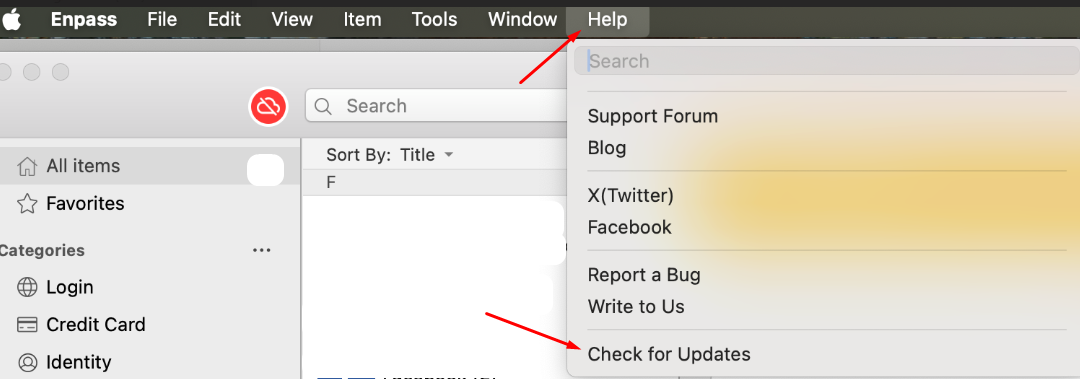
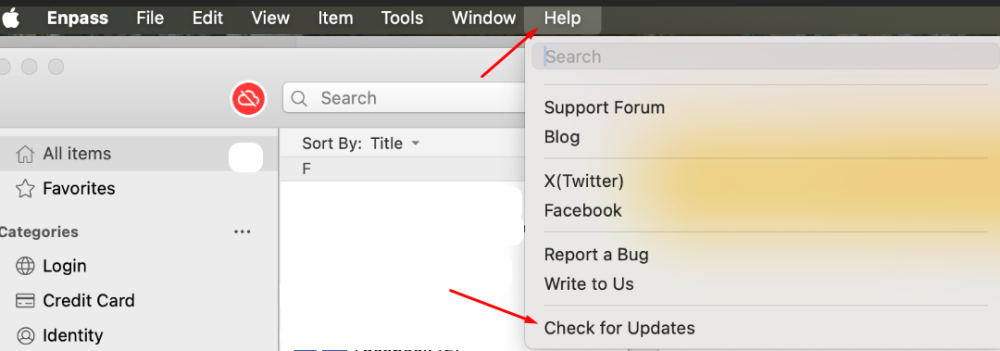
Our technical team is currently looking into the issue with the dock being filled with Enpass icons again, and we'll keep you updated on our progress. Additionally, please confirm whether you're receiving any new version alerts when checking for updates in the older version of Enpass (6.11.3)? Note: If you downloaded the app from the Mac App Store, you can update it by visiting the Enpass store page on the App Store. If you're using the website version, you can update the app by going to the Enpass app -> Menu bar --> Help --> Check for Updates.
-
We’ve resolved the issue in our latest iOS beta release. Please subscribe to TestFlight through the link provided on the webpage. We’ll inform you as soon as the stable fix is available. #SI-4019

-
-
I've reported this to the technical team. They are investigating it, and I will reach out to you with updates as soon as I receive them. #SI-4065
-
I am submitting this issue to our technical team as a feature request, and we will evaluate it for future updates. Please note that we must consider various factors in the decision-making process. #SI-4064
-
I've reported this issue to the technical team. They are currently investigating it, and I will reach out to you with updates as soon as I receive them. #SI-4063
-
-
I've reported this issue to the technical team. They are currently investigating it, and I will reach out to you with updates as soon as I receive them. #SI-4061