Amandeep Kumar
Enpass team member
-
Joined
Everything posted by Amandeep Kumar
-
No, it's not possible to create a second vault containing just the 25 passwords you desire and have the mobile device only use that vault. Enpass doesn't support selective syncing of specific items or vaults to different devices. The limitation of 25 items in the free version applies to the entire Enpass vault, regardless of whether you have multiple vaults. If you have more than 25 items in your vault, you'll need to upgrade to the premium version to access all your passwords on your mobile device.
-
I understand your frustration, and I apologize for any inconvenience this has caused. While I cannot speak directly to the development process, implementing FIDO2 support may involve various technical challenges and considerations specific to Enpass. However, your feedback is valuable, and I'll be sure to pass it along to the development team for further consideration. Thank you for your patience and continued support.
-
To resolve this issue, please follow these steps: 1. Open the Enpass extension settings on your normal browsing window. 2. Right-click on the Enpass extension icon. 3. Select "Manage extension." 4. Turn on the option that says "Allow in private mode." This should address the issue you're experiencing. Let me know if you need further assistance!
-
Hi @funkemunky Feature requests undergo a thorough evaluation process, considering various factors such as feasibility and other considerations, before implementation. This ensures that new features meet quality standards and align with the overall product vision. Your patience and understanding are appreciated as our team works diligently to address and prioritize feature requests.
-
This Feature undergo a thorough evaluation process, considering various factors such as feasibility and other considerations, before implementation. This ensures that new features meet quality standards and align with the overall product vision. Your patience and understanding are appreciated as our team works diligently to address and prioritize feature requests. #SI-1632
-
Our technical team is actively working on a solution. Fixing this bug may take some time, and the resolution will be included in the upcoming updates of the application.
-
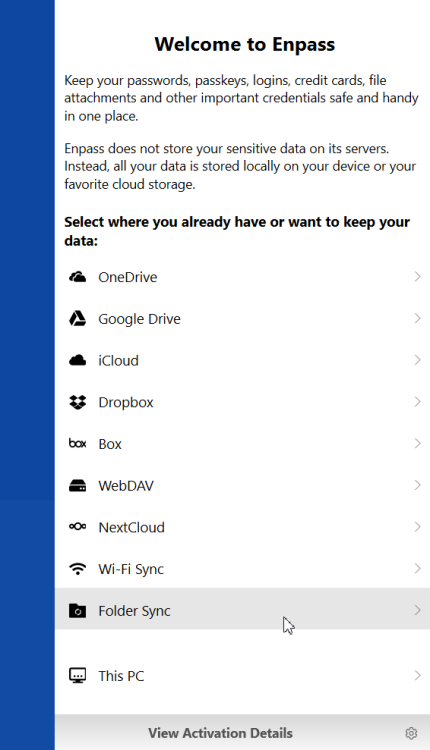
It seems there might be some confusion in the setup process. Here are the correct steps to set up Enpass: On the welcome screen, click on "Personal." Enter your registered email to activate your account. Once activation is complete, you will see all cloud sync options on the next screen. Select Dropbox as your preferred cloud service. If you already have data on Dropbox, it will prompt you to enter your master password to proceed. Following these steps should help you properly set up Enpass with your existing data on Dropbox. If you encounter any issues or have further questions, feel free to ask for assistance. We're here to help!
-
In the free version of Enpass, there's a cap of 25 logins for items stored in your smartphone's vault. However, there isn't a specific method for selecting which 25 items are synced to your phone. If you require storage for all your items, I recommend considering an Enpass subscription, which offers expanded features and storage capacity. You can explore the subscription options at Enpass Pricing.
-
As suggested, create separate entries for each site in Enpass and input your username and password only once. Additionally, you can store one-time codes separately for each site to keep your information organized and easily accessible.
-
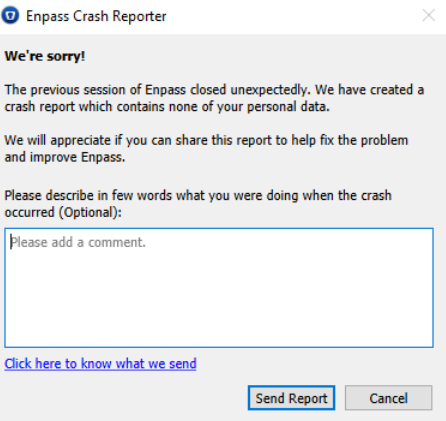
Certainly! To investigating the issue, and your feedback is crucial for us to understand the problem better. When Enpass crashes, do you receive the Enpass Crash Reporter notification? This notification typically appears after a crash and allows you to send crash reports to our technical team for analysis. Additionally, could you please confirm which version of Enpass you are using? Is it version 6.9.3(1592) or 6.9.3(1595)? Also mention your user name in comment to that we can verify that it is by you and tag this report accordingly. Thank you for your cooperation and patience as we work to resolve this issue. We're here to help and will do our best to ensure that Enpass works smoothly for you.
-
Hi @bu11etpr00f, Thank you for letting me know. I understand that the issue has been escalated to the technical team. If you need further assistance or have any additional questions, please feel free to reply to your previous thread. This will help avoid duplication and ensure that we can provide you with the best possible support. Let me know if there's anything else I can assist you with!
-
Certainly, could you please specify on which device you are encountering issues with categories and tags? Additionally, could you provide the Enpass version you are currently using? This information will help us assist you more effectively.
-
I've reported this issue to the Enpass technical team. They are currently investigating it, and I will reach out to you with updates as soon as I receive them. Thank you for your patience, and feel free to provide any additional feedback. #SI-3561
-
For security reasons, your OneDrive session expires periodically. To avoid this, you first need to disconnect the sync with OneDrive from Enpass settings, then again enable it, and you’ll be redirected to the OneDrive login page. Here you just have to enable “Keep me signed in” as shown in the image below and fill in the details to log in.
-
Unfortunately, we do not provide support for older versions of Enpass, as they may lack important updates and security enhancements. We recommend updating to the latest version of Enpass to ensure you have access to all the latest features and improvements. If you need assistance with updating or have any other questions, please feel free to ask!
-
To move your Enpass database from one OneDrive account to another, follow these steps: 1. Save the Enpass database file from Account A to your local device. 2. Restore all your data from the saved database file to a new vault in Enpass. 3. Connect this new vault to Account B's cloud storage. Make sure to remove all backup files from Account B to avoid any conflicts. If you need further assistance, feel free to ask!
-
Unfortunately, we do not currently have the feature you mentioned. Thank you for providing this feedback, and I have forwarded your request to our development team for consideration. If you have any more suggestions or questions, feel free to share. #SI-3674
-
I've reported this issue to the Enpass technical team. They are currently investigating it, and I will reach out to you with updates as soon as I receive them. Thank you for your patience, and feel free to provide any additional feedback. #SI-3673
-
Hi @Nikpick100 when attempting to access or restore such encrypted files, the application will prompt for the corresponding master password associated with that particular file.
-
I understand your concern, Unfortunately, recovering a lost Master Password is not possible, as it is not stored anywhere for security reasons. Your data remains entirely under your control, and we do not have access to it. However, if you have the Enpass App installed and have version 6.9.0 or above on another device with Face ID, biometrics enabled for unlocking, you may be able to recover your data by following these steps: **Option 1: Check Your Actual Master Password** Access the Enpass App on any other mobile or desktop with biometrics/Master Password. Verify if the Primary vault's cloud email address matches the one you are trying to connect to on your target machine. Unlock Enpass App via Face ID/biometrics > Click on Settings > Vaults > Primary > Change Master Password > Enter the Master Password you are sure about. 3.1. Check if it accepts and allows you to change the Master Password to a new one. **Option 2: Transfer Items to a New Cloud with a New Master Password** Unlock Enpass App on the specific device using biometrics/touch/PIN access. Go to Settings > Click on Add New Vault of Enpass with a new Vault password. Copy all items individually from other vaults and move them into the newly created vault. Sync this new vault with a new cloud account. Reinstall Enpass on your desktop/other device and restore data using the new cloud and new Master Password. Once data is restored on the desktop/mobile, repeat step 5 on all other devices.
-
We would like to share that Enpass app may ask for the master password occasionally even if the Windows Hello/PIN is set for security purposes. However, if this is happening too often, please try the below troubleshooting steps - Ensure that the Enpass app and Windows OS is up to date. Disable the Windows Hello authentication and enable it again from the Enpass app Settings → Security → Quick Unlock. Create a manual backup of your Enpass data and then reinstall the app. For more information and help, feel free to contact us via the same email, and we will be happy to assist you. Also, visit our user manual. https://support.enpass.io/home.htm
-
To initiate the setup of Enpass from the beginning, please visit the following link: https://support.enpass.io/home.htm. Once there, select your device type to access the detailed manual for setting up Enpass.
-
Hi @raalapas I've reported this issue to the Enpass technical team. They are currently investigating it, and I will reach out to you with updates as soon as I receive them. #SI-3669
-
Hi @navaho I'd like to confirm that we have indeed escalated the issue you reported to our development team. They are currently investigating and working on reproducing the problem on their end. Fixing any potential issues may take some time, but please rest assured that we are fully committed to resolving this matter as quickly as possible. Your patience and understanding are greatly appreciated. #SI-3666
-
Since your ticket is already logged with our support team, rest assured that they will assist you and provide help with your issue.