


Anshu kumar
Enpass team member
-
Joined
Everything posted by Anshu kumar
-
Hi Guys, Thanks for your suggestion. I have noted down your request. Cheers!
-
-
-
Hi @antoniy, I would like to share that after the Marshmallow update in some Samsung's devices don't support Android fingerprint API. They use Samsung's fingerprint API, which provides ambiguous information about cancellation behaviour. However, we are finding a workaround to solve this issue.
-
Hi @Tokushima, Thanks for reporting this issue. I have noted the website for further testing and will try to fix asap. Till then I request you to please co-operate with us.
-
Hi @Matthias Buesing, Thanks for writing in. I would like to share that we have already working with Google to allow Enpass extension to auto-fill in Chrome browser on the iOS devices, and once approved autofill on Chrome for iOS will work like Safari and Firefox. Cheers!
-
-
Hi @antoniy Thanks for writing in. I would like to let you know that Full-time fingerprint is supported only on Android devices that have Android Marshmallow Fingerprint API, so if your Samsung devices with Fingerprint scanner is running Android lesser than Marshmallow, fingerprint will work just like the PIN code and you have to enter master password every time after the app is exited. Hope this helps!
-
-
Hi @debgram , Sorry to hear about your trouble and I apologize for the inconvenience. This problem is not related to Enpass in general. There can be various reasons for this error. Please have a look at Microsofts support page and let me know does your problem get resolved? Cheers!
-
Hi @humidmark, Thanks for reporting this issue. I have noted the website for further testing and will try to fix asap. Till then I request you to please co-operate with us.
-
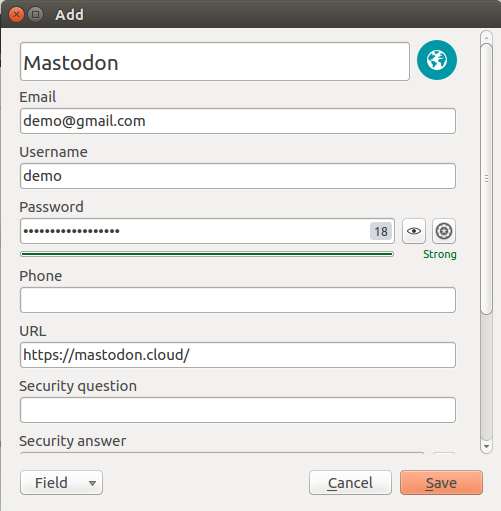
Hi @plinss, Sorry to hear about your trouble. I would like to share that while auto filling in any website, Enpass search for username/Emails fields. While in your case it seems that the username field is set first in the Enpass that might be the reason why it automatically detect username field and fills the first. So the best workaround is that you can re-arrange the field saved in Enpass. Hope this helps!
-
Hi @Santiago I'm glad to know that you have managed to resolve the issue. To restore the database from Google Drive, please enable sync in Enpass settings. Cheers!
-
Hi @R3HDH8pNh7 Thanks for reporting this issue and I apologize for the inconvenience. It would be a great help if you can share the demo account of your WebDAV to us at support@enpass.io or you can personally message me so that we can investigate where the problem could be. Thanks for your co-operation!
-
Hi @Gabbalo Thanks a lot for your time and sharing the feedback. The localization issue has already been fixed in latest version 5.5.2 (we call it Traditional version with installer) which has attachment feature too. The same will be available for the portable version before the end of this month. So I recommend you to please use Traditional version of Enpass. Noted and fix will be available in any of the coming updates. Cheers!
-
Hi @novettam Oops! This sounds very weird. Please share some more information so that we can take a closer look and check on this. Which Desktop environment are you using? Which Enpass version are you using? Which Keyboard layout are you using? What is the default language for Enpass and are you using any special character in master password? Thanks for your co-operation!
-
Hi @kagy Welcome to Enpass family! Sorry to say but yes, you have to manually move items into respective categories. To do so use Drag and Drop to change the category of items. Cheers!
-
-
Hi @NetFlight Thanks for writing to us. Its already considered for next major update. For now, please arrange these folders based on last modified time. Thanks for your cooperation!
-
Hi @vilsa Sorry to hear about your trouble and I apologize for the inconvenience. For quick troubleshooting, please disconnect the sync from all devices and reconnect again (to same Google account). Now do some sample changes in one device like mark any item to favorite, add a new item, add a new folder, and see if the changes got reflected in other devices. Please make sure Date and Time settings set to Automatic on all devices. Cheers!
-
Hi @Bjorn Lowgren Sorry to hear about your trouble and I apologize for the inconvenience. Before installing the update, please make sure that the existing Enpass app is completely closed (even from System tray or Menu bar) and if you are using your system as a multi-user please make sure Enpass app is closed from all user accounts. Also, open Task manager --> Tap 'Details' --> and check if Enpass app is there or not? If yes, please close it first and try to update again. Hope this helps!
-
-
Hi @Derik Thanks for reporting this issue and I apologize for the inconvenience. Please share some more info so that we can investigate where the problem could be? Which version of Enpass App and Enpass extension are you using? Have you installed any Antivirus/Firewall/security-related browser extension? Are you using proxy?
-
Hi @Vladimir Thanks for writing in and I apologize for the inconvenience. Please share some more info so that we can investigate where the problem could be. Which Desktop environment are you using? Which Enpass version are you using? What is the default language for Enpass and to which language you want to switch?
-
Hi Guys, Thanks for reporting this issue and I apologize for the inconvenience. I have noted down this issue and forwarded to dev team so they can try to fix this issue asap. Till then I request you to please cooperate with us.

