


Anshu kumar
Enpass team member
-
Joined
Everything posted by Anshu kumar
-
Hi @Sod Almighty Thanks for your suggestion. The suggested feature is already in our roadmap but I can't assure any ETA for this and only can say that it will be available in any of future versions. Keep suggesting!
-
Hi @jakejohn Sorry to hear about your trouble. Please share some more information so that we can take a closer look and check on this. Have you observed the same problem of settings being not preserved with any other settings in Enpass? Which Windows version are you using? Are any changes in Enpass data being saved? Like marking/unmarking favorites, creating new items? Are you using Enpass as a same user, who installed it in PC? Might me an issue related to permissions required to save changes on File system. Thanks for your co-operation!
-
Hi @lender1257 Thanks for writing in. You can sync Enpass data with MagentaCLOUD, but you have to enable WebDAV support in it. For more details please check out this link. Hope this helps!
-
Hi @Judy Sorry to hear about your trouble and I apologize for the inconvenience. Before installing the update, please make sure that the existing Enpass app is completely closed (even from System tray or Menu bar) and if you are using your system as a multi-user please make sure Enpass app is closed from all user accounts. Also, open Task manager -->Details--> and check if Enpass app is there or not? If yes, please quit it first and try to update again. Hope this helps!
-
Hi @Santiago Thanks for writing to us and liking Enpass. Desktop version also offer very smooth experience but I am really very sorry to hear that you are having trouble in unlocking keychain on Desktop. To get rid of this issue please check out this link. If your problem still persists, please share some more info so that we can help you in a better way. On which devices (all of them, along with OS version) are you using Enpass? Does Enpass (desktop) also crash when you try to search for any particular item? Which Enpass version are you using on each device? Have you changed the default location of Enpass database? In which language along with its keyboard layout are using for Enpass? Have you recently changed your Master password on any device? We will do our best to make Enpass work smoothly on your desktop too. Cheers!
-
-
Hi @justaguy Sorry for the inconvenience. We will definitely improve it in a future version. Keep suggesting!
-
Hi @debgram, I would like to share that the color of the Enpass icon is grey and it doesn't change according to the theme, even if it is communicating with the app or not.
-
-
Hi @debgram, Thanks for writing back. I'm afraid to say that I am not able to understand what did you mean by It would be great if you can explain the scenario a little bit more or if possible please share the screenshot. It will help us in getting a more clear picture about the issue before further proceedings. Thanks for your understanding!
-
Hi @Vladimir Thanks for writing back and sharing the details. I have noted your issue for further investigation, and I'll get back to you once I hear from the dev team. Thanks for your understanding.
-
Hi @Jay93, Thanks for writing in. I'm afraid to say that I am not able to understand where exactly you're getting problem with clicking the context menu. Please explain the scenario a bit more mentioning the OS where you're facing the issue.
-
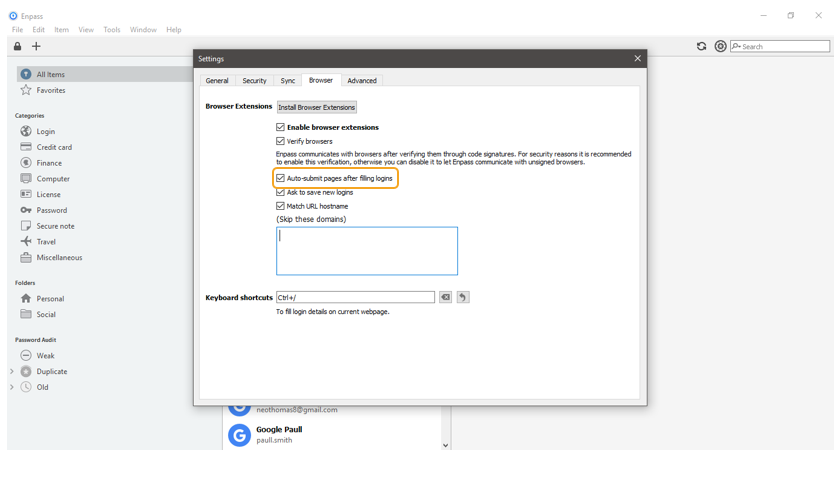
Hi @werelord , Sorry to hear about trouble. Please check if the option "Auto-submit pages after filling logins" is disabled in Enpass browser settings? If yes, please enable it and check. Hope this helps!
-
Hi @camjac251 Thanks for reporting this issue and I apologize for the inconvenience. I would like to share that we have already submitted the update of Firefox browser extension to Mozilla for review. It's in the queue and hopefully will be available soon. Yes, we have fixed some minor issue in Chrome extension and released an update(5.4.2).
-
-
-
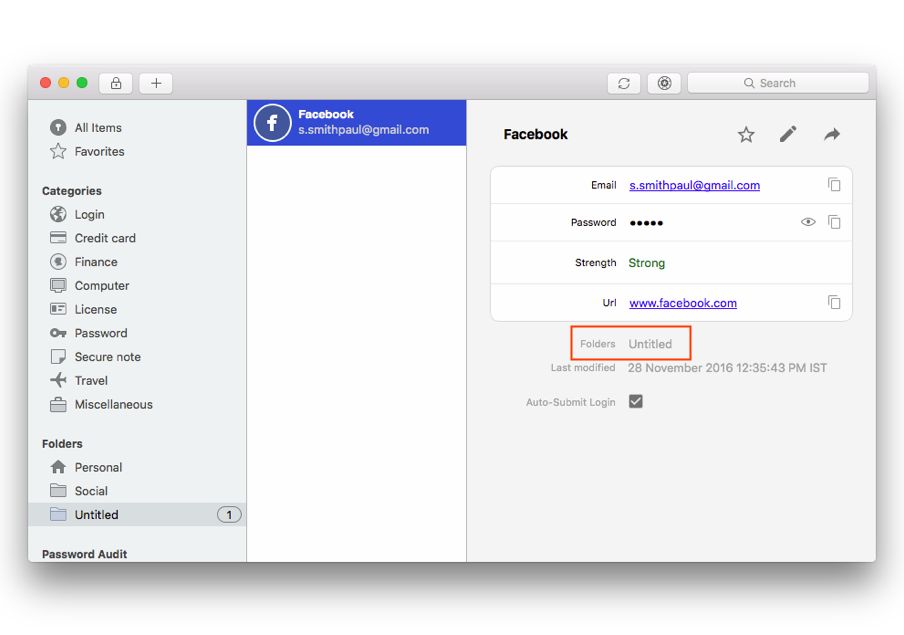
Hi @Matthias Buesing Thanks for your suggestion. I have noted down your request and we'll take it into consideration. But meanwhile; To do so, select the folder in which you want to add the new item and now try to add the item. It will add automatically to the selected folder. You can view the folder details of the particular item by selecting the items. Cheers!
-
Hi @phg Thanks for writing in. Hopefully before the end of this month. Cheers!
-
Hi @woody1, Thanks for writing in. As far as I can understand your query is related to Master password, and you're having trouble in unlocking Enpass keychain. Just to make a couple of things clear, I've following queries. On which devices (all of them, along with OS version) are you using Enpass? Which Enpass version are you using? Which cloud sync are you using? Type your password in a text editor, so you can see and make sure that the password is being typed correctly. Then copy and paste it into Enpass and let me know if it works? Thanks for your co-operation!
-
Hi @Andi Thanks for reporting this issue and I apologize for the inconvenience. I have noted down this issue and forwarded to the dev team, so they can try to fix this issue asap. Till then I request you to please bear with us.
-
Hi @FelschR Thanks. Based on your feedback, we have fixed Enpass chrome extension and released a new version(5.4.2). I apologize for the inconvenience caused to you. We have just released a new Enpass extension version (5.4.2) with the fix of Chrome browser. Please give a try and let me know if the issue still persists.
-
Hi @Jeff T. Thanks for your suggestion. You will be glad to know that it is already a part of next major UI overhaul. Cheers!
-
-
Hi @spinedoc777, Thanks for writing in and I apologize for the inconvenience. I have noted down your suggestion and we will do our best to improve it. Cheers!
-
Hi @brombie Sorry to hear about your trouble. To get rid of this issue, you can try any of the given steps and let me know if the problem still persists. Step 1: Go to Device Setting --> Apps --> Select Enpass --> Storage --> Tap Clear data. Step 2: Uninstall Enpass from the device. Go to Device Setting --> Backup & Restore --> Turn off Automatic restore option. Now install Enpass app and it will display welcome screen. Hope this helps!

