


Anshu kumar
Enpass team member
-
Joined
Everything posted by Anshu kumar
-
Hi @MacPauli, Sorry to hear about your trouble you are going through. Our dev team is looking into this issue and I will update you about it on Monday. Happy Weekend!
-
Hi @DazixCZ Thanks for writing back and sharing the URL. It seem's there is some problem with this website with the Auto-submit option and I have noted it and notified the dev team about it, Meanwhile, please disable Auto-submit Login for the particular item and manually click on the login button after autofilling. Yaa! it would be great. Cheers!
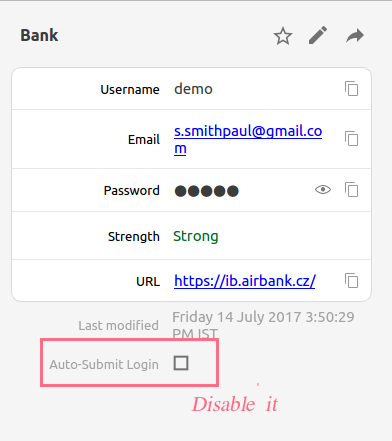
-
Hi @miwie Thanks for writing in. At any point of time your data is never left unencrypted on device or while syncing. At the time of syncing your Enpass transfers the whole encrypted database to your cloud. For more details please check out our user manual and FAQs. Cheers!
-
Hi @m.samuel Welcome to Enpass family. I would like to share that, in order to use Enpass Browser extension, the main app must be kept running in the background. The reason is that being an offline password manager, Enpass saves all your database locally on your device, not on any server. Whenever you visit a login page and click Enpass browser extension for auto-filling, then the extension securely connects with an Enpass app to fetch and auto-fill the details. For more details please have a look at our user manual link. In this case, there is an option in Enpass settings to keep it running in the background by minimizing it to system tray. Also, you can set Enpass to autorun on system startup so that you don't have to manually start it every time the system starts. Hope this helps!
-
-
Hi Michael, Thanks for writing in. I would like to share that Enpass charges a one-time fee per platform for the lifetime license. e.g if you buy it on an Android device and switch to another Android device, you don't need to buy it again as you can restore your purchase easily by downloading Enpass with the same account you used to purchase Enpass. The same has been mentioned on our website here https://www.enpass.io/pricing/ and https://www.enpass.io/kb/i-have-purchased-enpass-for-one-platform-do-i-need-to-purchase-separately-for-others/ Hope this answers your questions.
-
Hi @julioc Thanks for writing in. Previously we had this feature in Enpass but for security improvements, we had to remove it. However, you can use Ctrl+A command to select password while unlocking Enpass keychain. Cheers!
-
Hi Stephan, Thank you so much for notifying this issue and I apologize for that. I have penned down this issue and notified the dev team so they can try to fix this issue in a near extension update. I appreciate your patience in the meantime!
-
-
Hi @mb36 I apologize for the inconvenience. Our dev team is already looking into this issue and the fix will be available in the upcoming extension update. Till then I request you to please bear with us.
-
Hi @RSW Thanks for sharing your findings. We will look into this issue. Cheers!
-
Hi Guys, Sorry to hear about your trouble you are going through. We have tested this issue in our lab but were unable to reproduce it. To investigate further on this issue please let me know which desktop environment are you using and what is your default browser. Thanks for your co-operation!
-
Hi @PepeCZ Thanks a lot for your love and support. We keep on adding new features in Enpass which makes Enpass more user-friendly and it's not as if we don't want to add Windows Hello support in our traditional desktop app. Our dev team is working on it and it will be available in any of the upcoming release cycles. We appreciate your patience in the meantime.
-
Hi @tox1c90 Thanks for writing in. Enpass autofill works only with those browsers which provide accessibility events. This technical limitation is preventing us from auto filling in other browsers (Samsung browser, in your case ). You can also manually fill the logins in Samsung browser using Enpass Keyboard. However, I forwarded your request to dev team so they can check how it can be done. Cheers!
-
Hi @RSW Thanks for writing in. I would like to share that when you save any changes in your Enpass keychain, the sync is triggered after 5 secs, and in case if Enpass is sent to background before those 5 secs, there might be a chance that sync doesn't initiate and changes would not reflect on the cloud (Dropbox in your case). For Testing Purpose: Do some sample changes (like mark any item to favorite, add a new item, add a new folder ) on the iOS device and wait for more than 5 sec and now move app to background and let me know if the changes reflected on other devices? Thanks for your co-operation!
-
-
Hi @pjsl Thanks for using Enpass and sharing the valuable feedback. Thanks for notifying this issue. I have noted down this issue, and the fix will be available in the next update. Once the issue of clipboard not being cleared automatically is fixed, there shouldn't be any problem with Fill and Copy. Also, I have noted your request to add a feature of Fill only. Cheers!
-
Hi @TheWood1978 Sorry to hear about the trouble you are facing while using the Enpass browser extension. We have tested this issue in our lab with same OS build and were unable to reproduce it. Could you please try rebooting your system and check if it helps. If your problem still persists, please drop us an email at support@enpass.io mentioning a link to this discussion with these details so that we can take a closer look into this issue. Currently which Enpass and Enpass extension version are you using? What is your preferred browser and browser version and are you facing the same problem with other browsers too? Are you using any antivirus and any third party security-related extension? Are you using Proxy? No, you don't need to buy to use the browser extension because our Traditional version (Downloaded from our website) of Enpass supports the browser extensions.
-
Hi @cade Thanks for writing in. I would like to share that Enpass automatically creates a backup of your data on the system every day if there have been any changes made in the Enpass keychain since the last backup. For more details please check out our user manual. It would be a great help if you can share the website name (along with URL) and steps you perform after that the problem arises so that we can take a closer look into this issue. Thanks for your co-operation!
-
Hi @oaks Sorry to hear about the trouble you are going through, skipping this thread was just an oversight. If you don't mind, can you please drop us an email at support@enpass.io mentioning a link to this discussion with these details and it would be great if you can share a demo account of your WebDAV so that we can take a closer look into this issue. Currently which Enpass version are you using? Does the sync break after waking up the system from sleep mode or any other instance? Thanks for your co-operation!
-
-
Hi @RHPT Thanks for writing in. I know you are waiting for this feature for a long time and our dev team is working arduously to add this feature to Enpass along with a long list of features. At the moment I can't assure you of any ETA for final version of Enpass 6, but I can promise that the beta would be rolled out before end of this year. Cheers!
-
Hi @mtr Sorry for the inconvenience. You can download the latest desktop app from our website and Edge extension from here. The complete steps to set up Edge extension is mention in this thread: Cheers!
-
Hi @eschel Thanks for writing in. The problem seems to be with the index of Spotlight and re-building that might fix the issue. Cheers!
-
Thanks for the input @Mirosław Karczmarczyk. Noted and forwarded to the dev team. Cheers!


