


Anshu kumar
Enpass team member
-
Joined
Everything posted by Anshu kumar
-
Hey guys, Sorry for all the trouble you are facing while syncing with Dropbox which seems to be very specific with some devices/Dropbox accounts. We have improved Dropbox sync with some other issues in a new update and we'll be rolling out the Beta version soon. So, if you're interested in testing it before a public release please subscribe on the Play store as a Beta tester for Enpass. Thanks!
-
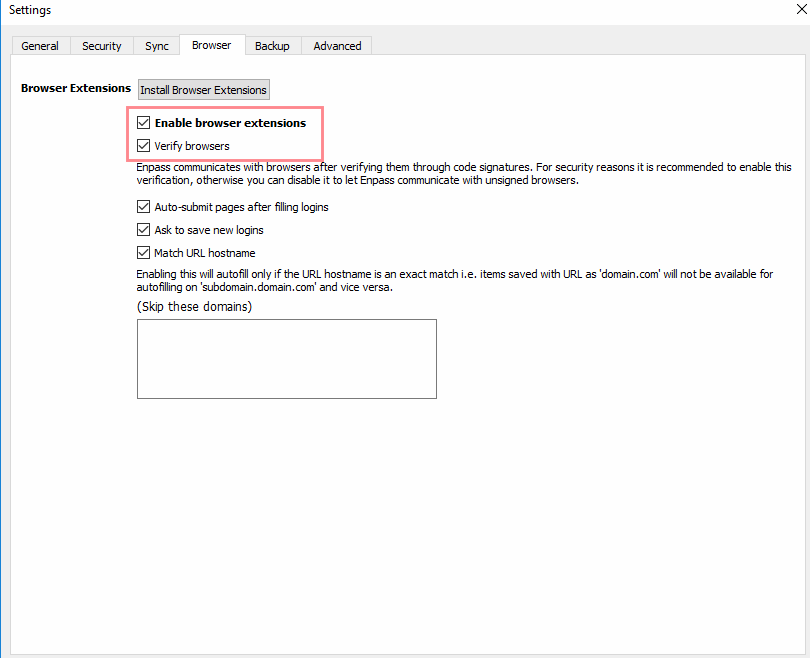
Hi @Heiner Thanks for writing in. As far as I understood you are facing a problem using Edge browser extension? If yes, please make sure you have installed Enpass password manager app and Enpass extension for Microsoft Edge from Windows store in your system and have Enabled browser extension in Enpass password manager browser settings. If I misunderstood the problem please elaborate a bit more.
-
Hi @thoko Sorry to hear about the trouble you are going through. Please make sure you are using the same URL to sync with the Mac device that you configured on Windows or iPhone devices. If the problem persists, please share a demo account of your WebDAV at support@enpass.io or you can personally message me so that we can investigate where the problem could be. Thanks for your co-operation.
-
-
-
Hi guys, Please have a look at this thread: Hope this helps!
-
Hi @onepass-refugee, Thanks for writing back and sharing the details. I have forwarded this issue to the testing team to look into it and I will keep you updated. Till then please bear with us.
-
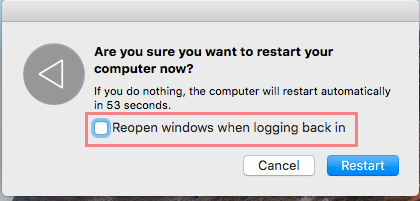
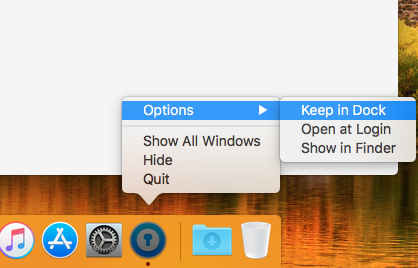
Hi @Julian That's strange! Please make sure you have disabled Reopen windows when logging back in option when you restart/shutdown your system. Also, If you kept Enpass in Dock then, please remove it and also disable Open at Login then check. Hope this helps!
-
Hi @Aristide Insite Sorry to hear that you are repetitively having trouble in unlocking keychain. Please have a look at our page listing some of the troubleshooting steps for the master password not working. Also, please share some more info so that we can diagnose where the problem could be. Which OSX and Enpass version are you using? Which cloud services are you using to sync? Have you changed the default location of Enpass database? Have you imported data from any other software? In which language along with its keyboard layout are using for Enpass? Awaiting your response.
-
Hi @Julian Sorry for the late reply. We have just pushed a new update that supports the WebExtensions and has some bug fixes along the way. It'll be live within few hours, so please update to the latest version of Enpass (5.6.2) and share your feedback. Cheers!
-
Hi @onepass-refugee Sorry to hear about your trouble going through. For quick troubleshooting please try re-installing the Enpass and check again. If the problem persists, please let me know : Build version of Windows you're using? Does this happen when you launch the fresh app or comes while the app is already running? Which Antivirus are you using? Have you installed any other Enpass version (Traditional or UWP) in your system? Thanks for your co-operation!
-
Hi @simonb, Sorry to hear about your trouble you are going through. I would really appreciate if you can please mention the exact steps performed those led to crash after you wakes up your Mac. Also, it would be a great help if you can share the crash report at support@enpass.io so that we can diagnosis where the problem could be. Thanks for your co-operation!
-
Hi guys, Thanks for writing in. Our dev team is already working on it and fixed will be available in an upcoming release. Cheers!
-
Hi @zyghom Sorry to hear about your trouble you are going through. The reason behind getting error 116 is that Enpass is not able to upload changes to cloud so please make sure your internet connection is stable and Date & Time settings set to automatic. If the problem persists, it would be a great help if you can PM a demo account of WebDAV along with OS and Enpass version you are using, so that we can diagnose where the problem could be. Thanks for your co-operation!
-
Hi @Vivant Sorry to hear about your trouble going through. To investigate further on this issue can you please let me know does this problem surfaces in any specific website or in all websites? Please specify the websites. For Testing Purpose: If there are any other notifications in the notification bar, then clear it and now pull the Menu bar quickly and let me know if the problem still persists. Thanks for your co-operation!
-
Hi @gokhanoz Sorry to hear about your trouble going through. It seems a device specific problem. However, our dev team is already looking into it. Could you please try reinstalling the App and check if it works. If the problem still persists, please let me know: Which Antivirus are you using? Have you installed any other Enpass version (Traditional or UWP) in your system? Thanks for your co-operation!
-
Hi @VAsRHDHachiRoku Yes, it's already planned for the next release. Cheers!
-
Hi @PepeCZ The good news about Enpass WebExtension for Firefox is here. Cheers!
-
Hi @Sander Schutten Sorry for the trouble you're facing with. Actually this issue is browser specific with Edge & Internet explorer and doesn't occur with Firefox and Chrome. When you enable sync, Enpass opens the respective cloud login page from where it returns to landing page on localhost with success message Continue with Enpass but here, Internet Explorer and Edge browsers are not able to load this page. Hope this helps!
-
Hi @Denis Manibal Sorry to hear about your trouble you are going through. This happens when you change the master password on one device and try to use it on the other one. Since Enpass data on cloud is now encrypted with new password, so your other devices will not be able to sync with the data on cloud and will show this message. Now you need to enter your new/changed master password to enable sync. For more details please check out this FAQ. If the problem still persists, please try these troubleshooting steps: Disconnect the sync on all devices. Login into OneDrive in any Browser--> Open Enpass Folder --> Select Sync_default.walletx file --> Rename it as BackupSync_default.walletx. Now open Enpass and turn on the sync on each device. Hope this helps!
-
-
Hi @midwesterndirt, You are facing this problem because the current Enpass v5.6.0 (Downloaded from Mac App Store) is not compatible with Firefox WebExtension. But the good news is that we have already submitted the update on Mac App Store for review. So as we've mentioned above in the post, you've to wait until the app hits the Store. Thank you.
-
Hi @jumper85, Thanks for reporting this issue. We are already aware of this issue and the fix will be available to you in the next update. Till then I request you to please bear with us.
-
-
Hi @Sophia I am really very sorry to hear that you are having trouble in unlocking keychain. Please have a look at our page listing some of the troubleshooting steps for the master password not working. If your problem still persists, please share some more info so that we can help you in a better way. Which Enpass version are you using on the device? Which cloud services are you using to sync? Have you changed the default location of Enpass database? In which language along with its keyboard layout are using for Enpass? Have you recently changed your Master password on any device? Awaiting your response.

