


Anshu kumar
Enpass team member
-
Joined
Everything posted by Anshu kumar
-
Hi guys, For the Android platform, Enpass 6 beta will be available within this week. And on the iOS platform it's already in the testing phase but at the moment I can't assure you the exact ETA. It will support on all platforms. Yes, you have to create windows session for everyone and Enpass is isolated in each account. Thanks.
-
Hi @Sbug, Enpass already have the feature of Minimize app to the system Tray on system startup. Please let me know the version of OS and Enpass which you are using so that I can investigate further. Thanks!
-
Hi @GlaxMor Thanks for writing in. I would like to share that Enpass for Android is only available on Google Play Store. We strongly recommend users to install Enpass only from the respective app stores (Google Play Store) as apps on Store are signed with developer certificates and delivery through it assures that software is genuine and not tempered. While installing Enpass from other websites or stores might put you in trouble of security risk like data theft. Thanks!
-
-
Hi, @mork Thanks for writing in. I would like to share that whenever you purchase an app from App Store it gets linked to the same Apple ID from which you made the purchase. Please make sure that you're using the same Apple ID on your iPad and it should automatically restore the pro-version. Cheers!
-
Hi, @hartungstenio, Thanks for writing in. Windows Store version of Enpass 6 will store its data in the App folder. Cheers!
-
-
Hi @tomandreson Sorry for the trouble you are going through. Please share some more info so that I can help you better. Which iOS and OSX version are you using? Which cloud services are you using to sync? While syncing what error message or code are you getting? Thanks for your co-operation.
-
Hi @NonKon Sorry to hear about the trouble you are going through. Please make sure that you are entering the correct password by checking caps lock too. Also, please type your master password in notepad and copy/paste it into the password field and check if that works. Please have a look at the page listing troubleshooting steps for the master password not working. Hope this helps!
-
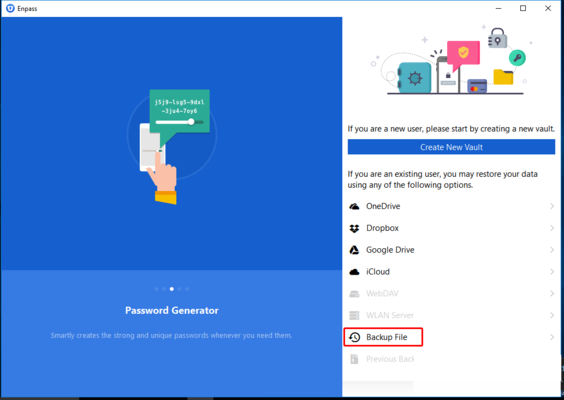
Hi @Arnas, Thanks for writing back. First of all, I would like to share that restoring Enpass 5 data directly from the cloud is not possible, you need to restore it with the backup file. Please follow these steps for restoring Enpass 5 data into Enpass 6. Step 1: Open Enpass 5 --> Take the backup of Enpass data and save it manually on the system. Step 2: Quit Enpass 6 (If running). Go to User Documents folder --> Rename Enpass6-Beta folder. Now Open Enpass 6 --> It will prompt you a welcome screen --> Select Backup file --> And follow the instruction. Hope this helps!
-
Hi @Arnas Thanks for writing in. It would be a great help if you can elaborate the scenario bit more what problem are you facing while restoring Enpass 5 data. Does Enpass crash? Is it doing a partial restore? Is it not accepting master password? Thanks for your co-operation.
-
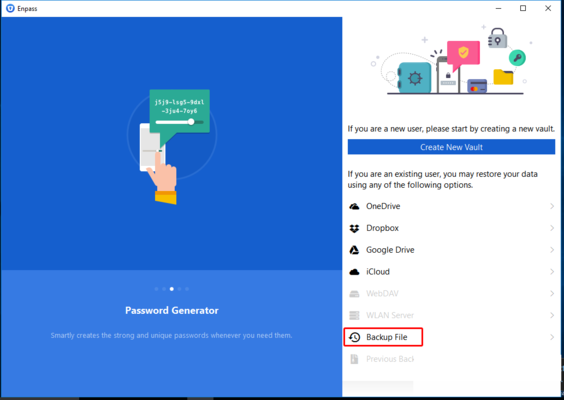
Hi @joefri Thanks for writing in and sorry for the trouble you are going through. Please perform these steps to restore Enpass 5 data into Enpass 6. Quit Enpass (If running). Go to user Documents Folder --> Select Enpass6-Beta folder --> Delete it. Now open Enpass 6 --> It will prompt you a welcome Screen --> Select Backup File --> Select Enpass 5 backup file --> And follow the instruction. Hope this helps!
-
Hi @My1 Thanks for writing back. It seems that you are running an older version of Enpass Portable. The latest version is available here on the website. Please check and let us know. Cheers!
-
Hi @My1, Thanks for writing in. Yes , windows version uses libsodium as well. You can see it alongside the main Enpass binary in installation folder. However if you have installed Enpass form Windows Store, it won't appear in a system search. Hope this helps!
-
Hi @Jakub Sorry to hear about the trouble you are going through. Please make sure that you are entering the correct password by checking caps lock too. Also please type your master password in notepad and copy/paste it into the password field and check if it works. If the problem still persists, please share some info so that we can help you better: On which all device (along with OS version) are you using Enpass? Which Enpass version are you using on each device? Thanks for your co-operation.
-
Hi @AndyMac, Thanks for your suggestion. I've noted it down and forwarded to the team for consideration. Cheers!
-
Hi @treefern Thanks for reporting this issue. I have noted it down and notified the dev team to look into it. Thanks!
-
Hey guys, Sorry for the trouble you are going through. Before updating Enpass, please make sure Enpass app is closed from System tray and if you are using your system as a multiuser make sure Enpass app is closed from all the accounts. Also open Task manager --> Tap Details --> And check if Enpass App is there? If yes, please close it and then try to update. Hope this helps!
-
Hey @tdhlawyer Please share some information so that we can look into this issue: Which versions of Enpass, Enpass extension and Chrome browser are you using? Are you using any antivirus or third-party security-related extension? Are you using a proxy? Are you facing the same problem with other browsers too? Thanks for your co-operation.
-
Hey @troypulk Sorry to hear about the trouble you're going through. Please let me know how are you sharing the item, i.e, through message or email? Also, please make sure that you're copying the complete link in the clipboard. Thanks!
-
Hey @wolfpacker Please let me know if Enpass crashes when you are done importing the data or do you get the prompt for a wrong password. Also, please let us know the platforms(along with the OS version) on which you're using Enpass and for how long have you using Enpass. Thanks for the reply.
-
Hi @Emilien, Thanks for reporting this issue. I've forwarded this issue to the team to look into it. Cheers!
-
Hi guys, We will improve this functionality in the next update. Thanks for reporting this issue. We will fix it in the next update. We'll look into these issues. Cheers, and keep reporting.
-
Hi @hkimgt, Thank you for trying the beta version and the feedback. Much Appreciated. I've noted down these issue in the bug tracker and notified the dev team to look into it. Please share some more info so that we can investigate further. On which all platform (along with OS version) are you using Enpass? Have you created all items in Enpass 5 or some of them in an older version of Enpass? Keep us posted if you have any feedback or suggestion.
-
Hi @AndyMac, Thanks for your suggestion. I've noted it down and forwarded to the team for consideration. Cheers!


