


Anshu kumar
Enpass team member
-
Joined
Everything posted by Anshu kumar
-
Hi @Bertel, Sorry for the trouble you're going through while restoring the Enpass data on Android device. Please follow these troubleshooting steps and share your feedback. Step 1: Turn off the sync from all devices. Login into Google Drive in any Browser--> Open Enpass Folder --> Select Sync_default.walletx file --> Rename it as oldSync_default.walletx. Now open Enpass on your Windows PC --> Settings --> And sync with Google Drive. Step 2: After successfully completing the above steps, please perform these steps on the Android device. Open Enpass on your Android device --> Select RESTORE MY EXISTING DATA --> Select same Google Drive account --> And follow the instructions. Hope this helps!
-
Hi @Alan in Oakland Thanks for writing in. It's because of security reason, Enpass protecting the data from being read from the clipboard by any other app. Cheers!
-
Hey guys, Sorry for the trouble you're going through. That's really strange! Please share some more info so that we can investigate further. Which OSX and Enpass version are you using? Are you facing this problem in any specific condition like when you wake up the system from sleep or at the fresh start of the app? Thanks for your co-operation.
-
Hi @Kan Thanks for writing in. I've forwarded this issue to the testing team to look further into it. Meanwhile please try these troubleshooting steps and share your findings. Quit Enpass (If running) Go to Home Folder--> Press Ctrl+H (to unhide hidden files). Now edit Enpass-Desktop.conf inside .config--> Sinew Software Systems--> Enpass-Desktop.conf and set LoginFeedbackSound to false as in LoginFeedbackSound=false. Hope this helps!
-
-
Hi @Donald Thanks for using Enpass and I'm glad to know that it reaches your expectation. You needn't worry about it and take it as a word from me that we will stick to our current business model for individual users. It is also confirmed that you would not be forced to switch to any subscription model. Sorry to say but currently we don't have any such plans to add more import functionality. However, I have noted down your suggestion for further consideration. In the meantime, you can import Handysafe password manager data into Enpass 5 and later on you can restore it in Enpass 6 using the steps mentioned in this post. Currently the Enpass v6 default store it's database inside the sandbox. However, I have noted down your suggestion and forwarded to the concerned team for further consideration. At the moment I can't assure you any ETA. Hope this answer your questions.
-
Hi @100 Watt Walrus, I appreciate your feedback and suggestions that you have provided. I've noted it down and forwarded to the concerned team for further consideration. Thanks again for taking the time out of your day to share your valuable ideas. Noted and fix will be available in the subsequent beta update. Cheers!
-
Hi @fmb Thanks for bringing this to our notice. I've forwarded this issue to the dev team to look into it. Thanks!
-
Hi @Dave 003, I would like to share that Enpass browser extension supports only stable version of the browsers. So please make sure you're using the stable one and let me know if the problem persists. Thanks!
-
Hi @preacha Thanks for writing in. I would like to share that Enpass support unlocking the extension using Touch ID and Face ID, but when you're using the extension for the first time, you have to enter the master password. I would suggest you please try re-enabling the Touch ID or Face ID from Enpass settings if you haven't already. And if the problem persists, please let me know the iOS and Enpass version you're using so that we can investigate further. Thanks for your co-operation.
-
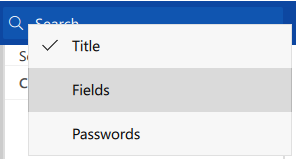
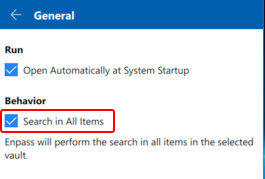
Hi @misterspock, Thanks for writing in. I would like to share that there are two ways to control search functionality. 1. Via Search menu option: Title: Selecting this option will search only the Title of the items. Fields: Selecting this option will search the field values and Title of the items. Passwords: Selecting this option will search only the Password fields of items. 2. By enabling the option Search in All items in Enpass General setting. Could you please try searching for the item by enabling these options accordingly. However, as you mentioned, "installing the beta, everything works fine, but now Enpass does not find entries." I've forwarded this issue to the testing team to look into it. Thanks for your co-operation.
-
Hi @JNiemi, Thanks for writing back and sharing the details. I've forwarded this issue to the testing team to look into it. Meanwhile please let me know which cloud services are you using to sync? Also, please turn off the internet connection on your device try deleting an item and let me know if Enpass still crashes. Thanks for your co-operation.
-
hi @Benny800, Sorry for the late response, skipping this thread was just an oversight. I would like to share that in next update we're going to introduce Folder sync support, which will allow you to sync multiple vaults with the same cloud account by giving a specific folder path to each vault which will fulfill your requirement. Cheers!
-
Hi @Dave 003, Thanks for writing back and I'm sorry it will take some more time. I would like to share that there might be some problem with the default browser which you've configured on your system and which is why Enpass is not able to open any link. Could you please review your default browser settings or try setting up Firefox as a default browser. Hope this helps!
-
Hi @DrSPH, Sorry for the trouble you're going through. Please make sure you're typing the correct master password, you can try typing your master password in notepad and copy/paste it into the password field. Also, please have a look at the page listing troubleshooting steps for the master password not working. Hope this helps!
-
Hey guys, Thanks for writing in and sorry for the trouble you're going through. Our dev team is looking into it and I'll update you once I hear from them. Till then please co-operate with us.
-
Hi @Dave 003 Thanks for writing back and sorry for the trouble you're facing. One of the possible reason might be the Outbound Rules for Enpass is disabled in Windows Firewall settings. To check please follow these steps: Open Windows Firewall settings → Advanced settings→ Outbound Rules → Enpass password manager and check. Also, please let me know the Antivirus if you're using so that we can investigate further. Thanks for your co-operation.
-
hI @JNiemi Sorry for the trouble you're going through. Please let me know the following so that we can look into it. Which Enpass version are you using? Does Enpass crash only when you delete an item or any other action you perform? Are you using Enpass on any other device? If yes, please let me know the OS version and if Enpass works fine? Thanks for your co-operation.
-
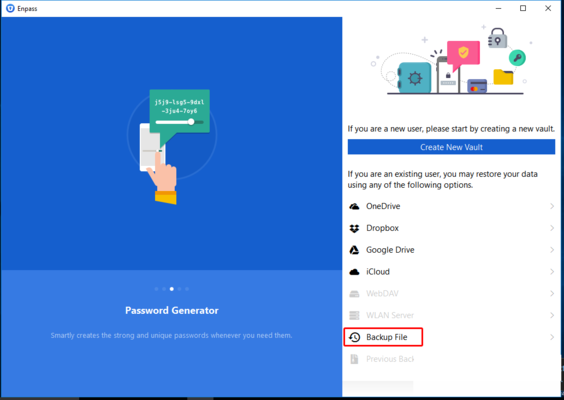
Hi @lokdawg78, First of all, I would like to share that restoring Enpass 5 data directly from the cloud is not possible, you need to restore it with the backup file. Please follow these steps for restoring Enpass 5 data into Enpass 6. Step 1: Open Enpass 5 --> Take the backup of Enpass data and save it manually on the system. Step 2: Quit Enpass 6 (If running). Go to User Documents folder --> Rename Enpass6-Beta folder. Now Open Enpass 6. It will prompt you a welcome screen --> Select Backup file --> Browse to the backup of Enpass 5 and follow the instructions. Hope this helps!
-
Hi @blaaaahblahblah Thanks for reporting this issue. We have improved support for Hi-DPI screens and fix will be available in the next update. I would like to have your feedback after the update. Thanks for your co-operation.
-
Hi @jakejohn, Thanks for writing in. I would like to share that detail page only displays the field which has value. However, you can delete the unnecessary field by clicking the label of that particular field. For more details please refer our user manual. Hope this helps!
-
Hi @Ben7002, Thanks for writing in. The suggested feature is already on our roadmap for the future version. Cheers!
-
Hi @Fredrik Thanks for your reply. You're facing this problem due to a known bug and our dev team is looking into it. Meanwhile please make Chrome as default browser and then try to sync. Hope this helps!
-
Hi @rafaeltg, Thanks for writing back. Please make sure you have "lsof" dependency installed on your system. If the problem still persists, please run lsof -i:10391 command in the terminal and share the output via support@enpass.io 10391 is the port number here. If it shows no output (blank), please try with other port numbers between 10391 to 10395. Also please let me know if you are facing the same problem with the other browsers (Firefox/Opera) as well. Thanks for your co-operation!
-
Thanks for your suggestion @maddy! Noted and forwarded to the concerned team. Cheers!

