


Anshu kumar
Enpass team member
-
Joined
Everything posted by Anshu kumar
-
Hi @Richard2016 Thanks for writing in. You can sync Enpass 6 data to Box cloud via WebDAV sync. To connect WebDAV please use the following Server: https://dav.box.com/dav using your Box login email address and password. Note: Web browser access is not supported. You need to use a WebDAV client. Cheers!
-
Hi @rafaeltg, Thanks for writing in. I would like to share that Enpass for Linux has been officially released only from our website. So you should install it from there only as installing it from other websites or stores might put you in trouble of security risks due to any possible tempering of setup executable. Cheers!
-
-
Hi @Lewisl Thanks for writing back. There might be some misunderstanding. Enpass 6 will be installed as a separate, parallel application that will not interfere with your existing Enpass 5 installation or it's database. Deleting the Enpass 6 Beta file won't affect your current Enpass 5 database and it's completely safe. However, if you afraid to delete you can just rename the Enpass6-Beta folder as previous Enpass6-Beta folder and start with a fresh database in Enpass 6. Hope this clarifies!
-
Hi @SamTe, Thanks for writing in. The current beta version doesn't have the option to view the attachment file inside the app itself. However, it will be available in the subsequent beta update. Cheers!
-
Hi @Lewisl Sorry for the trouble you're going through. I would like to share that in macOS database is saved inside the Containers, which is not deleted when you uninstall the app. To start with the new keychain, you need to manually delete that folder. To do, so please follow these steps: Quit Enpass (If running). Go to User --> Library Folder--> Containers --> Select in.sinew.Enpass6-Desktop- Beta --> Data --> Documents --> Select Enpass6-Beta folder --> Delete it. Now open Enpass, it will prompt you a welcome screen. NOTE: Usually Library folder is hidden, so make it visible by pressing and holding the Option key. Hope this helps!
-
Hi @Adam Sorry for the trouble you're going through. Please let me know if you're facing this problem in any specific condition like when you wake up the system from sleep or at the fresh start of the app. Thanks for your co-operation.
-
Hi @blaaaahblahblah, Sorry for the trouble you're going through. Please share some more info so that we can investigate further. Which device (along with OS version) are you using Enpass? Which Enpass version are you using? Which cloud services are you using to sync? Are you facing this problem while editing the credentials of any item? For Testing Purpose: Please turn off the internet connection and open Enpass and delete one dummy item and let me know if you're facing the same problem. Thanks for your co-operation.
-
Hi @fanata Sorry for the trouble you're going through. From the screenshot, it seems like Enpass is not able to detect scale factor of your desktop's display settings. So please set it manually in the Enpass Advanced Settings to match it with your desktop's scale factor If the problem still persists, please share some more info so that we can investigate further. Which Enpass version are you using? What is the scale factor and the screen resolution of your system? Thanks for your co-operation.
-
Hi @Chernsha Thanks for reporting this issue. I've noted it down and notified the dev team to look into it. Till then please co-operate with us.
-
Hi @vburdyko Sorry for the trouble you're going through. I've forwarded this issue to the dev team to look into it and I'll get back to you once I hear from them. Till then please co-operate with us.
-
Hi @djohannes, Thanks for writing in. Yes, it will migrate it's data to own app folder and not require such permissions. To delete the Enpass folder from Google Drive, please follow these steps: Login to Google Drive in any Browser --> Click on Setting icon --> Click on Settings --> Manage Apps --> Enpass Beta --> OPTIONS --> Delete hidden app data. Cheers!
-
-
Hi @djohannes Thanks for reporting this issue. I've noted it down and notified the dev team to look into it. Thanks for your co-operation.
-
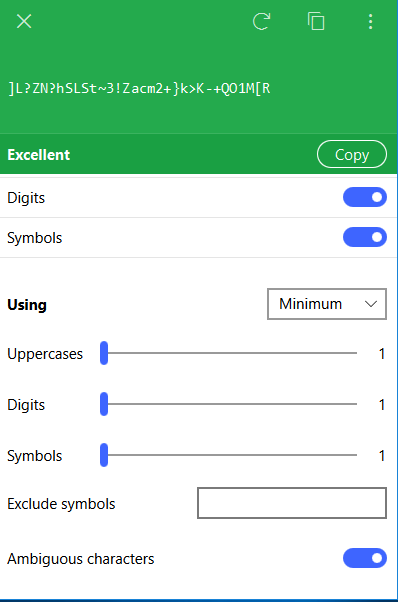
Hi @loadnabox, Thanks for writing in. I would like to share that we have already rolled out the Enpass 6 beta for Windows, Mac, and Android platform and for the other platforms are already in the queue which has a new UI along with most desired features including a new password generator algorithms, which will fulfill your requirement. You can download the beta version for the respective platform from here.
-
Hi @robert.endicott Sorry for the trouble you're going through. Please try selecting a different keyboard layout if you haven't tried that yet. If the problem persists, please let me know: On which device (Along with Android version) are you using Enpass? Which Enpass version are you using? What is your default browser and it's version? Are you able to login to the Box account in the browser? Thanks for your co-operation
-
Hi @frito, Sorry for the trouble you're going through. To investigate further on this issue I would like to have some info from your side so please let me know the following: Which Enpass and Extension versions are you using? What is your default browser and it's version? Are you facing the same problem with other browsers too? Are you facing this problem in any specific website or with all of them? Please share the websites. Does this problem surface in any specific scenario like when you wake the system from sleep or when you fresh start system or any other scenario? Thanks for your co-operation.
-
Hi @Danny Sorry for the trouble you're going through. Please try re-enabling the Google Drive sync from Enpass setting if you haven't tried it yet. If the problem persists, please let me know the version of OS and Enpass which you are using so that we can investigate further. Thanks!
-
Hi @RHPT, Thanks for the suggestion. I've noted it down. Already in the roadmap. Please share some more info so that we can investigate further. On which OS and screens are you facing this problem? Which Enpass version are you using? You'll get notification within the app itself or you can also check it on our Forum Post or Twitter. Cheers!
-
Hi @Sagelukahn, Thanks for writing in. If I use Enpass 6 on my desktop, will it sync with older enpass clients on iOS? NO! Since Enpass 6 is based on a new architecture, it will only sync with Enpass 6, and not with previous versions. But you don't need to worry much because the Beta versions will be installed as a separate application alongside Enpass 5. And to restore Enpass 5 data into Enpass 6, you need to follow the steps mentioned in the below post. We've already rolled out the beta for Windows, Mac, and Android and for the other platforms are already in the queue. Honestly, the team is also excited about rolling out the betas for all the platforms soon where we'll start with each platform separately until they are thoroughly tested and established as near stable, I can't assure you any ETA. Thanks for your understanding!
-
-
Hi @Fredrik, Thanks for writing in. Please let me know the default browser which you've configured on your device so that we can help you better. Thanks.
-
Hi @lokdawg78 Thanks for writing in. I would like to inform you that WebDAV sync will be available in the next update. I would like to share that the Microsoft team is working to make simpler APIs for developers to work with OneDrive for business (365). However. we do have plans to support it using WebDAV but at the moment we can't assure you any ETA. Thanks for your understanding.
-
-
Hi @phg, Thanks for writing in and sharing your feedback. Our dev team is working on it to improve. I've forwarded your feedback to the concerned team. Thanks!
