Anshu kumar
Enpass team member
-
Joined
Everything posted by Anshu kumar
-
Hi @wirebug, Thanks for writing in. I would like to share that current version of Enpass(5) autofill only Username/Email/ Password fields, while all other fields would remain empty. However, you can enable Automatically Copy TOTP after autofill option in Enpass browser settings, which will auto-copy the TOTP from the item to clipboard after autofilling your login details. You just have to paste it into the required field and go! Cheers!
-
Hey guys, This feature is already on our roadmap but at the moment I can't assure you any ETA. Thanks for your understanding.
-
Thanks for the input @7Bit. We'll look into it. Cheers!
-
Hi @magicmonty Thanks for reporting this issue. Please let me know which Android device, Android version, and Enpass version you are using so that we can investigate further. Thanks for your co-operation.
-
Hi @mrSLK Thanks for reporting this issue. We have tracked the issue and a fix will be available in the next update. Cheers!
-
Hi @wormie_dk Thanks for writing in. Option to Change Database Location will be available in the subsequent update. Cheers!
-
-
Hi @Kan I've noted it down and notified the dev team to look into it. Thanks for your co-operation.
-
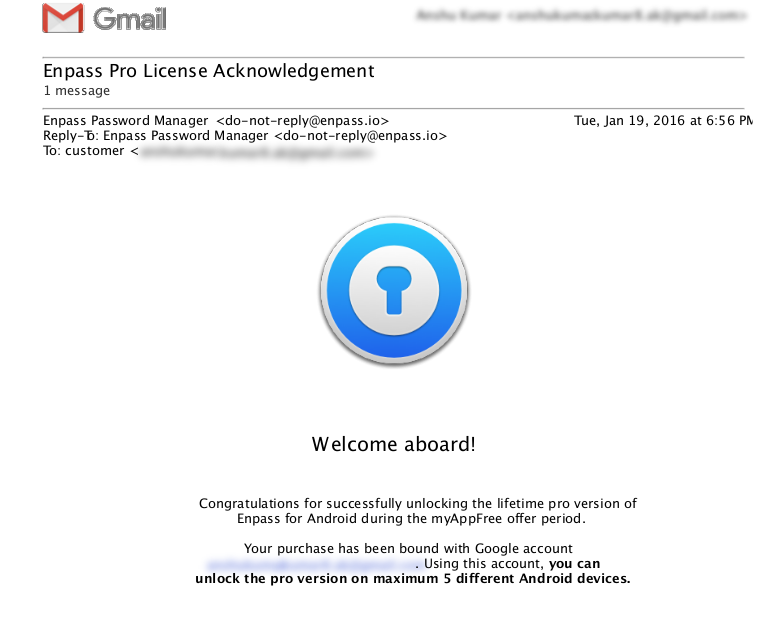
Hi @xxUNIVERSExxx Thanks for writing in. If your device limit has been reached, then I am really sorry as the limitation can't be cleared. As we sent a conformational email to you for successfully unlocking the Enpass Pro version during this promotional offer. In the sent email, we clearly mentioned that 'Using this account, you can unlock the pro version on maximum 5 different Android devices.' You can check it in your Gmail inbox and for the confirmation, a copy of the same email has been attached. Thanks for your understanding!
-
Hi @7Bit, Thanks for writing in. I would like to share that if the option Open Automatically at startup is enabled in Enpass General setting then the app will be automatically minimized to the system tray with system startup. But currently, it's not behaving as expected and same has been noted as a bug to be fixed in next beta update. Thanks!
-
hi @Kan, I would like to share that if the option Open Automatically at startup is enabled in Enpass General setting then the app will be automatically minimized to the system tray with system startup. But currently, it's not behaving as expected and same has been noted as a bug to be fixed in next beta update. Cheers!
-
Hi @albopf, Thanks for writing in. Today hackers have more resources than ever for password cracking at their disposal and we don't know which website uses which password hashing algorithm at their backend. We have to assume worst case scenario. Hence in Enpass 6, we have revised the range for password strength which categorizes the passwords as following based on the entropy Poor : Entropy <=40 Weak: Entropy <=60 Average: Entropy <=80 Good: Entropy <= 128 Excellent: Entropy > 128 Hope this answer your query.
-
Hey guys, Thanks for using Enpass beta and sharing your feedback. Thanks for your appreciation. I would like to share that restoring Enpass 5 data directly from the cloud is not possible because both the Enpass 6 and 5 sync data to a different location on clouds. You need to restore the backup file of Enpass 5 over WiFi (using backup and restore Service). For more details please refer to this post. Hope this helps! Thanks a lot for showing interest. We have noted your interest and will get back to you. Noted and notified the dev team to look into it. Please share your Apple ID via PM so that we can check. Noted and notified the dev team to look into it. Noted and forwarded to the concerned desk. Cheers!
- 24 replies
-
- beta
- enpass 6
- siri shortucts
- enpass beta
-
Tagged with:
-
-
Hi @Qema Thanks a lot for showing interest in Enpass translation for the Albanian Language. We have noted your interest and will get back to you when we have the plan to add Albanian support. Cheers!
-
Hi @medoix, The next beta of Enpass for the Windows platform is already in QA phase and hopefully will be available very soon. Thanks for your patience.
-
Hi @jankkm, Already fixed and you will get it in the next update. Cheers!
-
Hi @remo10 Welcome to Enpass family! We have just rolled out the beta of Enpass 6 for the iOS platform and will be available shortly. Cheers!
-
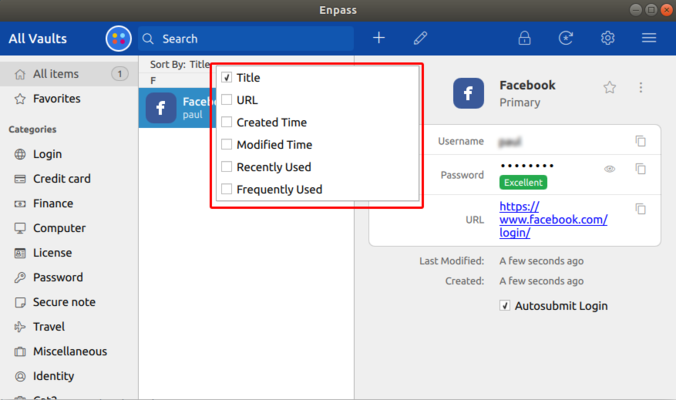
Hi @Stefan-Korfitz, Thanks for writing in. I would like to share that in the latest beta version of Enpass 6 we have already implemented a sorting function with all these options as shown in the attached image and hope it will fulfill your requirement. If you are willing to try the beta version of Enpass 6 then you can download it from our website. Please have a look at forum post to know how to restore Enpass 5 data into Enpass 6. Cheers.
-
Hi @Derek, Please have a look at the page listing troubleshooting steps for the master password not working. Hope this helps!
-
Hi @callfrank, Sorry for the trouble you are going through. Please share some more info so that we can help you better. Which Enpass and Enpass extension version are you using? Are you using any antivirus or third-party security-related extension or proxy? Are you facing the same problem with other browsers (Firefox/Opera) too? Thanks for your co-operation.
-
Hi @Tadly Yes, it will be available in the next beta update. Cheers!
-
Hi @kwitchibo, Thanks for writing in. Adding uppercase and digits in between words makes it less memorable without adding much to the security. Option to add them is just to satisfy requirements of some websites. An uppercase in the start is easy to remember and a digit in last can be pronounced as an additional word. Thanks!
-
Thanks for the feedback @Tadly, Happy to forward it to the dev team to look into it. Cheers!
-
Hey guys, Sorry to have kept you waiting for so long. But the good news is we have already improved autofill functionality to autofill in more than two fields including identities, in the latest beta version of Enpass 6. If you're willing to try out our latest beta version of Enpass and extension then you can download it from our website. Cheers!