


Anshu kumar
Enpass team member
-
Joined
Everything posted by Anshu kumar
-
Hi @Gabbalo, Thanks for writing back and sharing the details. Enpass extension communicates with Enpass over localhost address and it seems that Sophos antivirus is interfering the localhost(127.0.0.1) connections. One link I found on the web to allow localhost connection in Sophos antivirus is https://support.asperasoft.com/hc/en-us/articles/216126878-Connect-browser-plugin-does-not-work-with-Sophos-antivirus-web-control Hope this helps!
-
Hey @100 Watt Walrus, Thanks for writing in. Noted and forwarded to the concerned desk. Noted! Noted and fixed will be available in the next update.
-
Hey @Justin, Thanks for your suggestion. The suggested feature is already in our roadmap for the future version. Cheers!
-
Hey @Aleph Thanks for writing in and sorry to have kept you waiting for so long. The feature of the Wifi sync is already on our roadmap and will be available after the final release of Enpass 6. Thanks for your patience.
-
Hey @Axxel H Sorry for the trouble you are going through. Please share the device model (along with OS ) and the version of Enpass which you are using so that we can look into it. Thanks!
-
Hey @Michael Kennedy, Thanks for your suggestion. I've noted down your suggestion and forwarded to the concerned desk. Cheers!
-
Hey @Jackymattes Thanks for pointing this out. I've noted it for further improvements. Cheers!
-
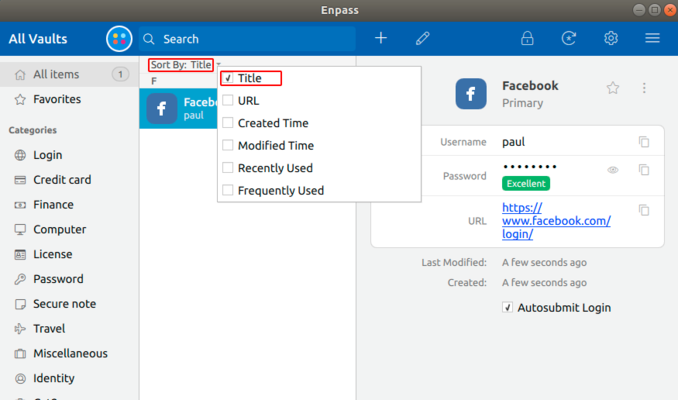
Hi @Pete Can you please confirm, if have you set Sort By to Title Only? If not, please change and try again. Hope this helps!
-
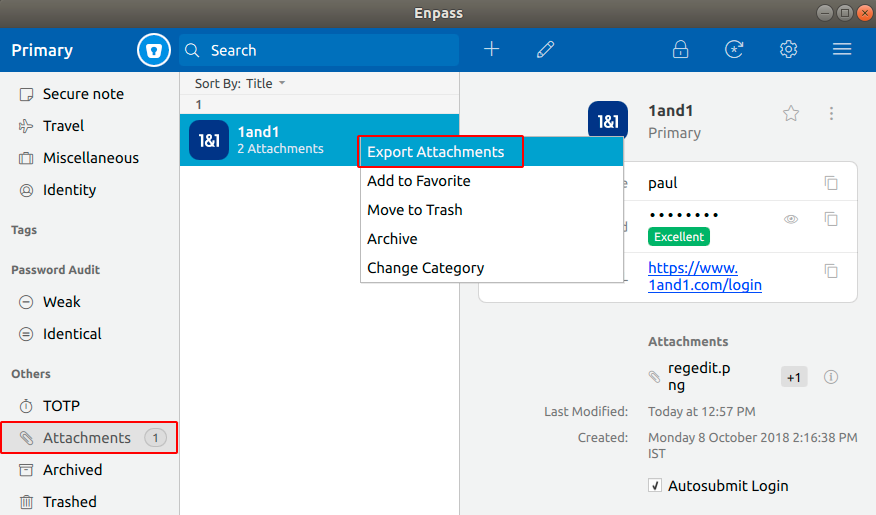
Hi @Nev, Thanks for pointing this out. I've noted it for further improvements, and a fix will be available in the subsequent beta updates. Meanwhile, you can try these steps to export attachments: Tap Attachments --> Select the particular item --> Right click on it --> Tap Export Attachments option. Hope this helps!
-
Hi @randix, Sorry for the trouble you are going through. It seems that you have installed the wrong extension. So please check you have installed the Enpass Connector for Chromebook only. Thanks!
-
Hi @Ahmet Ipkin Sorry for the inconvenience. We have tested this issue in our lab with the same OS version and everything works fine. To investigate further in this issue, please follow these steps and share your findings. Go to Home Folder--> Press Ctrl+H (to unhide hidden files) --> Open .mozilla folder --> And check if the native-messaging-hosts folder is exists --> And inside that folder EnpassNMHost.json file exists and have Read and Write permission. Also, run the following command in the terminal and share the output. /opt/Enpass/bin/EnpassHelper/runNativeMessaging.sh Thanks for your co-operation.
-
-
Hi @cmac18 The suggested feature is already on your roadmap for the future version. Cheers!
-
Hi @alexandre, Sorry for the trouble you are going through. Please share the versions of Enpass and iOS you are using along with the URL on which you are facing the issues so that we can help you better. Thanks!
-
Hi @Axxel H There is some issue with the previous beta version of Enpass importer. We'll try to push the update soon. Yes, you can do so! It' would be a great help if you can share the demo account of your WebDAV via a PM so that we can investigate where the problem could be. Thanks for your co-operation.
-
Thanks for the suggestion @JFS. Noted and forwarded to the concerned desk. Cheers!
-
Hi @Nev Thanks for writing back and explaining the scenario. We have tracked the issue and a fix will be available in the next update. Cheers!
-
Hi @SpikeNbg, Thanks for writing in. We've just added your Email ID in the beta program list. Soon, you'll get the confirmation Email. Cheers!
-
Hi @Gabbalo, Sorry for the trouble you are going through. Please share some more info so that we can investigate where the problem could be. Which Enpass version are you using? Are you using any Antivirus or third-party security-related extension? Are you facing the same problem with Opera browser too? Thanks for your co-operation.
-
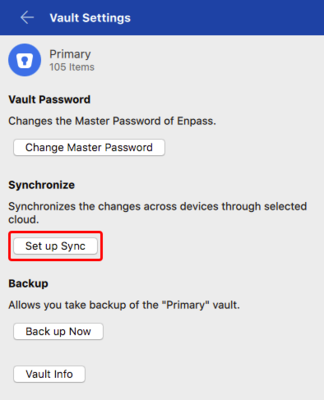
Hey @Oxymed32 Please follow these steps to enable sync in Enpass 6. Open Enpass --> Settings --> Vaults --> Tap Set up sync. Cheers!
-
Hi @mwang, Oops! We have just updated it.
-
Hi @Axxel H, Sorry for the trouble you are going through. The issue has been identified. Our dev team is working into it, and a fix will be available soon. I appreciate your patience.
-
Hi @WalkingHat Please share some more info so that we can look into it. Are you facing problem frequently or any specific scenario? What are the scale factor and the screen resolution of your system? Thanks for your co-operation.
-
Hi @Sgerum Sorry for the trouble you are going through. It seems that the graphics card drivers is not playing well with Enpass. Are you using it in a virtual machine? Can you let me know the configuration of your system like OS version, graphics card, processor etc? Also, please make sure your Graphics driver is up to date. Thanks!
-
Hi @100 Watt Walrus Thanks a lot for sharing your valuable feedback. Noted for further improvements. Forwarded to the concerned desk. We'll look into it. Forwarded to the QA team to look into it. For quick troubleshooting please re-connect the Google Drive sync and let me know if the problem persists. Noted and notified the dev team to look into it. We'll look into it.
