


Anshu kumar
Enpass team member
-
Joined
Everything posted by Anshu kumar
-
Hi @baak Sorry for the trouble caused. As per attached logs, I can see that the Chrome extension is not able to communicate with the App. To investigate it further, please share the version of Chrome browser you are using. Also, are you facing the same problem with Safari browser too? Thanks for your co-operation.
-
Hi @fear, Thanks for writing in. We have submitted the update to the App Store for review. It's in the queue and hopefully will be available soon. Cheers!
-
Hi @hebusthib, Thanks for sharing the info. NMHost is automatically started by Firefox by looking a registry key. You can also check it via the following steps. Run the registry editor (Hold Windows Key and R, then type in regedit)and navigate to the location as attached in the screenshot and check if you've got an EnpassNMHost file there. Thanks for your co-operation.

-
Hey guys, Sorry, but you'd have to wait till the final release to come up. I appreciate your co-operation and understanding. The support of WebDAV sync for Windows platform will be available in the next update due soon. Yeah, sure! Thanks!
-
Hi @djohannes Thanks for bringing this to our notice. I've noted down this issue in the bug tracker and notified the dev team to look into it. Thanks for your co-operation.
-
Hi @100 Watt Walrus Thanks for reporting this issue. It would be a great help if you can share the URL of the website so that we can investigate further and try to fix asap. Thanks for your co-operation.
-
Hey guys, We were able to reproduce the issue and notified the dev team to look into it. Thanks for your patience.
-
Hey guys, The update will be available by the end of this week. Thanks for your patience.
-
Hi @unclej, Thanks for writing in. As far as I understood you changed the password of the WebDAV, not the Enpass database. If yes then, please disconnect the sync on the all devices and re-connect it again. Hope this helps!
-
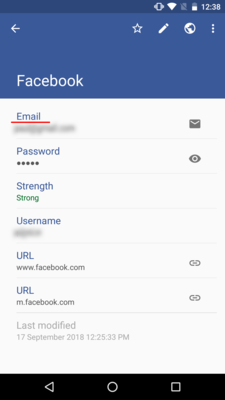
Hi @Gilrich Sorry for the trouble you're going through. Well, in this case, please re-order the field of the particular item. Keep Email ID of the particular item first as the attached image. Hope this helps!
-
-
Hi @Nev, Thanks for writing in. I've noted down your suggestion and forwarded to the concerned team for further consideration. Cheers!
-
Hi @MaxM, We haven't rolled the Edge extension for Enpass 6 beta. I'm afraid that you'd have to wait till the final release to come up. Thanks.
-
Hey guys, Sorry for the trouble you're going through. This issue has been fixed and you will get it in the next update. I would like to have your feedback after the update. Thanks for your patience.
-
Hey guys, Sorry for the trouble you're going through. I have found a similar issue in the Microsoft Community so please have a look at the troubleshooting steps. Hope this helps!
-
Hi @Tadly, I appreciate your feedback. I've noted it down and forwarded to the QA team to look into it. Thanks again for taking the time out of your day to share your valuable feedback. Cheers!
-
Hi @matz, Thanks for writing in. This issue has been fixed and you will get it in the next update. Thanks for your patience.
-
Hi @100 Watt Walrus Thanks for sharing your feedback. This issue has been fixed and you will get it in the next update. I've noted it down and notified the dev team to look into it. Noted and forwarded to the concerned desk. Cheers!
-
Hi @Alex Gurenko, Thanks for writing in. I would like to share that if the option Open Automatically at startup is enabled in Enpass General setting then the app will be automatically minimized to the system tray with system startup. But currently, it's not behaving as expected and same has been noted as a bug to be fixed in next beta update. Thanks!
-
Hi @Vince Thanks for writing in. I would like to share that the family sharing in apps on the Apple App store works only for the paid apps and not for in-app purchase in any app. Enpass is already a free app with an In-App purchase and according to the Apple's guidelines for Family sharing, In-App Purchases for any app can't be shared via family sharing. Thanks!
-
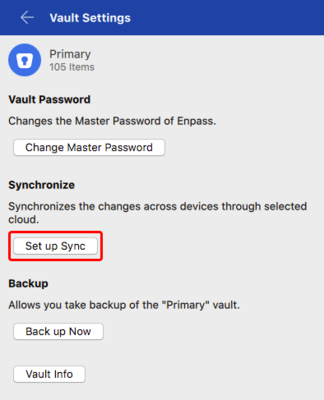
Hi @JSF, Thanks for writing in. Please follow these steps to enable sync in Enpass 6. Open Enpass --> Settings --> Vaults --> Tap Set up sync. NOTE: Currently there is some issue where WebDAV sync is not properly working and the fixed version will be available soon. Thanks for your patience.
-
hi @Eugéne, Thanks for reporting this issue. This issue has been fixed and you will get it in the next update due soon. Cheers!
-
Hi @Adam I have sternly directed the spambot to not repeat such a blunder again for your account! Sorry for that.
-
Hi @magicmonty, Thanks for writing back and sharing the details. It would be a great help if you can share a demo account of your WebDAV via a PM for us to look into this issue. Thanks for your co-operation.
-


