Anshu kumar
Enpass team member
-
Joined
Everything posted by Anshu kumar
-
Hey @keedhost, Thanks for your suggestion. I've noted down your suggestion and forwarded to the concerned desk. Cheers!
-
Hey @Meister, Thanks for reporting this issue. To investigate further on this issue I want a little input from your side so please let me know the OS version and Enpass version which you are using so that we can proceed further. Thanks for your co-operation.
-
Hey @albopf, Sorry for the trouble you are going through. Please let me know which iOS and Enpass version are you using along with the name of the App where you are having the problem so that we can look into it. Thanks!
-
Hey @schindi Thanks for your suggestion. The suggested feature is already on our roadmap for the future version. Cheers!
-
Hi @iamprasad88 No! It will be available after the final release of Enpass 6. Thanks!
-
Hey @xoqtox1960, Sorry for the trouble you are going through. Please make sure you're typing the correct master password, you can try typing your master password in notepad and copy/paste it into the password field. Also, please have a look at the page listing troubleshooting steps for the master password not working. Hope this helps!
-
Hey guys, This issue has been fixed and you will get it in the next update. I would like to have your feedback after the update. Thanks for your patience.
-
Hey guys, We have found the issue and a fix will be available in the next update. Cheers!
-
Hey @Vallaria Sorry for the trouble you are going through. I will really appreciate if you can perform following troubleshooting steps and share the output via support@enpass.io Verify from the 'Activity Monitor' if an executable with the name 'Enpass Helper' is running. If yes, please run this command in the terminal and share the results: lsof -i:10391 Where 10391 is the port number and if there is no output (blank), please try with other port numbers between 10391 to 10395. Thanks for your co-operation.
-
Hey @keedhost Thanks for your suggestion. I've noted it down and forwarded to the concerned desk for the further consideration. Cheers!
-
Hi @Nev Thanks for writing in. I've noted down this issue and notified the QA team to look into it. Thanks!
-
Hey @easytherm Sorry for the trouble you are going through. Please share some more info so that we can help you better. On which device (along with OS version) are you using Enpass? Which Enpass version and Enpass extension version are you using? Which Edge and Chrome version are you using? Are you using any Antivirus or any third party security-related extension? Thanks!
-
Hey @iamprasad88, The feature of the Wifi sync is already on our roadmap and will be available after the final release of Enpass 6. Thanks for your patience.
-
Hey guys, Sorry for the trouble you are going through. Our dev team is looking into this issue and I will update you about it on Monday. Happy Weekend!
-
Hey @keedhost, Thanks for writing in. The features for checking pwned passwords have already been implemented in the desktop version of the app. You can check for the password pawned by right-clicking on the password field. Please have a look at the user manual. For mobile, we have already implemented in the beta version of Enpass 6. If you're willing to check you can download it from our website. Cheers!
-
Hey @nephilim, Sorry for the trouble you are going through. Can you let me know are you facing this problem in any specific scenario like when you wake the system from the sleep or any other? Also, please let me know the following so that we can investigate further. Which Enpass and Enpass extension version are you using? Are you using any Antivirus or third-party security-related software? Are you facing the same problem with other browsers (Firefox/Opera) too? Thanks!
-
Hey @mdovey, Thanks for sharing the account details. Our QA team is looking into it and I'll update you once I hear from them. Till then please co-operate with us.
-
Hey @Pete1001, Sorry for the trouble you're going through. To check if the Antivirus is blocking please turn off the firewall from Antivirus settings or you can try starting your system in safe mode. If the problem persists, please perform these steps and share the output at support@enpass.io: Open Enpass and make sure that only the Enpass Firefox extension is enabled, now run the following command in command prompt: netstat -ano | findstr 10391 If this doesn't show any result, please try 10391 to 10395. Whichever command gives the output, then run this command: echo off & (for /f "tokens=5" %a in ('netstat -aon ^| findstr 10391') do tasklist /NH /FI "PID eq %a") & echo on Note: The value of findstr 10391 can be changed according to the output. For ex: suppose the output comes after running this command "netstat -ano | findstr 10392" then you have to run this command: echo off & (for /f "tokens=5" %a in ('netstat -aon ^| findstr 10392') do tasklist /NH /FI "PID eq %a") & echo on Also, please let me know are you facing the same problem with other browsers (Chrome/Opera) too? Thanks for your co-operation.
-
Noted and notified the QA team to look into it. Fixed. Our dev team is working to improve Tag functionality. Thanks!
-
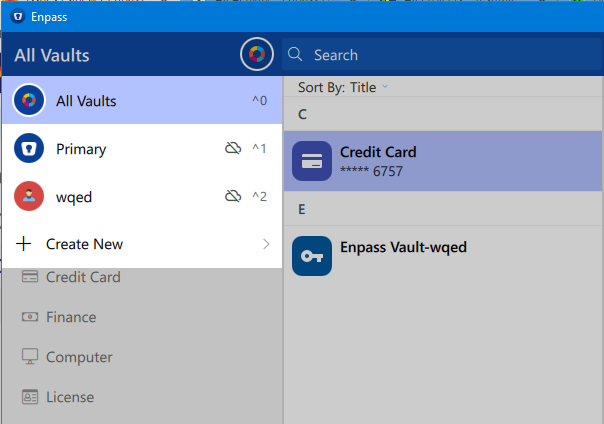
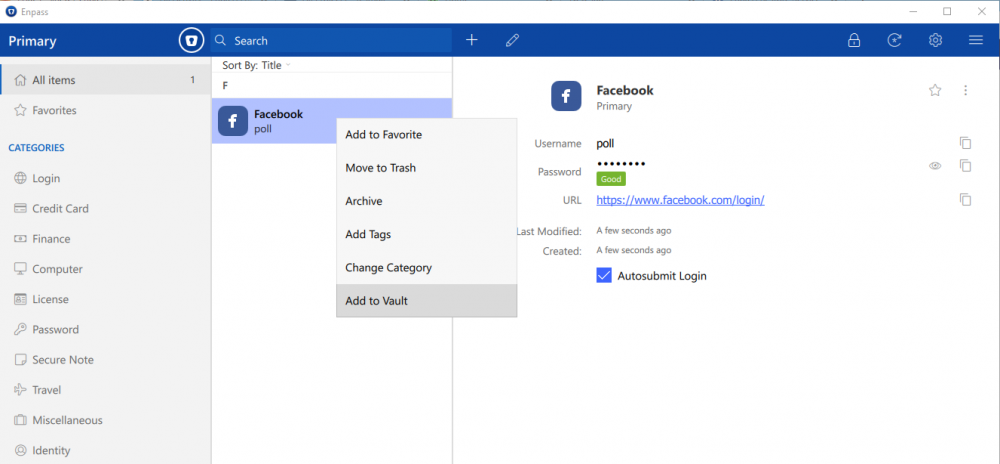
Hey @mwang Our dev team is already working into it and we'll try to push the update soon. Noted and forwarded to the concerned desk. Please follow these steps to move data from one vault to other. Select the particular vault in which the item exists. Now select the particular item and right click on it --> You'll have the option Add to Vault. Hope this helps!
-
Hey @Chandler Rodgers, You can make Enpass extension work with Chrome Canary browser by turning off the Code signature verification in main Enpass App as explained here in the user manual. Before that, just have a look at the whole scenario and associated risks (if any, in your case) in turning off the Browser verification. Currently, Enpass supports extensions for widely used browsers; Chrome, Firefox, Safari and Opera browser. However, the Enpass extension can be installed in many other Chromium/Firefox-based Web browsers available in the market, provided they support the installation of Chrome extensions (Here Chrome Canary browse is your case). So as mentioned here under Communication section, Enpass App validates the authenticity of both extension and Browser before making any connection and serving data for autofilling. In case of Waterfox Browser, Extension Validity Check gets passed but the validity check for Browser gets failed and you get the Error 403. So if you turn off the code signature verification, you can bypass the Browser checking and set your foot into autofilling in Chrome Canary Browser. To avoid any security risks associated with turning off the code signature verification, please make sure that you download the browser from the legitimate source and double check the authenticity of any extension you install. Thanks!
-
Hey @fermati, Thanks a lot of sharing your valuable feedback. I've noted down all the issues and notified the QA team to look into it. Thanks!
-
Hi @goodspeed Sorry for the trouble you are going through. Currently, Enpass browser extension supports only stable version of Chrome browser. So please try installing the stable version of Chrome and let us know if the problem persists. Thanks!
-
hey @Alberto, Sorry for the trouble you are going through. I've noted down this issue in the bug tracker on the high priority basis. We'll keep you updated if we found anything conclusive. Thanks for your co-operation.
-
Hey @mdovey, Can you share the demo account of your WebDAV via a PM so that we can investigate where the problem could be. Thanks for your co-operation.