Anshu kumar
Enpass team member
-
Joined
Everything posted by Anshu kumar
-
-
-
-
-
-
Hey @ubna I strongly recommend you to install Enpass from Google Play Store only as installing from other websites or stores might put you in trouble of security risk like data theft. Apps on Store are signed with developer certificates and delivery through it assures that software is genuine and not tempered. So it's recommended to download Enpass from Google Play Store only. Thanks for your understanding!
-
There is an Advanced option on the Master Password setup screen. If you have skipped that you can now follow these steps to enable Keyfile. Open Enpass --> Settings --> Security Settings --> Tap Changed Master Password --> Enter the master password to authorized yourself --> In the next screen you will get the option Advanced --> Click on it. Hope this helps!
-
Hey guys, Sorry for the trouble you are going through. We are already aware of this issue and fixed will be available in the next update. Till then we request you to please co-operate with us.
-
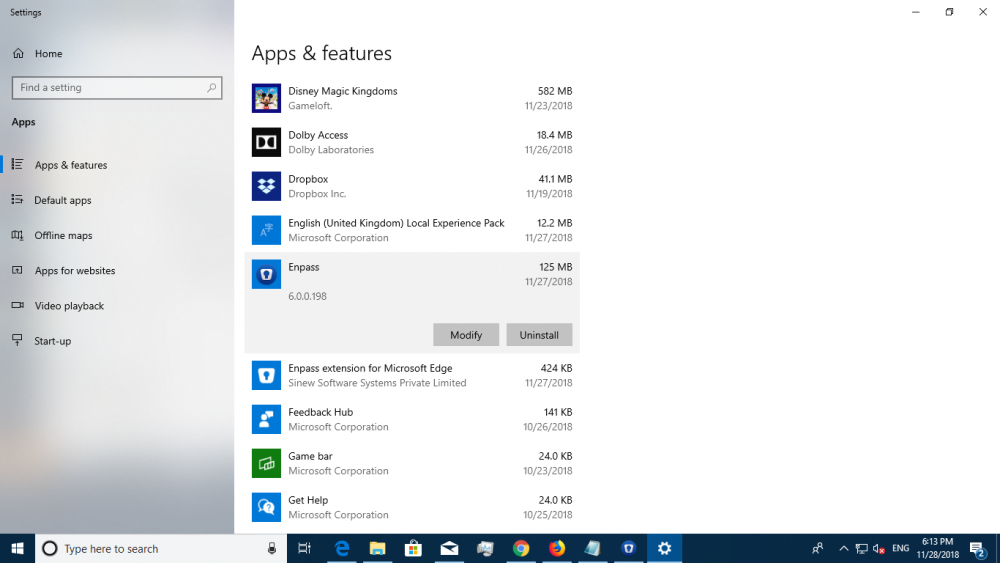
Hey @Mike_B, Sorry for the inconvenience. To investigate further on this issue we need some input from your side so please let me know the following: Are you using multi-monitor system? What's the scaling and resolution of each monitor. Which Enpass version are you using? To check Enpass version please follow these steps: Go to Add & Remove Programs --> Click on Enpass. Thanks for your co-operation.
-
Hey @ShikiByakko Thanks for reporting this issue. Please follow these troubleshooting steps and let me know if the problem persists. Go to Windows Settings --> System --> Display --> Scale and Layout --> Advanced scaling settings --> Disable let windows try to fix apps so they're not blurry option. Hope this helps!
-
-
Hey @Meister We have submitted the update to the Testflight. It is in process of Beta App review and hopefully will be available soon. Also, please make sure you have already signup for the beta program for iOS platform. Cheers!
-
Hey @Philip, Sorry for the trouble you are going through. Chrome web store does not allow two different channels (beta and production) for same extension, so we have to publish beta as a separate extension. Please install the beta Enpass browser extension for Chrome browser from this link and let me know if the problem persists. Thanks!
-
Hey guys, Sorry for the trouble you are going through. There was some technical issue from our end which we have fixed and published on the Store. It will be available soon so I request you to try purchasing the app again and share your findings. Thanks!
-
Hey guys, Sorry for the inconvenience. I would like to share that Chrome web store does not allow two different channels (beta and production) for the same extension, so we have to publish beta as a separate extension. Please install the beta Enpass browser extension for Chrome browser from this link and let me know if the problem persists. Thanks!
-
Hey guys, Yes, it will be fixed in the next update. Noted and forwarded to the concerned desk for further improvement. Please follow these steps: Open Enpass and take the backup of Enpass data save it manually on the device. Go to Enpass settings --> Advanced --> Apply function Erase Everything. NOTE: Before re-installing the app make sure you already have the backup of Enpass data. Now open Enpass and restore your backup files. Hope this helps!
-
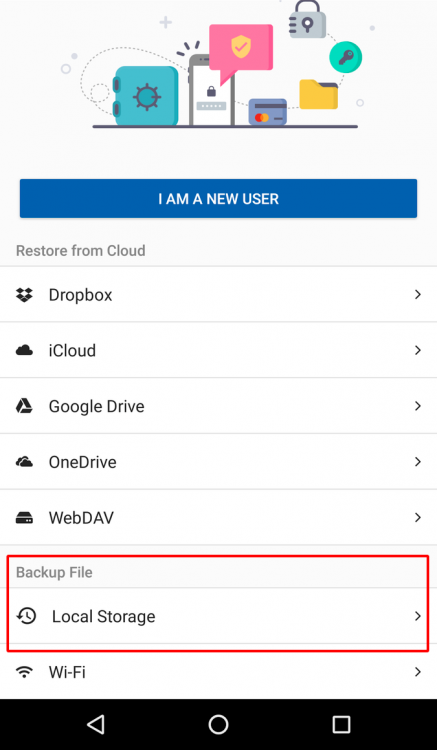
Hey guys, Noted and forwarded to the QA team to look into it. One of the possible reason for this issue might be that you have two Enpass apps (i.e. Enpass and Enpass Beta) installed on your device. So in case, if the Enpass Beta (v6.0.0.75) is still available on your device then take a back up of its data and uninstall it To restore your Enpass 5 data into Enpass 6 follow these simple steps: Install Enpass (you will get v6.0.0.91 if you are a beta tester) from Play Store. It will prompt you a Welcome screen --> Select Backup File --> Local Storage -->select the walletx file --> Enter Master Password and done. Hope this helps!

-
-
Hey, The suggested feature is already in our roadmap and will be available in the subsequent update. Cheers!
-
-
Hey @intermagic Sorry for the trouble you are going through. Yes, the beta will be available within a couple of days. Thanks for your co-operation.
-
-
Hey @mrSLK, Sorry for the trouble you are going through. We've fixed some issues and within a couple of days, we are going to roll out a new beta version. I would like to have your feedback after the update. Thanks for your co-operation.
-
Hey @craigacgomez, Thanks for your suggestion. I'll happy to forward your feedback to the concerned desk for further improvement. Cheers!
-
Hey @MilesTEG, Yes, it will be available within a couple of days. Cheers!