Anshu kumar
Enpass team member
-
Joined
Everything posted by Anshu kumar
-
Hi @nguyentatsangvn Thanks for writing in. Currently, it's not possible. However, removing the custom icon is already in our roadmap and will be available in the subsequent beta update. Cheers!
-
Hi @Gilrich, Noted for the further consideration. I've forwarded this issue to the QA team to look into it. Meanwhile, please drop us an email at support@enpass.io mentioning a link to this discussion so that we can take a closer look at this issue. Thanks for your co-operation.
-
Hi @Nev Sorry to hear about your trouble. Please share a screenshot, it will help in clearly understanding your problem and give a clear picture before further proceedings. Thanks for your co-operation!
-
Hi @Ludo Sorry for the trouble you are going through. Could you please try updating the app to the latest beta version and now try to import Enpass 5 data and let me know if the problem persists. Thanks for your co-operation.
-
Hi @RSW Thanks for writing in. Exporting data in CSV format is on our roadmap for the future version. Cheers!
-
Hi @Gilrich Thanks for writing in. You can check the list of the pwned password in the Weak section of Password Audit. Hope this helps!

-
Hi @Gilrich, Sorry for the late reply. Can you please share the URL of the website so that we can look into it. Thanks for your co-operation.
-
Hi @Syourt Sorry for the trouble you are going through. It would be a great help if you can share a demo account of your WebDAV via a PM so that we can investigate where the problem could be. Cheers!
- 24 replies
-
- beta
- enpass 6
- siri shortucts
- enpass beta
-
Tagged with:
-
Hey guys, This issue has been fixed and you will get it in the next update. I would like to have your feedback after the update. Thanks for your patience.
-
Hi @mwang, Thanks for writing back and sharing the details. I've noted it down and notified the dev team to look into it. Thanks for your co-operation.
-
Hi @Akshay Agarwal, Sorry, but at the moment I can't assure you any ETA. Thanks for your understanding.
-
Hi @Takács Károly Yes, the localization of the Hungarian language will be available in the next major update Enpass 6. Cheers!
-
Hi @d1abo Sorry for the trouble you are going through. Please share some more info so that we can help you better. Which OSX version are you using? Which Enpass extension version are you using? Are you using any security related extension or software? Thanks!
-
Yes, it will available in the next update. Cheers!
-
Hi @fermati The next beta is already in the QA phase and will be available very soon. (Hopefully within this week) I'm afraid that you'd have to wait till the final release to come up. Thanks for your understanding!
-
Hi @mwang, Welcome to Enpass Family! We have made some improvement in the import functionality, and I would like to have your feedback after the update. It would be a great help if you can share the URL of the websites so that we can try to fix soon. The feature of Folder Sync has already been implemented and will be in the next update. Cheers!
-
Hey guys, Sorry for the trouble you are going through. The sync issue with Google Drive has already been fixed and an update with the fixes along with other enhancements is already in the QA phase and hopefully, it will be rolled very soon. We appreciate your patience. Noted for further improvement. Cheers!
-
Hi @RSW, Sorry to hear about the trouble. Does Enpass get crashed after entering the master password? If yes, can you try in offline mode? Thanks!
-
-
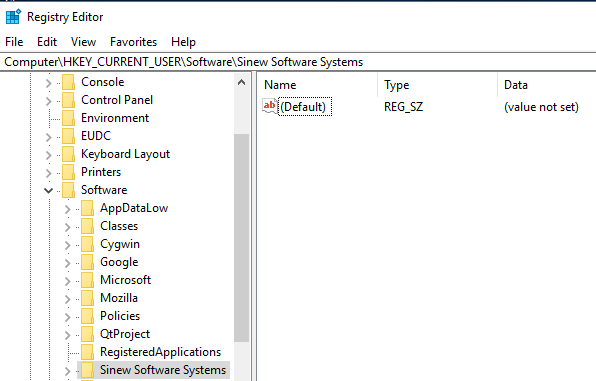
Hi @Dekkia, Sorry for the delay, it was an oversight. Please follow these troubleshooting steps and let me know if the problem persists. Uninstall Enpass from the Windows PC. Run the registry editor (Hold Windows Key and R, then type in regedit)and navigate to the location as attached in the screenshot. Delete Sinew Software Systems Folder. Now install the Enpass again and it should work. Hope this helps!
-
Hey Guys, It seems Google has fixed this issue. So now you can sync with Google Drive. Cheers!
-
Hi @Davide Please have a look at forum post: Hope this helps!
-
Hey guys, Sorry for the trouble you are going through. While investigating the problem, we have found that sync with Google Drive causing the app to crash. And the Google team is aware of this issue, and same is discussed here: https://github.com/openid/AppAuth-iOS/issues/306#issuecomment-424956366 Meanwhile, if you are using the Google Drive sync, then please follow these steps: Turn off the internet connection on your device and disconnect the sync from Google Drive in Enpass. Hope this helps!
-
Hi @chl Thanks for writing in. I would like to share that we have already implemented "Date Picker" in Enpass for Android and iOS platforms and for the Desktop platforms it will be available with subsequent beta updates. Sorry, I can't assure you any ETA. Cheers!
-
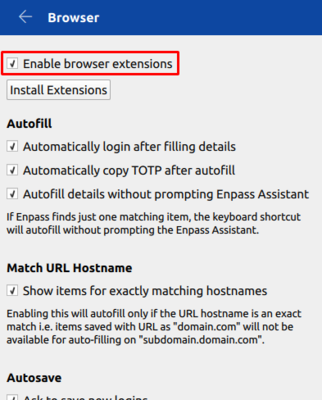
Hi @MilesTEG, Sorry for the trouble you are going through. I would suggest you please try re-enabling the browser extension settings from Enpass Browser settings if you haven't tried it yet. Hope this helps!