


Anshu kumar
Enpass team member
-
Joined
Everything posted by Anshu kumar
-
Hi @zilexa, Sorry for the trouble you are going through. Please share some more info so that we can investigate further: Which browser are you using? Enpass version? Are you facing this problem in any specific website or all of them? If possible please share the URL of the website. It would be a great help if you can share the screenshot of the problem. Also, let me know does this issue surfaces when you try to autofill via notification or Android autofill popup. Thanks!
-
Hi @David Le Thanks for writing in. Sorry to say but currently we don't have any plans to support Samsung Galaxy Watch. Any watch with Google's Wear OS should work though. However, I have forwarded it the concerned desk for further consideration. Cheers!
-
Hi @SK777 Thanks for your suggestion. Sorry for the delay, it was an oversight. I've noted it down and forwarded to the concerned desk for further consideration. Cheers!
-
Hi @Patrik Sorry for the trouble you're going through. I've noted down this issue in the bug tracker and notified the dev team to look into it. Till then we request you to please co-operate with us.
-
Hi @xarekate, Yes, same has already been implemented for the iOS platform. Cheers!
-
Hi @Eik0_ Sorry for the trouble you are going through. We tried to reproduce in our lab with given configuration and everything seems to work fine here. To investigate further, we need some help from your side. Please let us know: Windows 10 build version. Are you facing the same problem with other browsers too? Are you using any Antivirus or any third party security-related extension? Are you using multiple user accounts on your system? If yes, does this problem appear in the admin account or otherwise? Thanks for your co-operation
-
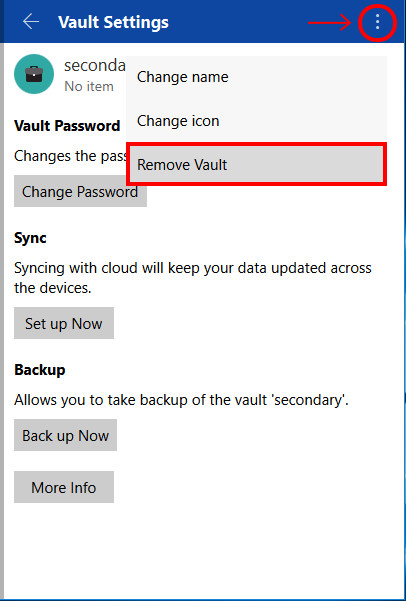
Hi @Nev Thanks for writing in. Please follow these steps to remove Vault. Open Enpass --> Settings --> Vaults --> Open Vault which you want to remove --> Select the Menu Option --> Tap Remove Vault. Cheers!
-
Hey guys, Thanks for writing in. I would like to share that the feature Copy TOTP after Autofill after autofill has already been implemented and will be available in the next major update Enpass 6. Cheers!
-
-
Hi @Martin Tazlari, Thanks for writing in and sorry for having kept you waiting. Actually, the update for the next beta is in the QA phase and hopefully, will be available very soon. Thanks for your co-operation.
-
Hi @sona786 Please let me know how can I help you. Thanks!
-
Hi @Brant Sorry for the trouble you are going through. We're already aware of this issue and our dev team is working on it and we'll try to push the update soon. Thanks for your co-operation.
-
-
-
Hey guys, Sorry for the trouble you are going through. Our dev team is already working on it and we'll try to push the update soon. Thanks for your co-operation.
-
Hi @zuoshoufantexi Thanks for writing in. Sorry, currently there is no other way download and Purchased Enpass for Android platform except Google play store only. However, I've forwarded your suggestion to the concerned desk. Thanks!
-
Hi @apollo13, Sorry, my miscommunication with dev team. Just updated the answer. Thanks!
-
Hi @apollo13, Thanks for writing in. Enpass 6 derives a key from the master password with PBKDF2-HMAC-SHA512 100K iterations (outside of SQLCipher) and uses it as the raw key for SQLCipher. Salt is first 16 byte of Sqlcipher database file. You need to follow the same procedure. Thanks!
-
Hi @Florian Thanks for writing in. At the moment I can't assure you any ETA. We are working tirelessly to bring the stable version of Enpass 6 (regular) for all the supported platform. It will take about two month after that for Portable version. I really appreciate your patience.
-
Hi @Emilio Rinaudo Thanks for trying the beta version. Yes, you can! As Enpass 6 will be installed as a separate, parallel application that will not interfere with your existing Enpass installation and it's database locally or cloud. It requires the password of the Primary vault. Yes, unlocking the Primary vault unlock the other vaults too. However, I've forwarded your suggestion to the concerned desk. At the moment I can't assure you any ETA. Cheers,
-
Hi guys, Thanks for reporting this issue. We'll look into it and the fix will be available very soon. Thanks for your co-operation.
-
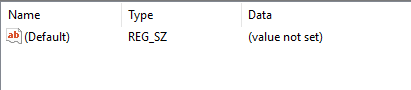
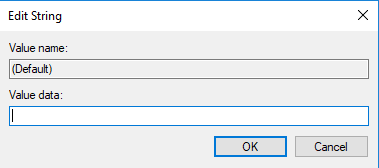
Hi @hebusthib, Thanks for writing back and sharing the screenshots. Though It should work. But for quick troubleshooting, you need to manually add the key for the second user as the same way it's added for your Admin account. To do so please follow these steps: Run the registry editor (Hold Windows Key and R, then type in regedit)and navigate to the location Computer\HKEY_CURRENT_USER\Software\Mozilla Select Mozilla Folder --> Right click on it --> Select New --> Key --> Name that new key as NativeMessagingHosts. Now Right click on NativeMessagingHosts Folder --> Select New --> Key --> Named it as EnpassNMHost. Double click on EnpassNMHost --> Double click on Default --> Set the same path as Admin account in the value data field. Hope this helps!
-
Hi guys, Thanks for writing in. As we have mentioned in the blog post, "The UWP app will be available on the Windows Store until our next major update. At that time, the bridged app would have all the functionality of the UWP app along with signature Windows 10 experiences. Thanks!
-
Hi @Achim Krah Thanks for writing in. Please share your Apple ID via PM so that we can add it into the beta program. Thanks!
- 24 replies
-
- beta
- enpass 6
- siri shortucts
- enpass beta
-
Tagged with:
-
Hi @fredskis, Thanks for writing in. Sorry to say no! But if you've ever synced Enpass 5 data to any cloud then you can restore easily. Thanks!



