


Anshu kumar
Enpass team member
-
Joined
Everything posted by Anshu kumar
-
Hey guys, Thanks for your suggestion. I have noted it down and it will be available with the future version of Enpass. Thanks!
-
-
-
Hey @Jan_Osch, Thanks for your suggestion. Noted and forwarded to the concerned desk for further consideration. Thanks!
-
Hey @Jannnw Sorry for the trouble you are going through. I have forwarded this issue to the QA team to look into it. I will get back to you on Monday. Thanks for your co-operation.
-
Hey @aomobi Thanks for reporting this issue. I have noted down this issue in the bug tracker and notified the dev team to look into it. Thanks for your co-operation.
-
-
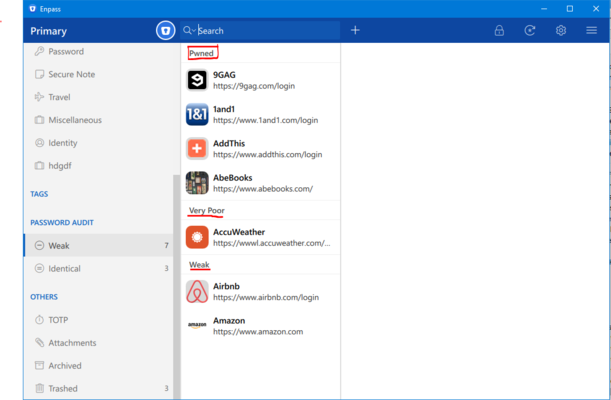
Hey @Jan_Osch, Pwned passwords will be shown in a Weak section of Password Audit. Hope this helps!
-
Hey @chrisonline Thanks for reporting this issue. I have noted it down and notified the dev team to look into it. Thanks for your co-operation.
-
Thanks for the suggestion @Milan Zdimal Noted and forwarded to the concerned desk for further consideration. Thanks!
-
Hey @OLLI_S, Sorry for that. But it will available with the subsequent update of Enpass. Thanks!
-
Thanks for the input @OLLI_S. I have noted it down and forwarded to the concerned desk for further consideration. Cheers!
-
Hey @Drufix, Thanks for your suggestion. I have noted it down and forwarded to the dev team for further consideration. Cheers!
-
Hey @GeoCrackr, Thanks for reporting this issue. I have noted down this issue and notified the QA team to look into it. Thanks for your co-operation.
-
Hey @Marc , Sorry for the inconvenience caused to you. I have noted down this issue in the high priority and forwarded to the dev team to look into it. Till then please co-operate with us.
-
-
Hey @ff_ay, Thanks for your suggestion. I have noted it down and forwarded to the concerned desk for further consideration. Cheers!
-
Hey @OLLI_S, Thanks for writing in. I would like to share that Enpass can auto copy the TOTP, just after filling the login details and you can paste that right in there Thanks!
-
Hey @Alessandro, Sorry for the trouble you are going through. Please run these commands on Terminal and then try again. sudo update-desktop-database sudo update-mime-database /usr/share/mime If the problem persists, please try this command in terminal and share result. xdg-open enpassauth://googledrive Thanks for your co-operation.
-
Hey @OLLI_S, The features for checking pwned passwords have already available in the Enpass. You can check under the ≡ menu from the toolbar --> select Tools → Check for Pwned Passwords. For more details please have a look at our user manual. Pwned passwords will be shown in Weak section of audit. Thanks!
-
-
Hey guys, At the moment I can not confirm you any ETA and would say that Portable version is in the priority list. We will update you once it is out for beta. Thanks for your love and understanding.
-
Hey @gtx Thanks for writing in. dvinod.webfactional.com our internal domain, but nothing in our app redirects to that. If you have tried opening some help link from the app in a browser, old browser redirect cache must be directing to it, as it was there during Enpass 6 development phase. Thanks!
-
Hey @wolfe, Please refer to this FAQ. If you are unable to update intel driver, use this FIX. Hope this helps!
-
Please follow these simple steps on your Windows 7 PC: Download Enpass from this link. Now open Enpass --> And Restore the data from same OneDrive account which you are using on your Home PC. If I misunderstood the problem please explain little more so that I can help you better. Thanks!


