Anshu kumar
Enpass team member
-
Joined
Everything posted by Anshu kumar
-
Hi @Monk32, Thanks for bringing this to our notice. I've forwarded this issue to the testing team to look further on it. Till then, please bear with us.
-
-
-
Hi @Ekalb., Thanks for writing back and sharing the URL. I've noted it and forwarded to the dev team to look into it and hopefully the fix will be available in the next extension update. Thanks for your co-operation.
-
Hi @Ekalb. Sorry, the URL you posted is not accessible to us. So please check it and revert. Cheers!
-
Hi @the509man Being an offline Password manager Enpass saves your database locally on your device and in order to autofill in websites, Enpass extension has to relay on the main app to fetch the data from. That is why it should be opened in background always. For more details please go to the given link.However this behaviour of Enpass will not be bothersome if you can choose to set it to run automatically on every boot. Hope this helps! Hi @mschindl Sorry for the trouble you're going through. Please run the debug tool (the one I sent you via PM) and share the logs so that we can investigate further. Your co-operation is appreciated.
-
Hi @Kurt Hilgartner, Yes, you can easily restore the data and keep them in sync across devices through cloud sync. So just sync your data from Galaxy S6 to any of supported cloud and then restore it on iPhone while getting started. Just choose Restore My Existing Data to restore from the cloud. Hope this helps!
-
Hi @mschindl, Sorry to hear about the trouble you are facing. Please let me know are you facing this problem on a specific website (if so please mention its URL) or all of them? Thanks for your co-operation.
-
Hi @nortz Sorry to hear about the trouble you are facing. Please let me know if there are any other notifications in the notification bar? If yes, then clear it and try to auto-fill via Enpass notification and let me know if the problem persists. Thanks for your co-operation.
-
Hey guys, We are sorry for the trouble you are facing. We have marked this issue of high priority and our team is trying to reproduce it here. To dig out this bug I need some information from your side. Are you using multiple login accounts on your Mac? Have you tried both versions (Enpass Website or App Store)? Which OSX, Enpass version, Enpass extension version are you using? Which other extensions have you installed in Safari browsers? Does Enpass browser extension work on Chrome/Opera browsers? If you think any third party software installed by you could be interfering with the connection (like Alfred for Mac), please name it. You can send your replies in a PM to me. Your co-operation is highly appreciated. Cheers!
-
Hi @brosenz Sorry for the trouble you are going through. We have fixed some issues in a recent update 5.6.6 so please update the app and share your findings. Cheers!
-
Hi @aslag Thanks for reporting this issue and I apologize for the inconvenience. It would be a great help if you can share the full crash report at support@enpass.io so that we can investigate further. Meanwhile, you can download the previous version of Enpass 5.6.0 from this link. Thanks for your co-operation.
-
The fix will be made available in the very next update (5.6.1). Cheers!
-
Hi @niemalsnever, Thanks for writing back. Yes, there was glitch in uninstall script and a fix will be available in the next update. Your co-operation is highly appreciated.
-
Hi @niemalsnever Sorry for the late response, skipping this thread was just an oversight. To install Enpass silently please follow these steps: Download Enpass. Open Command Prompt --> Go to Enpass download location and run this command Enpass_5.6.0_Setup.exe /ALLUSER /S For uninstalling: Open Command Prompt --> Go to installation location and run this command uninstall.exe /ALLUSER /S Hope this helps!
-
Hi @Sensaistorm Thanks for writing in and detailed explanation. To do so, select the folder in which you want to add the new item and now try to add the item. It will add automatically to the selected folder. Hope this helps!
-
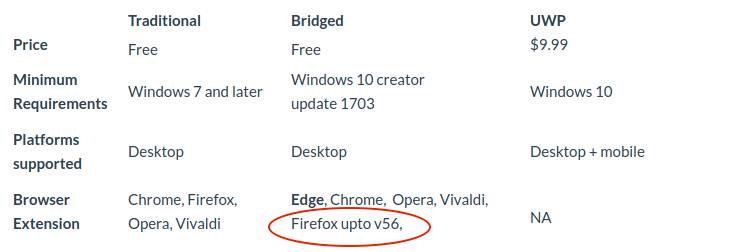
Hi @Thecapn_dennis, I'm really sorry for the inconvenience caused to you. There exist the following three version of Enpass for Windows. The recent addition in the list is the bridged version which we developed for distribution through Store with a support for the Edge extension. It has a limitation to support Firefox up to v56. Though we are also working on to add Edge support in Traditional version. In your case to use Firefox v57 please download the website version of Enpass and Firefox webExtension from our website. For more details please check out this blog-post. There should be no problem with any version of Enpass to work with Chrome browser. Please share some more info so that we can help you further. What error message or code are you getting while using Enpass browser extension on Chrome? Which Chrome version and Enpass extension version are you using? Have you installed any Antivirus/ Firewall/third party any security-related browser extension? Thanks for your co-operation.
-
Hi @Peter Wang The final version of the Firefox 57 extension is already up and can be downloaded from our website. Cheers!
-
Hi @Robin, Thanks for reporting this issue and detailed explanation. I have forwarded this issue to the testing team and I'll get back to you when I hear from them. Thanks for your co-operation.
-
Hey guys, We'll definitely integrate this feature in next update due soon. Cheers!
-
-
Hi guys, As mentioned here the Bridged version of Enpass autofills into Firefox upto v56 using the add-on sdk downloaded from Firefox Store. Currently, It doesn't not work with Enpass WebExtension to connect with Firefox 57 but we are working on it. Till then please bear with us. Thanks for your understanding.
-
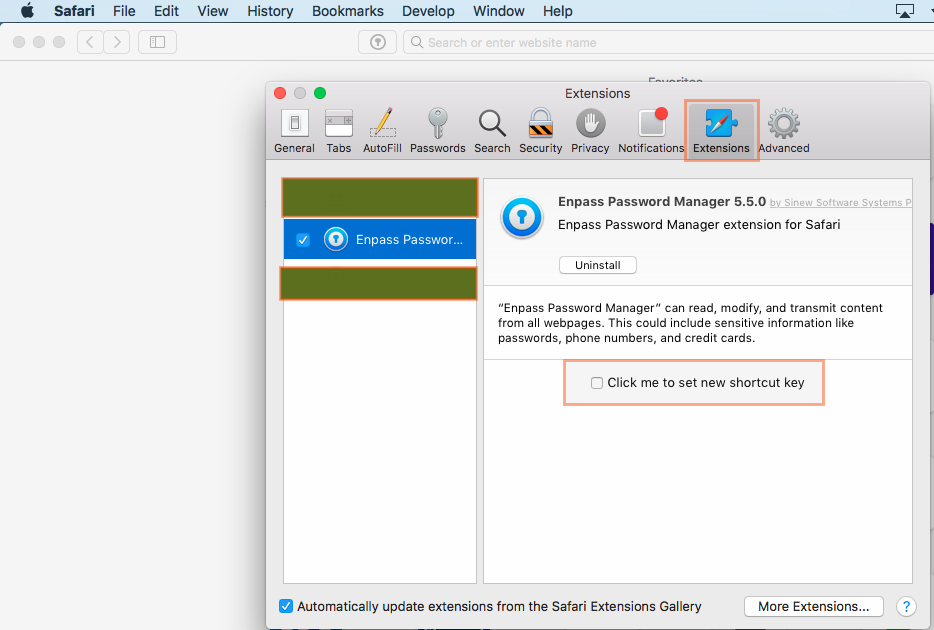
Hi @Marijn To change Enpass browser extension shortcut in Safari browser please follow these steps: Open Safari browser --> Go to Preference --> Extensions --> click me to set new shortcut key option. Hope this helps!
-
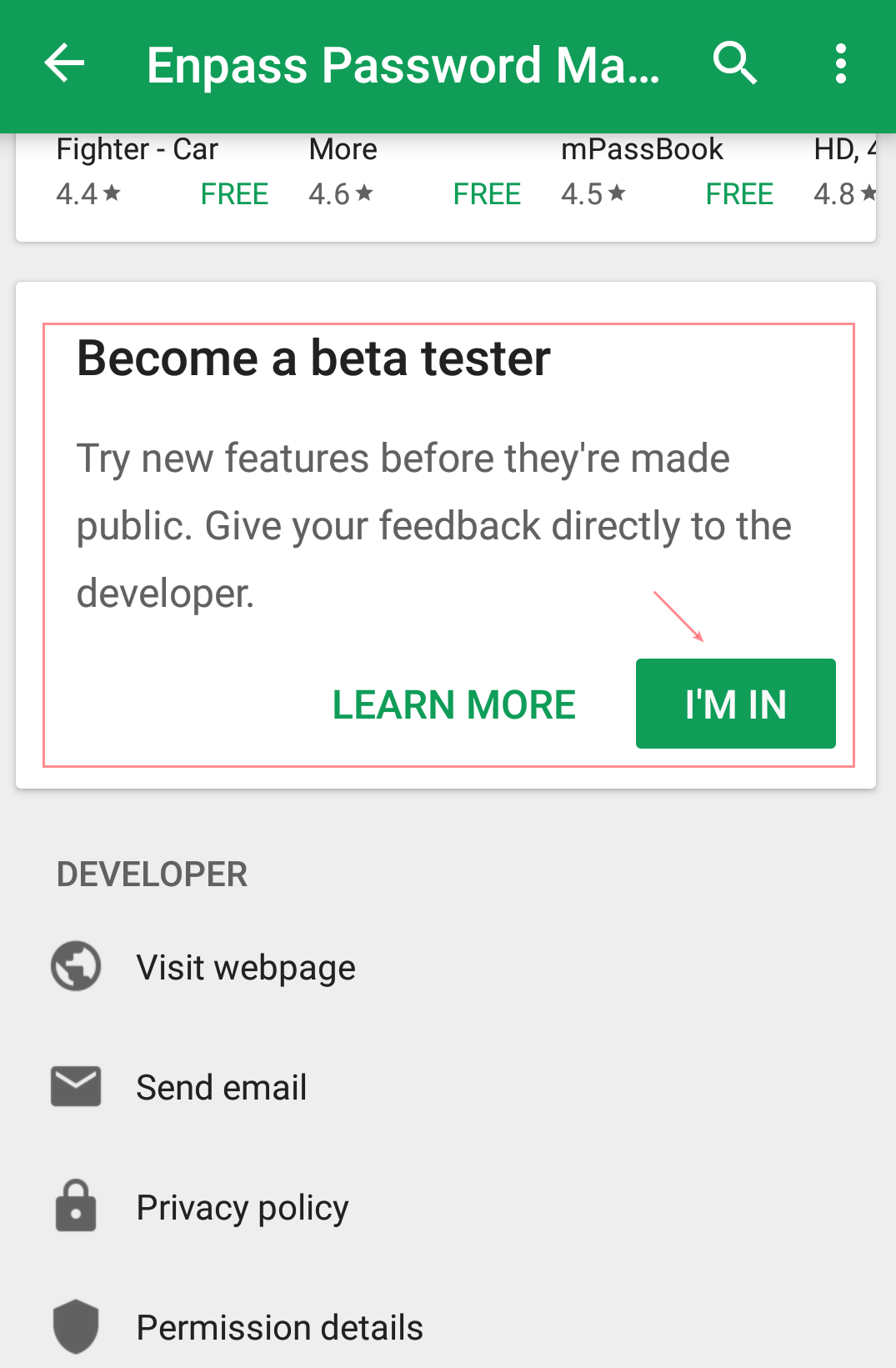
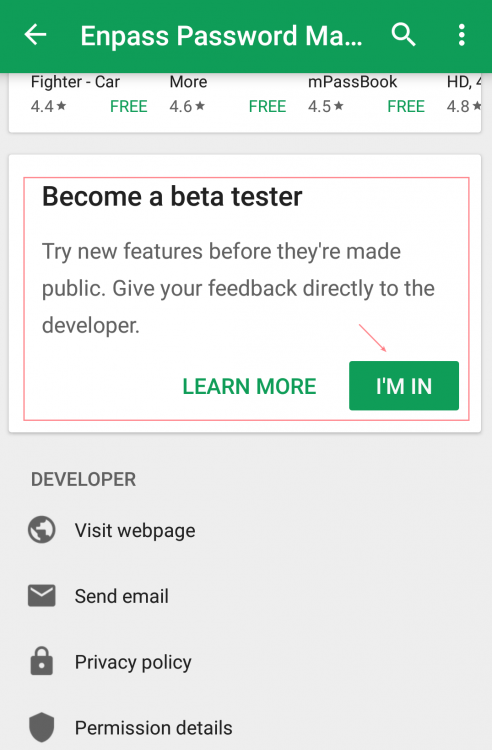
Hi @stevetaz Sorry for the inconvenience. To join our beta program please follow these steps: Open Google Play Store --> Open the Enpass page and scroll down to the bottom of the page, you'll find the option Become A Beta Tester. Hope this helps!
-
Hi @Denis Our dev team is already looking into this issue and hopefully, a fix will be made available soon. Till then please bear with us. Cheers!