


Anshu kumar
Enpass team member
-
Joined
Everything posted by Anshu kumar
-
Hi @Ludwigjjj I will definitely help you in migrating your data from mSecure. First of all, I would like to share that importing data from other password managers is currently possible only from our traditional desktop versions. They are available for Windows, Mac and Linux and can be downloaded from our website. So once you have imported data, you can easily migrate that to your other devices using Sync or Backup/Restore feature of Enpass. To import mSecure data into Enpass please follow these steps: Open mSecure app --> Go to File --> Export -->Save this file as "filename.CSV". Now import the same file into Enpass by using Generic CSV/DSV Format. For more details please check out our user manual. Cheers and welcome to Enpass!
-
Hi @Scorpion Thanks for your suggestion. This feature has already been planned for the next major update (Enpass 6). Cheers!
-
Hi @kevin.purcell Thanks for writing in. It's already there in our roadmap.
-
Hi @spacy2, We are aware of this issue where Enpass started crashing on the older mac devices after the recent update to v5.6.0. Sorry for the inconvenience guys! This was something, technically unusual but we have fixed this and stable version will be rolled out soon. Meanwhile, you can download the pre-release version and continue using it until the update is available. Since this fix is available from our website, syncing with iCloud would not be possible. Cheers!
-
-
Hi @finswim01 Sorry to hear about your trouble you are going through. Please type your password in a text editor, so you can see and make sure that the password is being typed correctly. Then copy and paste it into Enpass and let me know if it works? If the problem still persists, please drop us an email at support@enpass.io mentioning a link to this discussion with these details so that we can take a closer look at this issue. Which cloud services are you using to sync? Which keyboard layout are you using? What is the default language for Enpass and are you using any special character in the master password? Have you changed the default location of Enpass database on your PC? Thanks for your co-operation!
-
-
Hi @Xpdmk Thanks for writing back and sharing the details. We tested this issue in our lab but were unable to reproduce it. BTW, does this happens every time when you unlock using Hello and lock the Surface? However, much appreciated it would be if you could provide us some more information; any other installed software like antivirus/anti-malware that could be interrupting the normal flow of Enpass or anything else you think would help us reproducing it here. Thanks for your co-operation!
-
Hi @diego.narducci88 Sorry to say but at the moment I can't assure you any ETA. Thanks for your patience.
-
Hi @Dream Hosting This problem surfaces when the date and time on your device are not accurate. Please synchronize your time with network on your Windows PC, preferably set to automatic, and if you've already done that then disable & re-enable the synchronization with network. Hope this helps!
-
Hi @JohnnyX Sorry to hear about the trouble you are going through. To investigate further on this please share some more info. On which devices (all of them, along with OS version) are you using Enpass? Which Enpass version are you using on the each device? Which cloud services are you using to sync? Is your Date and Time settings set to Automatic on both devices? Awaiting your response.
-
-
Hi guys, Autofilling in more than two fields is planned for the next major update (Enpass 6). Thanks for your patience.
-
-
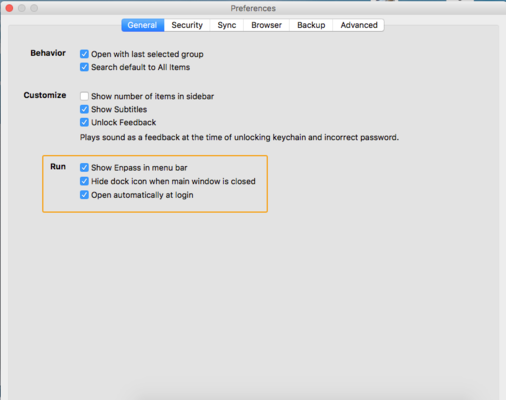
Hi @Julian Sorry for the inconvenience. Please let me know which Enpass version are you using and have you enabled all three option in Enpass General Run settings.
-
Hi @jcp Sorry to hear about the trouble you are going through, skipping this thread was just an oversight. If you don't mind, can you please drop us an email at support@enpass.io mentioning a link to this discussion with these details so that we can take a closer look into this issue. What is the version of Enpass, Window build and Make/model of Windows device? How many total items are there in Enpass? Have you imported data from any other software? Have you changed the default location of Enpass database on your PC? For troubleshooting, please start Enpass with a fresh new database, for which you need to rename your current database by following the steps below. Quit Enpass (If running). Go to user Document Folder --> Select Enpass Folder --> Rename it as Enpass_backup. Now open Enpass, it will prompt you a welcome screen. Create any sample database and now try to open Enpass setting windows. You can restore your older database by renaming the Enpass_backup to Enpass. Thanks for your co-operation.
-
Thanks for your suggestion. I have noted it down for internal discussion. Cheers!
-
-
Hi @Aristide Insite Sorry to hear about the trouble. To restore the backup files please follow these steps: I. App downloaded from Mac App store: Quit Enpass (If running). Go to User --> Library Folder--> Containers --> in.sinew.Enpass-Desktop --> Data folder--> Library--> walletx.db--> rename it as oldwalletx.db. NOTE: Usually Library folder is hidden, so make it visible by pressing and holding the Option key. II. App downloaded from Enpass website: Quit Enpass (If running). Go to User Documents --> Enpass folder--> Rename it as OldEnpass. Now open Enpass it will start fresh as a new app. Now select Restore my existing data --> Select Backup files and follow the instruction. Hope this helps!
-
Hi @Unsay I can understand the level of frustration at your end. Actually, we haven't rolled out the Enpass WebExtension for Firefox on all the platforms. Our dev team is working on it and once it's done, we will push the update for Portable version too. Till then I request you to please co-operate with us.
-
Hi The current UWP App doesn't support the external browser extensions due to sandbox restrictions and unavailability of required APIs to communicate with third party Apps. So to use browser extensions you have to stick with the traditional Windows PC App, at least for now. But the good news is that very soon we are gonna overcome this issue of autofilling in Edge, Chrome and the other supported browsers. Cheers!
-
-
Hi @avinator Sorry for the inconvenience. We got some reports from the users about the crash of Enpass 5.6.0 on the older mac devices. It would be a great help if you can share the screenshot of the system report. You can find it with the mentioned steps: Click on the Apple logo on your Mac (present on the top left corner) --> Click on About This Mac --> More Info --> System Report. Thanks for your co-operation!
-
Hi @Willforth I would like to share that currently, the support for browser extension is only for the Traditional Version of the app which is win32 app and can be downloaded for free from our website. It offers the following features which are not there in the UWP app. Importing data from other software. Support of Enpass browser extensions for Chrome, Firefox, Opera and Safari (Mac). Auto run at system startup. Password Audit. Hope this helps!
-

