Anshu kumar
Enpass team member
-
Joined
Everything posted by Anshu kumar
-
Hi @theArchonius, Sorry to hear about your trouble. Please try re-installing Enpass on your Nexus and then restoring your database from Dropbox and let me know if Enpass still crashes? Hope this helps!
-
Hi @Gilrich Thanks for reporting this issue. We are already aware of this issue and the fix will be available to you in the next update. Till then I request you to please bear with us.
-
Hi @arihuh Thanks for writing back and sharing the details. I have noted down this issue and forwarded to the dev team and the fix will be available in the next update. Till then I request you to please co-operate with us.
-
Hi @Removable A form filler with option to fill user identity on the web pages is already there in our roadmap for the future version. Cheers!
-
Hi @ArP Thanks for reporting this issue. I have noted the website and the concerned team will look into it. Till then I request you to please co-operate with us.
-
Hi @Ekalb Thanks for writing in and I really appreciate your efforts to make it work for you. I suggest you to please contact Proximus cloud support team as they will assist you in a better way. Cheers!
-
Hi @MikeR Welcome to Enpass Family! We have been working hard to match our product's feature and quality to that of our user's expectations. Enpass works well with autofilling of credit cards and logins. To autofill in credit card page, you have to manually click on the Enpass extension to autofill. For more details please have a look at user manual. If your problem still persists, please let me know on which website are you facing this problem so that we can investigate where the problem could be.
-
Hi @arihuh Thanks for reporting this issue and I apologize for the inconvenience. Please let me know which Android device and Android version are you using so that we can investigate further where the problem could be. Thanks for your co-operation!
-
Hi @Removable Thanks for reporting this issue. I have noted down this issue and forwarded to the dev team so they can try to fix this issue asap. Till then I request you to please co-operate with us.
-
Hi @sarimon, Sorry to hear about your trouble. Please let me know exactly what kind of issue are you facing while syncing along with following details: Which Android device and Android version are you using? Which cloud sync are you using and while syncing what error message or code are you getting? Also, please Log into your preferred cloud account from any browser to check for the Enpass data file (sync_default.walletx) under Enpass folder (should be one copy of file and Enpass folder). Thanks for your co-operation!
-
-
Hi @Binh Truong Sorry to hear about your trouble. To autofill in any app, Enpass searches for package name of App in the URL field of items and that in reverse order; i.e. to fill in Facebook App with package name com.facebook.katana, Enpass searches for items matching URL katana.facebook.com or facebook.com, and shows the items available. If the matching item is not available, user has two option to make the items available for autofilling. The easy way: Search for the item on autofill page displayed for app, and upon selecting the desired item, Enpass will prompt to add its package name as URL field in reverse order to make it available next time. Manually add the package name of App as URL field in the item in reverse order. So, in this case you have to manually create a URL field in the item with value of package name of ACB app i.e. vn.com.acb.mobile. Hope this helps!
-
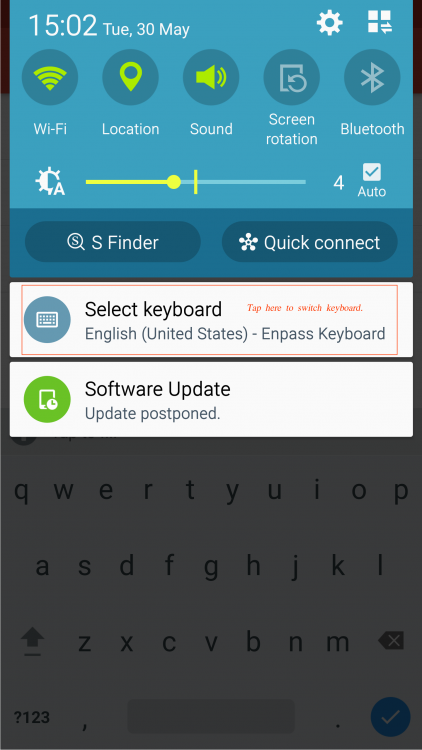
Hi @Gatto Thanks for writing in. In the Samsung devices, it shows an option to switch the keyboard from the notification bar. Cheers!
-
Hi @Da Kine Glad to know you like Enpass! Sorry to say but currently we don't have any plans to sell Enpass other than the Google Play Store. But I have noted down your request and forwarded to the concerned team for consideration. Cheers!
-
Hi @Gatto Yes, you have to add an environment variable in your system as mentioned above. This is due to an issue in Qt framework as mentioned in this comment here
-
Hi @NieChe Thanks for writing in. Please have a look at our FAQ to set up sync with WebDAV. If your problem still persists, please share some more info so that we can help you in a better way. On which device (Along with OS version) are you using Enpass? Which Enpass version are you using? While syncing what error message or code are you getting? It would be really helpful if you can share a demo account of your WebDAV so that we can investigate where the problem could be. Thanks for your co-operation!
-
Hi @Gatto, This feature is already planned for the next major update but at the moment I can't assure you exact ETA. Stay connected to see all the new feature we add to Enpass. Cheers!
-
Hi @norisounds Thanks for writing in. The suggested feature "Copy" button in Password generator is already on our roadmap. However, I would like to share that when you click on "Fill & Copy" button ( even if the password field is not automatically detected), it copies the newly created password on clipboard. Cheers!
-
Hi @Daniell Thanks for writing in. No! I would like to share that Enpass is tied with Google Play services and can only be downloaded and purchased from Google Play store. We strongly recommend users to install Enpass only from the respective app stores (Google Play Store in your case) as apps on Store are signed with developer certificates and delivery through it assures that software is genuine and not tempered. While installing Enpass from other websites or stores might put you in trouble of security risk like data theft. Cheers!
-
-
Hi @edolnx Sorry to hear about your trouble. I would like to share that Enpass browser extension communicates to the Enpass app over the localhost address. So please check and verify that any third-party application is not interfering the localhost connections (127.0.0.1) and make sure you have "lsof" installed on your system. Also, please run the below command in terminal and share the output. lsof -i:10391 Where 10391 is a port number. If there is no output (blank), please try with other port numbers between 10391 to 10395. Thanks for your co-operation!
-
Hi @Gatto Thanks for using Enpass and writing to us. Sorry to say that currently the feature to display the age of passwords and setting an expiration date is not there in Enpass, but is already in our roadmap for the future version. Enpass uses an algorithm which runs an internal scan and displays the strength of the password. For more details please have a look at our user guide. Cheers!
-
Hi @BrigoNortensson, Thanks for writing to us with your valuable suggestion. Automatic password changer (APC) is something which is in our roadmap with all the milestones you mentioned (expiry date, password recipe with allowed characters), but the final milestone of APC is something which is tough and would be complicated due to offline nature of Enpass. Would Enpass be an online password manager, it'd have been easy job, having your data on its cloud and changing the passwords silently for some specific websites (with pre-defined password changing algorithms). But we do have plans to introduce APC later as a component of Password audit. Cheers!
-
Hi @LKo Sorry for the inconvenience. To investigate further on this issue, please provide some more details as: Which OSX version and Mac machine are you using? How many total items are there in Enpass? Are you facing this problem in a specific condition ( During search or when you wake your system from sleep mode or any other scenario)? For Testing Purpose: Please also try if the same issue appears in the website version of Enpass (the one downloadable from our website, instead of AppStore). Thanks for your co-operation!
-
Hi @EMike Thanks for writing in. You needn't to worry about it, and take it as a word from me that we will stick to our current business model of providing the offline version of Enpass. It is also confirmed that our individual users like you would not be forced to switch to any subscription model and would keep getting the updates the same way throughout the lifetime of Enpass. Cheers!