


Anshu kumar
Enpass team member
-
Joined
Everything posted by Anshu kumar
-
Hi @jrodsep Thanks for writing in. In the current version if you change the Master Password on one device, then it gets changed for the local database and on the cloud account with which sync is ON. But it doesn’t get updated on rest of the devices as they are unaware of new password. So after unlocking with an older password, during the next sync operation, you will be asked for new password to unlock the downloaded file, and you have to manually change the master password on that device. For more details check out this FAQ. But in the next major version, we are working on improvement of this scenario where it will be changed on all devices. Hope this helps!
-
Hi @quidproquo Sorry to hear about your trouble. First of all, I would like to share that exporting data is currently possible only through our traditional desktop versions. They are available for Windows, Mac and Linux and can be downloaded from our website. As you mentioned, can you use your PIN to access your Enpass database? Well, in this case, the only way to recover your Enpass items is to manually share each item either via Mail or Message from your mobile device. Download Enpass on a desktop device, create a new keychain and manually add each shared item one by one. And make sure after recovering all the data to Enpass, you delete the data from mail or iMessage to avoid any data breach. I know it's a bit tedious, but it's the only way to recover your database.
-
-
Hi @0rAX0 Oops! This sounds very weird as neither we have faced it here nor reported by any other customer so far. Please share some more information so that we can take a closer look and check on this. Have you recently imported data of any other password manager into Enpass? Have you recently switched to other cloud (Dropbox)? Are you facing the same problem in other devices (Android and iOS) device too? Have you recently changed the master password on any device? What is the Last modified time of any two duplicated items? Once we are able to find the cause that have resulted to duplication of items , we would try to help you restoring the original items in your database.
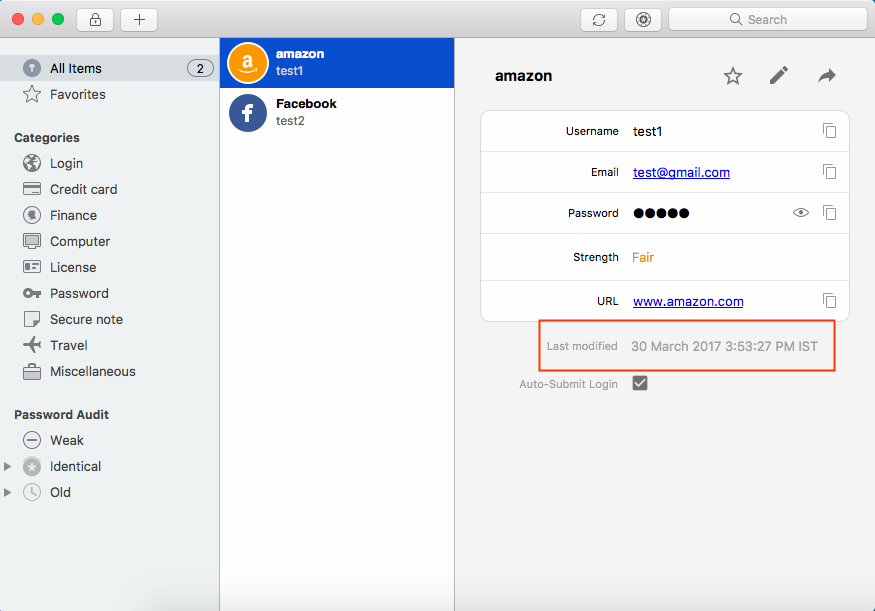
-
-
Hi @qzmarco , Thanks for writing back. Update of Enpass Extension has already been submitted on stores for review. Update on all stores except Firefox will be available soon. Cheers!
-
-
Hi @Heiko Thanks for writing in. Sorry to say but I can not confirm you any ETA for this and only can say that it will be available in next major version with support for Form filler. Stay connected! Cheers!
-
-
-
Hi @8n7jfe282i , Thanks for reporting this issue and I apologize for the inconvenience. I have noted down this issue and forwarded to dev team so they can try to fix this issue asap. Till then I request you to please cooperate with us.
-
Hi @robie.cz , Thanks for reporting this issue. I have noted down this issue and try to fix it in the upcoming updates. Cheers!
-
Hi @niemalsnever Thanks for writing in. I would like to share that currently the Enpass browser extension makes available some certain items for matching URL having the usernames, email addresses and passwords fields on a page. Since none of these (actionable for auto-filling ) fields is found on the TOTP page, Enpass shows only the recent items. However, we will keep on improving this. Cheers!
-
Hi @Rooco Thanks for reporting this issue and I apologize for the inconvenience. I have noted the website for further testing and will try to fix asap. Till then I request you to please co-operate with us. Thanks for your co-operation!
-
Hi @Darksky, Thanks for writing in and I apologize for the inconvenience. I'm afraid to say that I don't understand completely what you mean by: To know how Enpass autofill works please have a look at user manual and let me know exactly what problem are you facing while auto-filling so that I can help you in a better way. Thanks for your co-operation!
-
Hi @aristosv, Thanks for writing in. Sorry to say but currently there is no other way to fill login credentials without using shortcut command (Ctrl+/). And this restriction is also proved to be a safeguard against various kind of phishing attacks. Cheers!
-
Hi @OLLI_S Thanks for writing back. Sorry to say but it's not possible to rename the database.
-
Hi @dw72 Thank you for sharing the video. It was a great help. And well, I have forwarded this issue to the development team so they can take a look at the issue. Thanks for your cooperation.
-
Hi @Cristian Thanks for your suggestion.I have noted down your request and we'll take it into consideration. Cheers.
-
-
Hi @OLLI_S Thanks for writing in. I would like to share that Windows Store apps store their data inside app sandbox and it's not possible to change the default location. So, in this case, I recommend you to sync data between your devices through cloud of your choice, which will keep the database updated on both the devices. For more details please have a look at our FAQs. https://www.enpass.io/kb/why-should-i-enable-sync-on-my-device-is-it-safe/ https://www.enpass.io/kb/which-clouds-are-supported-for-sync-4/ Hope this helps!
-
Hi @dw72 , That's very strange and I'm sorry for the inconvenience. Can you please let me know which OS version are you using so that we can investigate where the problem could be?
-
Hi @drjbg, Thanks for writing in. I would like to share that when you create any item it will be saved in All items and it's categories respectively. And when you move items to a particular folder, Enpass will generate a reference of that particular item in the folder leaving the item in the category. BTW, you can hide the unwanted categories from the Sidebar using Menu->View->Sidebar. To do so, select the folder in which you want to add the new item (or you can even create a new folder and then select it) and now try to add the item. It will add automatically to the selected folder. Hope this helps!
-
Hi @itsuia, Thanks for writing in. The attached image shows the built-in browser in Enpass App. If you want to directly login using an item, tap the button that’s to the right of its URL and select Enpass Browser from the list. Every time you tap a URL, you’d be prompted to select a browser and the link will open in a new tab. For more details please have a look at user manual. Hope this helps!
-
Hi @thirashima , Thanks for taking the time to let us know. We are aware of this issue and it will be fixed in the next update. Till then I request you to please bear with us.

