


Pratyush Sharma
Enpass team member
-
Joined
Everything posted by Pratyush Sharma
-
Hi @Yevhen Kushnir, Thanks for sharing the details. I have noted down the issue and notified the concerned team to look into it. Thanks!
-
Hi, Thanks for writing back in. We have noted down your valuable suggestion and forwarded it to the concerned team for further consideration. Thanks for your feedback!
-
Hi @fha Thanks for sharing the details. We tried replicating the same at our end. We’ll suggest you follow the below workaround to import 1pif file in Enpass: Create a folder (any name you wish) on your Mac(preferably Desktop). Export 1pif file into that folder or copy-paste any existing file into the newly created folder. In Enpass, while importing data, select the particular folder where you save the file (in the previous step) and click on Open button in the bottom right corner. (See attached screenshot). You should be able to import data from 1pif file. If this doesn’t help or if you find any difficulty, please let us know.
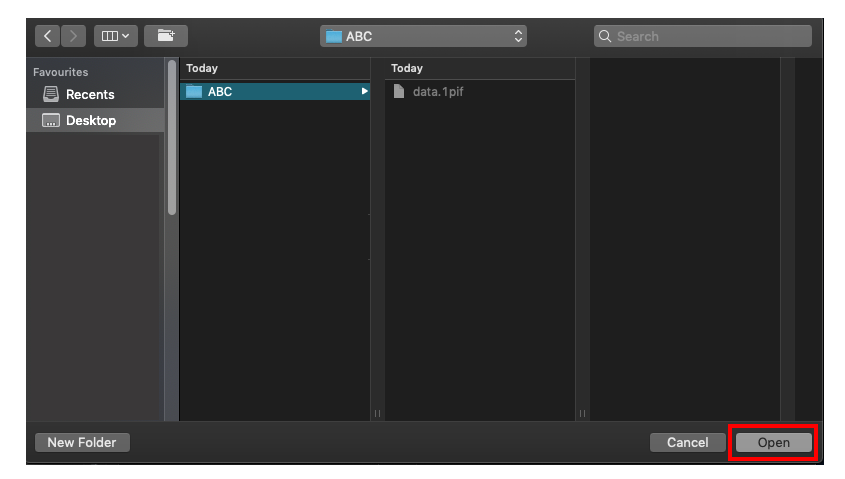
-
Hi @Yevhen Kushnir Thanks for sharing the details. I have noted down this issue and notified the concerned team to look into it. Hopefully, a fix will be available in the future updates. If there's anything else, let me know. Thanks.
-
Hi @An Enpass User, We regret the inconvenience. Sometimes re-booting the device might help. If the problem persists, please share the following details so that we can help you better. On which device (along with OS version) are you using Enpass? Which Enpass version and extension version are you using? Which Vivaldi version are you using? Thanks for your co-operation.
-
Hi, Thanks for writing back in. Please follow the below mentioned steps and revert if the issue persists: Disconnect sync from all devices. Open One Drive in the system's default browser and logout form the cloud account. Now try to enable sync with your OneDrive account. Hope this helps!
-
Hi @Yevhen Kushnir, Welcome to the forums! That really looks ugly! Could you please share the screen resolution of your system's display, and did you try restarting Enpass to check if that icon's appearance changes? Thanks for your co-operation.
-
Hi @Previously Satisfied User, We are sorry for the inconvenience caused to you. However, please do not worry as your earlier purchase is safe and we'll help you restore it. Please share your purchase receipt and the device details where you're trying to restore your earlier purchae with us on support@enpass.io so we can help you better. Thanks for co-operation.
-
Hi, Sorry for the inconvenience caused to you. Please let us know the following details so we can further investigate this issue: Which Enpass version you are using? How many items are there in your Enpass? Are you facing this issue when the App is running in the background, and you try to open it in the foreground or any specific condition? Thanks for your co-operation.
-
Hi @jgw0, Thanks for using Enpass and writing in. Please follow the steps as mentioned in our user manual and if you face any issue, revert to us on support@enpass.io with the following details so we can help you better: On which devices (along with OS) are you using Enpass? Which Enpass version you are using? Which Roboform version you are using? Which language you are using as default?
-
Hi @fha, Sorry for the inconvenience caused to you. Please revert to us with the following details on support@enpass.io so we can further investigate: On which devices (along with OS) are you importing data into Enpass? Which 1Password version you are using? If possible, share the screenshot of the issue? Thanks for you co-operation.
-
Hi @RASTPB, Thanks for writing in. To share a vault via sync, you can either create a new account on any of the cloud providers or use any of your existing OneDrive accounts and follow the below steps: Open Enpass on your phone and go to Enpass settings --> Vaults --> Tap on Primary ---> Select Sync and choose a cloud account to your database. Enter your cloud account details, follow the instructions and wait till the sync is done. Now open Enpass on your wife phone --> Vaults --> Tap on Primary ---> Select the cloud (as in Step 1) from which you had enabled sync on your phone.
-
Hi @FuN_KeY, We appreciate your quick and valuable feedback on Enpass compatibility with the latest Edge update. We'll work on improving the Enpass compatibility with Edge, and have considered your suggestion for our reference. Thanks.
-
Hi All, Thanks for writing in. We have noted down your valuable suggestion and forwarded it to the concerned team for further consideration. Thanks for your feedback!
-
Hi @Abdul, Sorry for the inconvenience. Could you please try enabling the 'Match URL Hostname' in Enpass browser settings. If the problem persists, please let me know.
-
Hi @user3458, Thanks for using Enpass and writing in. You can move/copy the item in another vault once you select the particular vault on which the item is. (If you have selected ‘All Vaults’, then the option ‘Add to Vault’ will disable.)
-
Hi, Sorry for the trouble you are going through. Please try to restore your database using the WiFi restore option and let us know if the issue persists. Thanks!
-
Hi @user3458, Thanks for writing back in. If possible, please create a dummy item on any website and share the video of the steps you are doing to autofill so we can check where the problem could be.
-
Hi @saschap, Thanks for writing back in. We would like to inform you that if you have enabled the Touch ID, then the app asks for the master password when the System restarts When you quit Enpass and start it again as a fresh app. However, we do have plans to improve the functionality in future updates.
-
Hi @m.lederle Thanks for writing back in. Currently, the TOTP refresh time is 30 seconds only. However, we have noted down your valuable suggestion and forwarded it to the concerned team for further consideration.
-
-
Hi@Netizensmith, Sorry for the trouble you are going through. Please let us know when you click on the link to open Enpass does it get open in the foreground? If no, then please copy the URL from the browser and open Enpass manually Hope this helps!
-
Hi @Joaquim Figueiredo, Sorry for the inconvenience caused to you. Please follow the steps 2 to 4 from this link and reboot the system. If the problem still persists, kindly contact Microsoft Support as they will assist you better. Hope this helps!
-
Hi @RayR Thanks for writing in. Currently we don't support Enpass in ARM devices. However, we have future plans to support Enpass in ARM devices and we will update you if we have any information regarding this. Thanks!
-
Hi @0o1, Sorry for the inconvenience. Please take the backup of Enpass data first and then reinstall the app. Now register on Enpass using the same email ID which you used in your Android device. If the issue persists, kindly share the Enpass purchase receipt and registered email ID with us at support@enpass.io. Thanks!