


Anshu kumar
Enpass team member
-
Joined
Everything posted by Anshu kumar
-
Hi guys, Thanks for your suggestion. We are on it and our dev team is working hard to bring this feature ASAP. I appreciate your patience in the meantime. Cheers!
-
Hi @Lawrence, Thanks for your prompt reply and sharing the screenshots. To investigate further in this issue, I might need to send a diagnostics tool with some more queries. Please drop us an email at support@enpass.io mentioning a link to this discussion and we will take it further. Thanks for your co-operation.
-
Thanks for the info @spino, I have noted down this issue and forwarded to the dev team, so they can check where the problem could be. I appreciate your patience in the meantime.
-
Hi Thanks for your prompt reply. We have just re-tested this issue in our lab and unable to reproduce. One of the possible reason could be that some other extension of Firefox is using the same keys combination. Can you please check it and let me know?
-
Hi @LKo, Thanks for writing in. No! You can simply download the latest beta version from here: Cheers!
-
Hi Sorry to hear about your trouble. Please share more details like on which device (along with OS version)/Enpass version and which keyboard layout are you using. Please try by setting some other, less common shortcut for testing purpose and see if the same problem occurs when you use that shortcut for autofilling. Also please mention if you are facing the same problem in other browsers as well.
-
Hi guys, Sorry to hear about your trouble. I would like to let you know that the Keyboard shortcuts are only used to autofill in login details, for a credit card you have to manually click on the Enpass extension to autofill. For more details please have a look at user manual . It seems that there might be some problem with Field Type of credit card while importing the data from 1password. Please manually create the credit card item and then try to autofill and let me know does it works? Currently No! But we already have plans to work on an improved version with complete Form-filling that will save all the fields from the page inside Enpass keychain. I can't assure any ETA for this and only can say that it will be available in any of future versions. We don’t recommend to use Enpass by disabling the code signature verification. As mentioned here under communication section, Enpass App validates authenticity of both extension and Browser before making any connection and serving data for autofilling. So if you turn off the code signature verification, you bypass the Browser checking and set your foot into autofilling in Opera Browser. Though it is not a safe practice. To avoid any security risks associated, please make sure that you download the browser from the legitimate source and double check the authenticity of any extension you install. Please let me know what error message or code are you getting when you enable Verify browsers also provide some more details like Antivirus/ Firewall/third party network security/ any security related Extension or Proxy are you using. so that we can investigate where the problem could be. Cheers!
-
Hi @spino, Thanks for reporting this issue and we apologize for the inconvenience. Please provide some more details like which Android device/ Android version and Enpass version are you using. so that we can investigate where the problem could be.
-
Hi @zigguratt, Thanks for reporting this issue and we apologize for the inconvenience. I have noted down this issue in the bug tracker and forwarded to dev team so they can check and try to fix this issue asap. Meanwhile please delete all the Enpass folder from Google Drive except latest one.
-
Hi @mbrustad, Thaks for your prompt reply. No! Yeah sure and thanks a lot for showing interest in Enpass localization in Swedish. We are managing localizations for Enpass at crowdin.com. If you are interested in contribution, please send a mail to localization@enpass.io and we will revert you with. Cheers!
-
-
Hi @mbrustad, Thanks for your suggestion. I have noted down your suggestion and forwarded to concerned team. Cheers!
-
Hi @LKo, Sorry to hear about your trouble and I apologize for the inconvenience. We have identified an issue which might be causing this problem. This issue has been fixed and will be available in the upcoming beta update. I would like to have your feedback on the issue in upcoming beta. Till then I request you to please bear with us.
-
Hi guys, Thanks for your suggestion noted and added in our roadmap, but I can't say when this will be implemented, but it will certainly be considered and discussed. Cheers!
-
-
Thanks for your suggestion @My1. Sorry to say but currently we don't have any plans to add other sync services, although I have noted down your suggestion and forwarded to concerned team. Cheers!
-
-
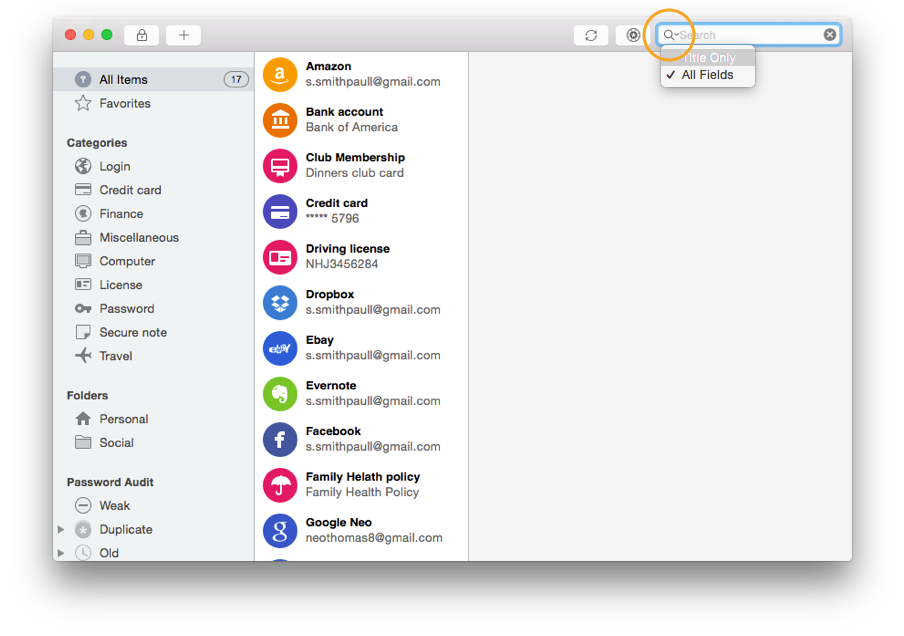
Hi @jscgn Sorry to hear about your trouble. Please provide some more details, so that we can investigate where the problem could be. Are you using Enpass portable version in USB drive/Harddisk. (Please specify the details of USBDrive like are you using USB 2.0/USB 3.0 ). How many total items are there in Enpass? How much memory and CPU Enpass portable version is consuming? For Testing Purpose: Please select Title only in search fields and now search for any items and check does Enpass still freezes? For more details please see the attachment.
-
Hi @Dzik1000 Sorry to hear about your trouble. I would like to let you know, in order to use Enpass Browser extension, the main app must be running in background. The reason is that being an offline password manager, Enpass saves all your database locally on your device not on any server. Whenever you visit a login page and click Enpass browser extension for auto-filling, then the extension securely connects with Enpass app to fetch and auto-fill the details. For more details please have a look at our user manual link. If your problem still persists, please drop us an email at support@enpass.io mentioning a link to this discussion and we will take it further. Thanks for your co-operation.
-
Hi @NordicNorm, Sorry to hear about your trouble. Generate password option in browser extension helps you in generating password only and saves it only if it prompts you to save/update password in keychain. If it prompted you and didn't update the password in keychain, please provide some more details, so that we can investigate where the problem could be. On which website (along with URL) you are facing this problem. Have you followed the same steps to generate password as mention in the user manual. Cheers!
-
-
-
Hi @pattomi Thanks for your suggestion. Currently We don't have any plans to add Mega cloud Sync, but I have noted your request. Cheers!
-
Hi @jesse.bruffett, Sorry to hear about trouble. We have fixed this issue in current beta version of Enpass and will be available very soon with the next release. You can get and try out the Beta version as mentioned in the posts below: Cheers!
-

