


Anshu kumar
Enpass team member
-
Joined
Everything posted by Anshu kumar
-
-
Hi @JB Labelle Thanks for writing in. Currently No. Currently there is no API available for Win32 apps. We are waiting for official release of any relevant APIs and as soon as we have them, we will start working on this feature. Thanks for reporting these issue. I have noted down this issue in bug tracker and forwarded to dev team, so they can try to fix this issue asap. I have noted down your suggestion.
-
-
-
Hi @My1, Thanks for writing in. iCloud sync for other platform is already in our roadmap but I can't assure any ETA for this and only can say that it will be available in future versions. Cheers!
-
Hi @Edwar D Day, Thanks for reporting this issue and I apologize for the inconvenience. This issue has been fixed and will be available in next update. Till then I request you to please bear with us.
-
Hi @PepeCZ Thanks for writing in. As you know there are two Enpass versions for Windows: Traditional Windows version and Windows Store version ( UWP). The Traditional Windows version is more powerful and Free under our policy of free desktop versions for Enpass. It was always free and we never charged for this. The Store version was first released for Windows Phones and shared the purchased license with the Modern Windows App (Former name for store Apps Windows 8.1) under Universal scheme of Microsoft while our traditional Windows version was free since day one. The Free Traditional version has below extra features which are not there in Paid Store version Importing data from other software. Support of Enpass browser extensions for Chrome, Firefox, Vivaldi, Opera and Safari (Mac). Auto run at system startup. Password Audit. Below are some links to user manual of different versions to throw more light of their functionality Traditional Windows: https://www.enpass.io/docs/desktop-windows/getting_start.html UWP Windows 10: https://www.enpass.io/docs/uwp/create.html Windows 8 Modern App: https://www.enpass.io/docs/winphone/getting_start.html
-
Thanks for your suggestion @Jaspreet Singh! I have note down your suggestion and will consider in future update. Keep Suggesting!
-
Hi @archetwist I would like to let you know that Enpass saves some settings in system registry. When you run app without inserting the Pen Drive (external USB stick), it won't find any data file in the previous location. New setup screen will come and due to security reason it clears all the old settings from registry. I recommend you to try our portable version, which store settings along with the data file and you will not face this issue anymore. Cheers!
-
Hi @Mattchewie, Thanks for reporting. We will look into this issue.
-
Hi @Mandrake Sorry to hear about your trouble. To diagnose this issue I want a little help from your side. Please follow these steps: Step 1: Log into Enpass --> Go to Tools --> Settings --> General --> Enable Minimize App to System Tray. Now click (Single click) on Enpass icon in the System tray and check whether it display Enpass mini window. Step 2: Open Task Manager --> Tap Details --> And check Enpass.exe and Enpasshelper.exe is there? And also please provide some more details like Enpass version, Antivirus /Firewall/third party network security/ any security related Extension or Proxy are you using.
-
Hi @Mandrake Yes, you have to select location every time while using portable version. It has been designed for those who have to keep switching the workstations and need access to their data immediately. If you are using Enpass for your personal use on your Home and Work PC, we recommended you to use Traditional version of Enpass which is also completely free. Cheers!
-
Hi @Mandrake Right now we don't have any plan. Stay connected to see all the new feature we add frequently to Enpass. Cheers!
-
Hi @Gerald Hart Sorry to hear about your trouble. Please provide some more details for further investigation like OS version, Enpass version and let me know if you have your ever installed Enpass on other system previously. Also please share the screenshot. It will help in clearly understanding your problem and give a clear picture before further proceedings.
-
Hi @jhf2442 That's very strange! Please provide some more info for further investigation like Enpass version, Cloud sync, Desktop environment along with Keyboard layout and default language for Enpass.
-
-
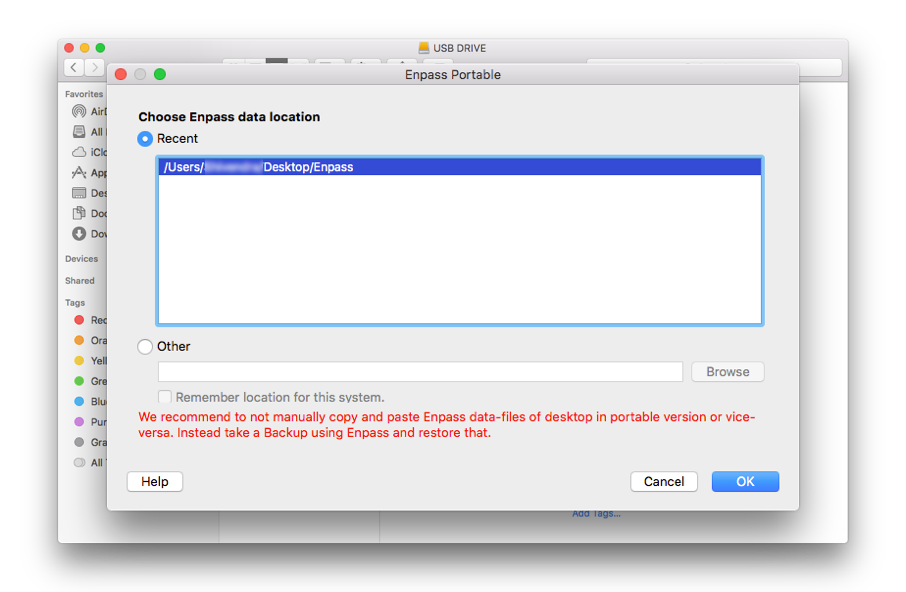
Hi @Mandrake Thanks for writing in. Actually enabling the function "Remember location for this system" will add the database path to *recent* list on current system and whenever you access the portable version of Enpass on that system again, you can quickly access the database.
-
Hi @Mandrake Sorry to hear about your trouble. Currently Enpass doesn't support Cyberfox browser, but you can make Enpass extension work with Cyberfox browser by turning off the Code signature verification in main Enpass App and perform the similar steps as mentioned here.
-
Hi @pontus Thanks for writing in. Actually, this is not the Enpass issue . It seems that there might be some problem with Dropbox App. So please contact Dropbox support team as they will assist you in a better way.
-
Hi @archetwist, Sorry to hear about your trouble and I apologize for the late reply. We were trying to reproduce this issue on our end and haven't been able to. Could you provide steps to reproduce the issue and also please provide some more details for further investigation. On which devices (all of them, along with OS version) are you using Enpass? Are you using external drive to store Enpass data in all devices?
-
Hi @samw5 I’m sorry to hear that the issue is not resolved completely. Please check and make sure you are using same Google Drive account in both devices. Also log into your Google Drive account and look for the Enpass folder there (should be one Enpass folder there). Now inside that folder, check for the sync_default.walletx for the number of copies it has (should be one).
-
Hey guys, The feature of exporting Enpass Data in CSV format has already been implemented and will be available in next update. I appreciate your patience in the meantime.
-
Hi @samw5 Sorry to hear about your trouble. For quick troubleshooting please disconnect the sync and reconnect it again. If your problem still persists, please provide some more details like which Android device, Android version, Enpass version, Cloud sync are you using. so that we can investigate where the problem could be.
-
Thanks for getting back to me @nuentes. Actually No! but we have already found this issue in internal testing and hopefully it will fixed soon. Although thanks for reporting this issue.
-
Hi @NicolasP42, Sorry to hear about your trouble. It seems something ( some unwanted line or special character ) is blocking the import process. So please make a copy of exported file and open in text editor and remove these lines and now try to import the same file by following the steps mentioned here in user manual.

