Anshu kumar
Enpass team member
-
Joined
Everything posted by Anshu kumar
-
Hi @DarthPug, Thanks for reporting these issues and passing those URLs along. I'm sorry for the inconvenience caused you. This issue has been fixed and will be available in next update. Till then we request you to please bear with us.
-
-
Hi @al3x4nder, Thanks for writing in. Please drop us an email at support@enpass.io with the language and some important places where you have found mistakes, so that we can try to fix asap. Cheers!
-
Hi @marcoshalano, Thanks for your suggestion. The mentioned feature is already in our roadmap and will be available in future versions.
-
Thanks for your suggestion @marcoshalano! I have noted down your request.
-
-
Hi @ithinkiam, Thanks for your suggestion. Our development team is working on similar feature called "subset of Password", which will fulfill your requirement and will be available in near future. Cheers!
-
Thanks for your suggestion @Astrolab_Max! WiFi Sync is already in our roadmap but due to some other priorities it has moved down. I have added an upvote for this feature. Cheers!
-
Hi all, Thanks for taking the time to let us know. We are aware of this issue and it will be fixed in the next update. Till then please bear with us.
-
Hi @DarthPug, Welcome to the Enpass Family! Thanks for the suggestion. We always love to know what users are looking for in Enpass. We'll take it into consideration. The mentioned feature has already been implemented and will be available in next update. Cheers!
-
Hi @Orangutan, First of all, Welcome to the Enpass Family! Thanks for the suggestion. We always love to know what users are looking for in Enpass. At the moment, Enpass doesn't support auto backup locally in your system, but this feature has already been implemented for the desktops and hopefully will be available in any of the upcoming updates. No need to worry if you have setup the Sync which automatically takes backup of your data with latest changes. You can have look, similar is being discussed here: I have noted down your suggestions and we will discuss this feature in our next meeting. Cheers!
-
Thanks for your suggestion @Daylen!
-
Thanks for your suggestion @Daylen, noted and added to roadmap.
-
Hi all, I am extremely sorry for the inconvenience. Unfortunately I don't have any updates at this time because we are still not able to reproduce it but the team is looking into it and we have increased the efforts. I will really appreciate for any of your inputs helpful in producing it here. Thanks for your patience. Cheers!
-
Hi @R3HDH8pNh7, Sorry to hear about your trouble. To investigate further in this issue, I might need to send a diagnostics tool with some more queries. Please drop us an email at support@enpass.io mentioning a link to this discussion and we will take it further. Thanks for your co-operation.
-
Hi @Roger MELON, Thanks for using Enpass and writing to us. Purchasing Enpass on one platform will not let you use the full version on another platform because of the platform specific restrictions. For example, all the purchases on Play Store are managed by Google and will not be accessible on iOS or Windows Store. If Enpass would have been online and subscription based software then we could have share your account details across platforms to enable full version. The same has been mentioned on our website here https://www.enpass.io/pricing/ and https://www.enpass.io/kb/i-have-purchased-enpass-for-one-platform-do-i-need-to-purchase-separately-for-others/
-
Hi @ikabupini, Thanks for reporting the issue. Our development team is looking into it. It would be really greatful, if you provides some other website URL, so that we can try to fix it asap.
-
Hi @renz, Thanks for your suggestion. We are really sorry as due to security reason we can't provide the mentioned feature. The reason for this is that whenever you copy any information to the app, then there are chances that the copied information can be accessed by a malicious app and it may be able to read and steal the information. Unfortunately, we can't stop this as Android doesn't provide any API to restrict other apps from accessing clipboard. In this case you can use Enpass Keyboard to manually fill any information. We strongly recommended user to use Enpass Keyboard instead of copy and paste.
-
Thanks For your suggestion @Dag Stenstad, I have noted down your request.
-
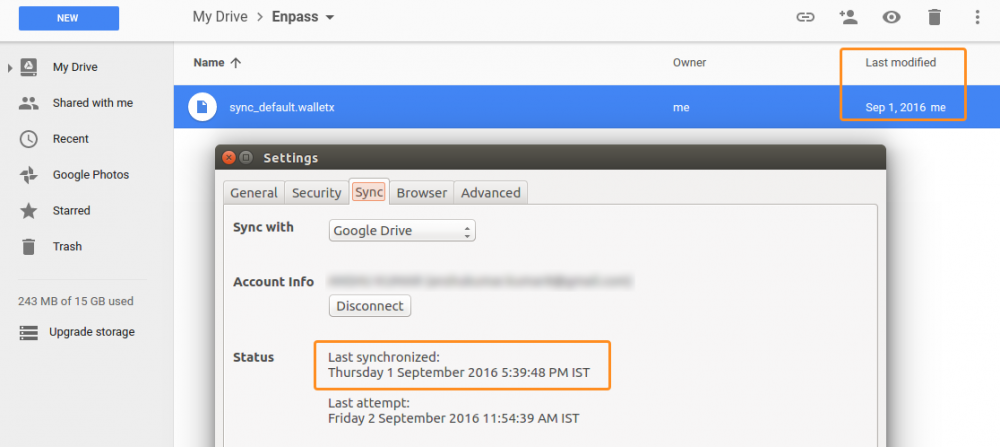
Hi @Frank, I'm sorry that the second point wasn't clear enough. Yes, the clock should be right on all devices. Also please share the last syncronized time (Enpass) from your devices and last modified time of sync_default.walletx file on cloud.
-
Hi @Frank, Sorry to hear about your trouble. Please provide some more info for further investigation. Log into your Google Drive and OneDrive account and look for the Enpass folder there (should be one Enpass folder there). Now inside that folder, do you have multiple copies of sync_default.walletx (should be one)? Is your Date and Time info same for all devices ?
-
-
Hi @kraades, Sorry to hear about your trouble. I would like to let you know, in order to use Enpass Browser extension, the main app must be running in background. The reason is that being an offline password manager, Enpass saves all your database locally on your device not on any server. Whenever you visit a login page and click Enpass browser extension for auto-filling, then the extension securely connects with Enpass app to fetch and auto-fill the details. For more details please have a look at our user manual link. You can also make Enpass app running in the background by Enabling the option 'Minimize app to system tray' in Enpass General settings. For more details please have a look at user manual link.
-
-
Hi all, Thanks for your suggestion. I have noted down your request.