Anshu kumar
Enpass team member
-
Joined
Everything posted by Anshu kumar
-
Hi @Xarin Sorry to hear about your trouble. I would like to let you know when you purchase something on play store it gets linked with the Google ID from which you installed and made payment to Google Play Store. To restore Enpass to Pro version follow the instructions: Go to Play Store --> Click on sidebar and select the account from which Enpass app is purchased --> Re-install the app --> Enpass Pro will be restored. NOTE: Before uninstalling the Enpass app, make sure you have already taken the backup of Enpass data.
-
Hi @nuentes, Thanks for reporting this issue and I apologize for the inconvenience. I have noted down this issue and forwarded to dev team, so they can try to fix this issue asap. Till then I request you to please bear with us.
-
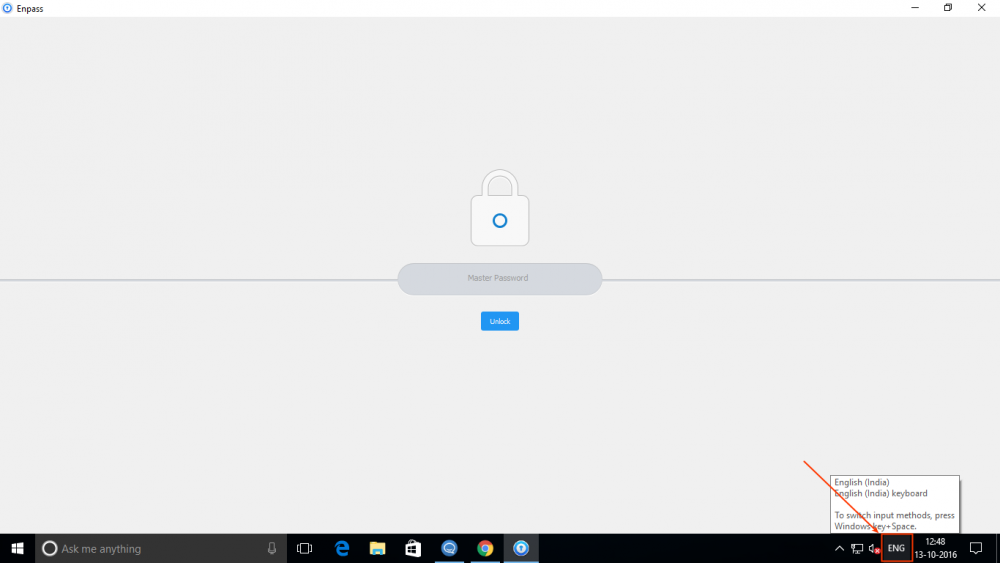
Hi @BJ, Thanks for your prompt reply and answering my questions. It seems that there might be some problem with Keyboard layout. So please let me know which keyboard layout are you using and while entering the master password in both Enpass versions (Traditional & UWP) what is the keyboard layout language display in system tray. Also whenever this issue persists again in the future, please type your master password in notepad and then copy/pasted it into the password field and let me know does it works?
-
Hi @dnf Sorry to hear about your trouble. Please drop us an email at support@enpass.io mentioning a link to this discussion with details like Antivirus/Firewall/third party network security/ any security related Extension or Proxy are you using, so that we can investigate where the problem could be.
-
Hi @BJ That's very strange! Please provide some more details, so that I can investigate where the problem could be. On which device (Along with OS version) are you using Enpass? Have you installed two Enpass versions (Traditional & UWP) in your System? What is the default language for Enpass and are you using any special character in master password? Have you recently changed your master password? What is the size of Enpass file in User Document Folder?
-
Hi @DerekM, Sorry to hear about your trouble. We are already aware of this issue, this issue has already been fixed and will be available in next update. Meanwhile you can try by restarting Safari browser. Thanks for your cooperation.
-
Hi @Orson Wang, Thanks for reporting this issue and I'm sorry for the inconvenience caused you. I have noted down this issue in bug tracker and forwarded to dev team, so they can try to fix this issue asap. Till then I request you to please bear with us.
-
-
Hi Thanks for getting back to me and answering my question. For Firefox: It seems that you are running Firefox browser via terminal. If yes, please use this command /Applications/Firefox.app/Contents/MacOS/firefox and try again or you can directly run via double clicking the Firefox.app. For Chrome: I would like to let you know Enpass extension communicate to Enpass over localhost address. One of the possible reason might be that you are using Proxy settings for local addresses.To resolve the issue please follow the steps given below: Go to System Preferences ➝ Network ➝ Ethernet/ WiFi/ Other Network ➝ Advance ➝ Proxies ➝ Web Proxy (HTTP) and in the Bypass proxy settings for these Host & Domains box➝ Add 127.0.0.1
-
Hi @guyguy16 Sorry to hear about your trouble. In order to use Enpass Browser extension, please make sure Enpass is running in the background. For more details please have a look at user manual link how Enpass browser extension works. If your problem still persists, please provide some more details like Enpass version/Firewall/third party network security/ any security related Extension or Proxy are you using, so that we can investigate where the problem could be.
-
Hi @guyguy16 As you said, I have a Mac running El Capitan, I would like to let you know, Enpass for MAC can be downloaded from two places: MAC App store and Enpass website. iCloud sync supported only with the version downloaded from the App store. For more details please have a look here. Cheers!
-
Hi @J Baker I apologize for the inconvenience. Please provide some more details for further investigation like OS version, Enpass version, B-Folder version and default language of B-Folder.
-
Hi Sorry to hear about your trouble. Please provide some more details for further investigation. Which Enpass version, Firefox version and Chrome version are you using? Exactly what error message or code are you getting? Please share the screenshot, It will help in clearly understanding your problem and give a clear picture before further proceedings.
-
Hi @thoko Sorry to hear about your trouble. Please drop us an email at support@enpass.io mentioning a link to this discussion with details like device (along with OS version), Enpass version, Firefox version Antivirus/Firewall/third party network security/ any security related Extension or Proxy are you using, so that we can investigate where the problem could be.
-
Hi @niemalsnever, Thanks for writing in. We are aware of this issue, It will be fixed in future update.
-
Hi @Chris1003 Thanks for writing in. In version 5.3.0, we have improved the import process, in which icons are imported from the URL of the items. So please check and let me know does it works? Cheers!
-
Hi @knarz3r, I apologize for the inconvenience! I have forwarded this issue to concerned team. Meanwhile I suggest you to please download the website version of Enpass to check if it crashes on your mac. In case of any crash, please share the crash report with us. Also please drop us an email at support@enpass.io mentioning a link to this discussion and I will take it further after this weekend. I really appreciate your patience. Happy weekend!
-
-
Hi @scottrych, Thanks for writing in and sorry for late reply. Yes, we are and would be available in next update. If you can't wait for the next update, you can make Enpass extension work with Safari Technical Preview by turning off the Code signature verification in main Enpass App as explained here in user manual although its not a safe practice. To avoid any security risks associated with turning off the code signature verification, please make sure that you download the browser from the legitimate source and double check the authenticity of any extension you install.
-
Hi @tox1c90, Sorry to hear about your trouble and we apologize for the inconvenience. We are looking into this issue and we will try to fix this issue asap. Till then please bear with us.
-
Hi @Kristian Sorry to hear about your trouble. Please let me know exactly what error message or code are you getting? Are you using any third party Apps as Firewall for connection monitoring which might be stopping connection to WebDAV? I would like to let you know that whenever Enpass takes a backup on SD card or local storage, it creates a specific folder " Enpass_backups" on local storage and saves the backup file in it with .walletx extension. Enpass can restore the backup only if backup file is located in that specific folder. To create Enpass_backups folder please follow these steps: Open Enpass and create a empty database. Now go to Enpass Settings ➝ Tap Backup and Restore ➝ Backup. Now move the backup file (which you transferred via USB) in Enpass_backups folder and now try to restore. I would like to let you know currently Enpass doesn't support WiFi sync, but you can Backup and Restore Enpass data via WiFi. So please let me know exactly which method have you follow and while restoring the database what error message are you getting. Please click a photo of error message and share with us. If your problem still persists, please provide some more details for further investigation. Which Android device are you using? Instead of restoring can you create a new database with sample items on the same device? Are you able to restore the same database on other device using any method (You can try free desktop). Please drop us an email at support@enpass.io mentioning a link to this discussion with suitable time at which you will be available on Skype.
-
Hi @M-A, Thanks for writing in. At the moment I can't specify ETA. Sorry to say, but it is not technically possible, unfortunately Windows Store would not allow you to download old version. Thanks for understanding!
-
Hi @c_w, Yes, you can edit field's label and field's type of any item. For more details please have a look at user manual link. Cheers!
-
-
Hey guys, Today only we have released the update as v5.3.1, so please update from Mac App store to get rid of these crashing issues. Cheers!