Anshu kumar
Enpass team member
-
Joined
Everything posted by Anshu kumar
-
Hi @HenkeV8, Sorry to hear about about trouble. It seems that your problem might be different as discussed in above thread, so please provide some more details for further investigation. On which all devices (Along with OS version) are you using Enpass? Which cloud sync are you using? Disable the internet connection and now try to open Enpass and let us know does Enpass gets crashed? In which language and region are you using your device?
-
Hi @earl.grey, Thanks for getting in touch with us. This feature has already been in the development phase and will be available in the next major update (5.4). Thanks for your co-operation.
-
Hi all, Sorry to hear about your trouble. Please provide some more details for further investigation. Which Android device and Android version are you using? Also if you can share a demo account of your WebDAV (for diagnosing the issue) to support@enpass.io (mentioning this thread) or in a personal message to me. Thanks for reporting this issue. Please provide some more details for further investigation. Which Android device are you using? How much memory Enpass is consuming? Have you check memory consumption issue through any app or via device setting? If possible, can you please share the screenshot. We have fixed this issue and very soon we will roll out the next beta with fixes. Please bear with us. Cheers!
-
-
Hi @Endru, Thanks for writing in with your question. Support for custom templates is already in our roadmap and will be available in future version. Meanwhile you can use these steps: Create and customize an item as your wish. Right click on the item and select duplicate. For more details please have a look at our user manual. Cheers!
-
Hi @sksbrg, Sorry for the inconvenience. One of the possible reason might be that, for the security purposes many websites neither allow copy/paste or auto-filling during the login. So in this case user has to manually fill the login details. Please let us know if you are able to paste in the same website if copied from somewhere else than Enpass. Cheers!
-
Hi @Matthias Buesing, Sorry to hear about your trouble. We’ve been working hard to improve Enpass import capabilities, but it’s a big challenge for us to cover all of the password managers and their different data formats. We will check into this in coming release cycles. Thanks for your co-operation.
-
Hi @asesq2, I am sorry to hear that you're having trouble with sync. We have fixed this issue in our Beta version available on Play store.
-
-
Hi @Matthew, Thanks for writing in. Yes, you can view history of last 5 changed passwords. For more details please have a look at our user manual for linux. Cheers!
-
Hi @Monk32, Thanks for writing in. We have noted down your suggestion as a feature requests and will be discussed in our next meeting. We have fixed this issue in the current beta version and will be available very soon with the next release. Please bear with us. Cheers!
-
Hi @gammy, Sorry to hear about your trouble. We have optimized the memory consumption in current beta version and very soon we will roll out stable one. Please bear with us. Cheers!
-
Hi @jurisch-IT Thanks for writing in. This settings mention the color of the theme not the color of icon of Enpass in Taskbar of the system. So if the theme of Windows is dark you should choose Show System-tray icon for Dark theme and it will display light icon. Cheers!
-
Hi @4oo4, Thanks for writing in. I am glad to inform you that the support for Diceware-generated passwords has already been added in latest beta version. Cheers!
-
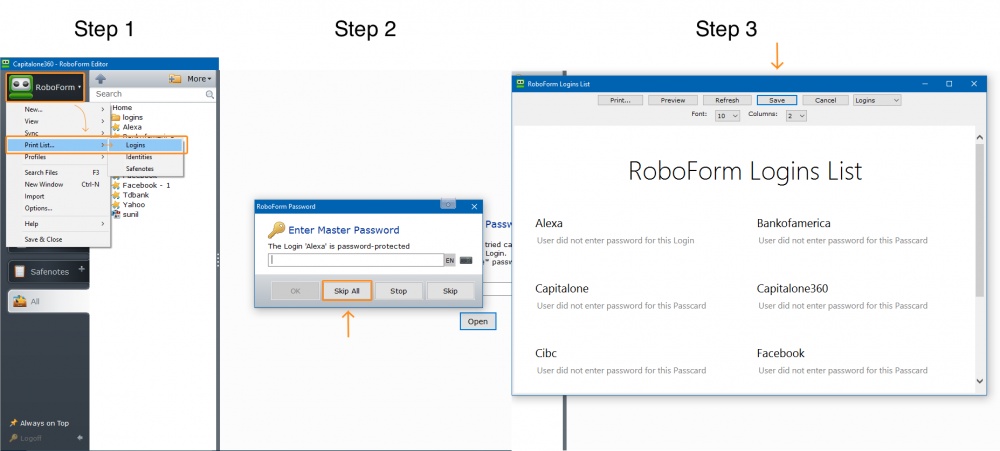
Hi @Mudplugger, I am sorry that my steps didn't help (little bit confusing). First you need to export your data from RoboForm in html format using these steps: Login into RoboForm --> Click on RoboForm icon in the Menu --> Click on Print List --> Select Logins --> Then it will asks for Enter Master Password --> Click on Skip All button--> And then click on Save button and save this file as "filename.html". For more details please see the attachment. Similarly follow these steps for Identities and Safenotes. Importing the Roboform data to Enpass. Once exported, you can import that RoboForm data (Filename.html) into Enpass by following the steps mentioned here in user manual https://www.enpass.io/docs/desktop-windows/import_export.html BTW, I would also like to let you know that recently RoboForm has changed their export format with some changes in the password field. For more details please refer.
-
Hi @4oo4, Thanks for writing in. Currently TOTP support is available for Login categories only, but we have added its support for all categories (except Secure Note) in latest beta version and very soon we will roll out a stable one. BTW, you are using right command. Cheers!
-
Hi @cjkessler, Thanks for you reply. I would like to let you know that Samsung and Nexus devices with Android Marshmallow have provided Fingerprint API in their SDK for the fingerprint sensor, but LG G4 doesn't provide any SDK for the same, so we can't support it until it is available for us to integrate. Cheers!
-
Hi @Mathias Brodala, I can understand your frustration here. As mentioned in the reply by Yogesh above, We are currently looking at this issue to fix, but we can't specify the exact ETA. Thanks for your co-operation.
-
Hi @Flohe91220, Sorry to say that this feature is not available in Enpass. I can't say when this will be implemented, but it will certainly be discussed in next meeting.
-
Thanks so much for the additional info, @nixx and much thanks for the very prompt action and response. We really appreciate it. It'll be very helpful in finding the issue. If you discover any special conditions for crash, please let us know .
-
-
Thanks for the info, @nixx. We have observed that sometimes on Windows Phone, there are very unusual kind of issues so I need some more details for further investigation. Have you notice any specific time interval after which the app starts crashing once you've rebooted your device? Which cloud sync are you using? Have you upgraded your device from Windows 8 OS to 10? How many total items are there in Enpass? After using Enpass, do you quit it or it keeps running in Background? At the time of crash, please observe if the internet is available in phone? (Asking to learn if it could be related to known issue in Microsoft Licensing API). Did you purchase Enpass from same country/store where you're using it now or you've switched the country in store? In which language and region are you using your device? In case if you don't want to reveal this info in this public thread, you can personally message me too. Cheers!
-
Hi @motocoder, First of all, Welcome to the Enpass Family! We have two versions of Enpass for Windows. One we call as Traditional version which is free as part of our Desktop version scheme and is more powerful due to access to wide range of system APIs (for browser extensions) while the other one downloadable from Windows Store is the UWP version which is paid and based on windows latest universal platform design. The Traditional windows version currently doesn't have access to Windows Hello Support (due to lack of required APIs) but soon we will provide the quick unlock using PIN code. UWP Apps on Windows can not communicate with traditional Apps like Chrome, Firefox browsers (architectural issues) and also doesn't support the external browser extensions due to sandbox restrictions and unavailability of required APIs to communicate with third party Apps. So to use browser extensions you have to stick with the traditional Windows PC App. Hope it helps! Cheers,
-
Hi @Romain, Thanks for your suggestion. I can't say when this will be implemented, but it will certainly be discussed in next meet.
-
Hi @Romain, Thanks for your suggestion. Noted and added to roadmap.