


Garima Singh
Enpass team member
-
Joined
Everything posted by Garima Singh
-
-
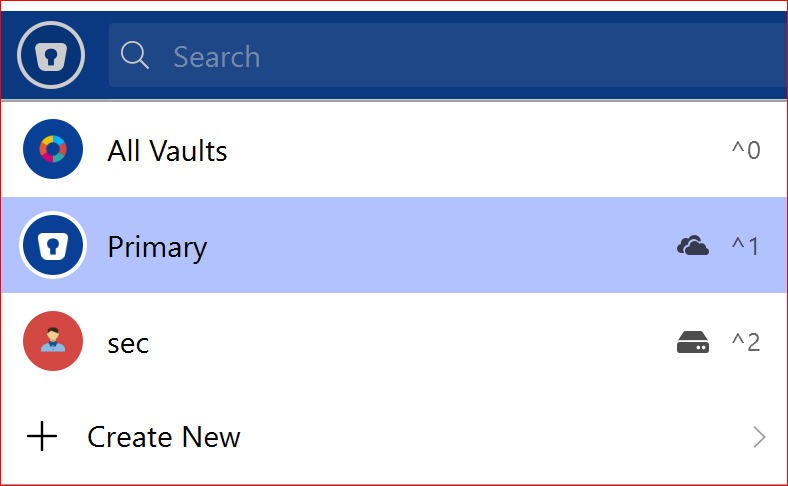
Hey @ryan29, Thanks for the patience. To dig out this bug I need some information from your side. Could you please share the below info: Does the tag got collapse when Enpass gets locked and when you unlock again? Have you selected All vaults or only Primary or secondary? Does both vault synced with WebDAV cloud? Thanks for your co-operation.
-
Hey @SydMtl43 Welcome to the forum. Thanks for writing your suggestion on the same. I have forwarded it to the concerned team to look into this and to make necessary changes. Thanks.
-
Hey @chke419 Please have a look at this forum post and revert us back if you have any query or if the issue persists. Also, please refer to this FAQ to know how to install plugin. Thanks.
-
Hey, Thanks for using Enpass and writing to us. We really appreciate you for exploring the app and giving time in finding this valuable suggestion. The suggestion has been noted and forwarded to the development team for further consideration. Thanks for the suggestion!
-
Hi @Springcomp, We are sorry for the inconvenience caused to you. If the problem comes again, please share the following details so that we can investigate where the problem could be. On which devices and OS versions (mention all) are you using Enpass? Which Enpass version are you using on each device? Are you getting any error message or code during sync? If yes, share it with us. Does the Date and Time setting set to automatic on all devices? Does the last synced time get updated on the sync page? Thanks!
-
Hey @Martijn;) and @John Doe Sorry for the trouble you are having. For quick troubleshooting, please disable the auto-fill feature and enable it again. Also, add dummy data in any of the login categories and then try to auto-fill and share your findings. I would like to share that Enpass always uses the username/email field along with password to auto-fill the details. For eg; if the field of username line is numeric or any other apart from email and username. Then Enpass will not able to fill it correctly. Please make sure you are using correct field type while saving the details. For more details, please refer to this link of our user manual. If the problem still persists, please share the following details so that we can investigate where the problem could be. On which device and OS version are you using Enpass? Which Enpass version are you using on the same? Can you please let me know on which website are you facing this problem? Thanks.
-
Hi @DesChin Welcome to the forum and sorry for the inconvenience caused to you. Please follow these steps and let me know if the problem persists. Turn off the sync from all devices. Open Google Drive in any browser -->Go to Settings → Manage Apps → Enpass. From the Options menu, choose to Delete hidden app data. Now open Enpass and turn on the sync. Hope this helps!
-
Hey @adamoutler@gmail.com Welcome to the forums! Our Dev team is working on it. Till then, we will request you to please co-operate with us. Thanks for understanding!
-
Hey @Simon555 Welcome to the forum. Enpass lets you mark the items which you want to exclude from Password audit. Please refer to this link. If that doesn't help, please share some more info so that we can check further. On which device are you having this issue? Which Enpass version you using on the same device? Thanks.
-
Hey @JamesP Welcome to the forum! Please follow the help article here. If that doesn’t help, please share the following details so that we can investigate where the problem could be. On which devices and OS versions (mention all) are you using Enpass? Which Enpass version are you using on each device? Does the Date and Time setting set to automatic on all devices? Does the last synced time get updated on the sync page? Thanks!
-
Hey @red1 Thanks for notifying us. I'm glad to know that the problem has been resolved. Thanks!
-
Hey @eddi and @xterm @datarepos Thanks for sharing the details. I would like to share that the issue has been reproduced by the team. Our team is now working to fix the issue. Your co-operation will be highly appreciated. Thanks for understanding.
-
Hey @Jrgn Thanks for writing to us. For quick troubleshooting, please disable the auto-fill feature and enable it again. Also, add dummy data in any of the login categories and then try to auto-fill and share your findings. For more details, please refer to this link of our user manual. If the problem still persists, please share the following details so that we can investigate where the problem could be. On which device and OS version are you using Enpass? Which Enpass version are you using on the same? Can you please let me know on which website are you facing this problem? Please share the screenshot of the screenshot of the issue, if possible. Please try to auto-fill using any other browser(eg- chrome, firefox) and share your findings with us. Thanks.
-
Hi @onescareduser, We are sorry for the inconvenience caused to you. Please share some more info so that we can check further. On which device and OS version are you having this issue? Which Enpass version are you using? What is the Field Type of this Username? Also, is it marked sensitive in the field type? Have you imported data from any other software? Thanks.
-
Hey @Shekesh Welcome to the forum! It would be great if you can share the demo account of your WebDAV so that we can investigate where the problem could be? Thanks.
-
-
Hey @Webber731 Sorry for the trouble you are going through. To restore the backup file, please follow the below steps- Open Enpass ---> Settings ---> Vaults > Create a new Vault by clicking on “+“ ---> Click on ‘Local storage’ under Backup file --> Select the location and folder of file(which is saved locally) --> Select the vault which you wish to restore and click on Continue --> Enter master password (same you using previously)--> Tap on 'Continue'. Backup file is exist in the given location: C:\Users\XXXXXX\AppData\Local\Packages\SinewSoftwareSystems.EnpassPasswordManager_fwdy0m65qb6h2\LocalState\Backups (where XXXXXX is your user account name of the system) Thanks.
-
Hey @bhh, Thanks for using Enpass and writing to us. We appreciate your feedback. Please note that we already have a feature request for the same, which is aligned for implementation in the future. However, we’re not sure of a specific timeline when this will be implemented. Thanks.
-
Hey @Captain_Eric Our team is trying to resolve the issue. It would be really helpful if you share the logs using this above method. Thanks for the co-operation.
-
Hey @Krit Thanks for sharing the details. Could you please change the default browser and try to setup sync again with iCloud. If the problem persists, please share the video of the same while setting up the sync. Thanks for the co-operation.
-
Hey @ryan29 Thanks for sharing the details. I have noted down this issue and notified the QA team to look into it. Thanks for your cooperation.
-
Hi @Kristian___, Welcome to the forum! For quick troubleshooting, disconnect the sync from all the devices and reconnect it again. If your problem persists, please share the following details so that we can investigate where the problem could be. On which devices with OS versions (mention all) are you using Enpass? Which Enpass version are you using on each device? Are you able to access all Enpass data on any of the devices? Are you getting any error message or code during sync? If yes, share it with us. Does the Date and Time setting set to automatic on all devices? Does the last synced time get updated on the sync page? Thanks!
-
Hey @Mohammed Thanks for writing to us. Currently, there is no such feature. However, you can copy the generated password by clicking on copy icon right beside the password of the item saved. Also, I have noted your suggestion and forwarded to the development team. Thanks.
-
Hey @Winco Thanks for writing back. I would like to share that you can only delete custom icon with the method Pratyush told you above as deleting option won't be available if you have no custom icon saved or in case of only default icon is available while performing those steps. If you have saved any other icon by yourself but you are not getting the option to delete, please make a video of the same and share it with us. Thanks for the co-operation.

