


Anshu kumar
Enpass team member
-
Joined
Everything posted by Anshu kumar
-
Hi @boo, Thanks for writing in. Actually, you're getting this error because the copied TOTP is only valid for 30 seconds and by the time you autofill the logins and paste the TOTP, it's already expired. However, you can opt to copy the TOTP automatically when you autofill the webpage directly from the Enpass extension. This way, you just need to paste the TOTP and don't have to worry about the countdown timer. Cheers!
-
-
Hi @niklas, Thanks for your suggestion. This is something we do have plans to implement in our next major update. Cheers!
-
Hey guys, Thanks for writing in and sorry for the confusion. I would like to share that there are three different versions of Enpass for Windows 10. Please have a look at our blog post to know the differences between their functionalities. Please refer this thread. Cheers!
- 6 replies
-
-

- 1
-
-
- windows hello
- uwp
- desktop
- store
-
Tagged with:
-
Hi @Benqer, Thanks for writing in. Our dev team is already working on "Autofilling in basic auth dialogs" in Firefox browser. Till then, please co-operate with us.
-
Hi @zzzzla456, Thanks for writing in. Please elaborate the scenario bit more, what problem are you facing while using Enpass so that we can help you better. Thank you
-
Hi @Dalewn Thanks for your patience and support. Actually, the APIs required for Hello integration doesn't work great with the Windows 32bit Bridged app. Although, we are in talks with the Microsoft team and they are working on it. Once we get a confirmation on fix we will implement in Enpass. Till then I request you to please bear with us.
-
Hi @Lince Thanks for writing in. We tested this issue on Windows 10 PC with the Avast Antivirus (v18.3.2333) but didn't face any issues. Please let me know the Windows Build and Avast's version that you are using so that we can investigate it further? Thanks!
-
Hi @d1900, Sorry for the inconvenience. We had this issue of opening up to an empty database when the system is brought up from sleep and Enpass is unlocked using Touch ID. Please let me know if you're facing this problem with the same scenario or any other. Thanks for your co-operation.
-
-
Hi @Fernando Sorry for the trouble you are going through. Please have a look at these troubleshooting steps for the master password not working. To do so, please follow these steps: Quit Enpass (If running). Go to User Document Folder --> Select Enpass Folder --> Rename it as backupEnpass. Now open Enpass and restore your database from Dropbox. Hope this helps!
-
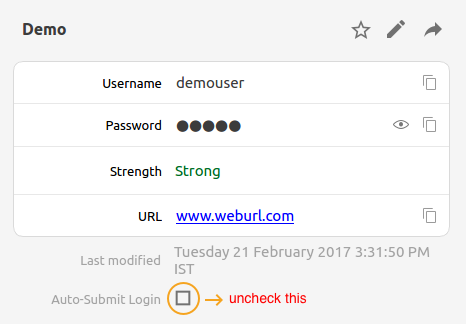
Hi @Garry Thanks for the suggestion. I've noted it down and forwarded to the concerned desk. Meanwhile, please try disabling the auto submit for the particular item and check if helps. Also, please share the website URL for us to look into it. Cheers!
-
Hi @Gilrich Sorry for the late reply. This problem surfaces when the "Autofill info" isn't saved in the particular item. The "Autofill info" contains the package name and signature of the App, which you can save by following these steps: Open the app to autofill--> Click on the Notification icon to autofill --> Unlock Enpass and search for the item in Enpass ---> Tap on the item --> It will prompt you to "MODIFY AND AUTOFILL" and then try to autofill. Hope this helps!
-
-
Hi @Bahiense, First of all thank you so much for using Enpass and encouraging your wife to do the same. We appreciate it. Well, it is not technically possible to sync the database in two different cloud accounts simultaneously. You need to use the same cloud account to automatically synchronize the data in various devices. Cheers!
-
Hi @User Thanks for bringing this to our notice. I've forwarded this issue to the dev team to look into it. Till then please bear with us.
-
Hi @Andymase Thanks for writing in. To delete any fields of an existing item --> Tap Edit --> Tap the label of that field you want to delete --> Tap the Delete icon in action bar on the top. For more details please refer our user manual. No! That shouldn't be happening. May you please share some more info so that we can look into it. On which Android device and Android version are you using? Which Enpass version are you using? Have you imported data from any other software? Thanks!
-
Hi @Pamela, Thanks for writing in. I would like to share that whenever you purchase an app from App Store it gets linked to the same Apple ID with which you made the purchase. Once you log in with the same Apple ID on the other Apple devices and then download Enpass, it will automatically restore the pro-version. Cheers!
-
Hi @Maki Sorry for the trouble you are going through. Please try clearing the cache and cookies from Safari browser, if you haven't tried that yet. If the problem still persists please drop us an email support@enpass.io mentioning this link so that we can share a debug tool and investigate where the problem could be. Thanks for your co-operation.
-
-
Thanks for sharing the video. That drives me crazy. To dig out this issue, I want a little input from your side so please let me know: Have you installed Edge browser from other sources other than Google play store? If you installed Enpass from Google Play Store then the package name should be "com.microsoft.emmx". On which device you are using Enpass? I've tested this issue on the same version of Edge browser (1.0.0.1916) and everything works fine here. It would be great if you can try installing the stable version of Edge browser from Google Play Store and check if you are facing the same behavior again. Thanks for your co-operation.
-
Hi @DocJay, Thanks for bringing this to our notice. I've noted it down and shared with the dev team to look into it. Till then please bear with us.
-
-
Hi @Len, Sorry for the trouble you are going through. Please drop us an Email at " support@enpass.io " so that we can investigate further and try to resolve this issue asap. Which cloud services are you using to sync? Have you enabled the auto backup setting in Enpass? Have you imported data from any other software? Are you using Enpass on any other device, where you can access your data? Does Enpass crash right after entering the master password or any other instance? Thanks for your co-operation.
-
Hi @Ben Woodard, Sorry for the trouble you are going through. Please try re-enabling the Face ID option from Enpass settings, if you haven't tried yet and let me know how it works out. Cheers!

