


Pratyush Sharma
Enpass team member
-
Joined
Everything posted by Pratyush Sharma
-
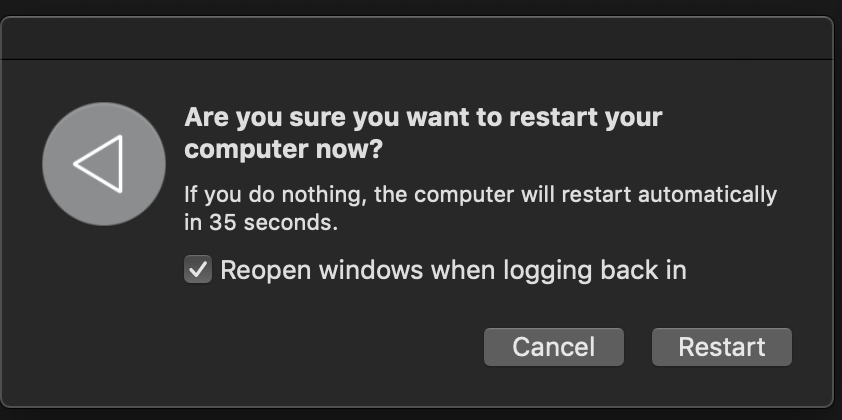
Hi @someenpassuser, Thanks for writing back in. Please let us know have you Enable the checkbox in "Are you sure....." pop-up when you restart or shut down the system. If Yes, it is system behavior as the user enables the checkbox while restarting or shutdown, which opens the Enpass application in the foreground.
-
Hi @Belogron, Sorry for the inconvenience caused to you. Please let us know the following details so we can help you better. On which device (along with OS version) are you using Enpass? Which Enpass version are you using? Which cloud are you using to sync? Also, let us know how many items you have in Enpass App? Thanks!
-
Hi @Stanford, Thanks for writing back in. We are working to have the latest version released ASAP
-
Hi @lookslikerain75, Sorry for the inconvenience caused to you. Please share the following details so that we can investigate where the problem could be. On which device (along with OS version) are you using Enpass? Which Enpass version are you using?
-
Hi @Sagar28, Sorry for the inconvenience caused to you. Please share the following details so that we can investigate where the problem could be. On which device (along with OS version) are you using Enpass? Which Enpass version are you using? Are you facing this issue on any particular website? Also from your comment "not work when doing forget password", we could not quite understand what problem you are facing. Please share some more details so that we can assist you better.
-
Hi @HeroesQuest1, Sorry for the inconvenience caused to you. Please update your Enpass App on Mac to the latest version(6.4.1) and check if the issue persists. Make sure that date and time are accurate on all devices (preferably set to automatic). Hope this helps!
-
Hi @MacGuy, Sorry for the inconvenience caused to you. Please share the following details so that we can investigate where the problem could be. On which device (along with OS version) are you using Enpass? Which Enpass version are you using?
-
Hi @Maxsi, Thanks for sharing the details. I have noted down your input and notified the QA team to look into it.
-
Hi @fantasista, Thanks for writing back in. I have noted down this issue and notified the QA team to look into it.
-
Hi @Mikey2233, Thanks for sharing the logs. Our team is working on issue.Till then, we will request you to please co-operate with us. Thanks!
-
Hi @Kylosky, Thanks for using Enpass and writing in. We have noted down your valuable suggestion and forwarded it to the concerned team for further consideration. Thanks for your feedback!
-
Hi @Michel.Schnabel Thanks for using Enpass and writing in. I would like to share that Enpass is an offline password manager and your data gets saved on your device only or if you had enabled sync then its copy gets saved at your preferred cloud. We can help you to get your data back in case if you have a backup of Enpass data over the cloud or locally on the device or if you are using Enpass on any other devices where you can access all your data.
-
Hi @boomzilla, Thanks for notifying us. I'm glad to know that the problem has been resolved.
-
Hi All, Update! We are glad to announce that the wait is finally over as we release the latest version of Enpass Portable for all desktop platforms (Windows, Mac, and Linux) to cater to the long impending user-requests. For more details, have a look at this forum post. Thanks for your co-operation.
-
Hi @Maxsi, We need a little input from your side, can you please let us know are you facing this problem when you manually lock the system using (cmd+L) button or when the system gets auto-locked. Also, please let us know are you using any Antivirus or third party security app which keeps the active background process. Thanks for your co-operation.
-
Hi @vampyren, Thanks for sharing your inputs. We have notified your feedback to the concerned team. However, please let us know if you face any issues.
-
Hi @truehumandesign & @Frank S, Thanks for sharing the details. For quick troubleshooting, disconnect the sync from all the devices and reconnect it again. Also, make sure you have enabled " keep me signed in" as mentioned in this FAQ. If the issue persists, let us know.
-
Hi @FirecrackerBE, Thanks for writing back in. Please share your finding with us after reinstalling the Chrome browser.
-
Hi @guizop, We are sorry for the inconvenience caused to you. Please let us know the following details so we can further investigate: We need a little input from your side; please let us know the following detail: On which device (along with OS version) are you using Enpass? Which Enpass version are you using? Are you using any Antivirus or third-party security-related extension? Go to General settings and make some changes. Restart Enpass and see if your changes persist or not. Thanks for your co-operation.
-
Hi @Emperor, We are sorry for the inconvenience caused to you. We are already aware of this issue and our Dev team is working on it. Hopefully, fix will be available in the next update. Till then, we will request you to please co-operate with us. Thanks!
-
-
-
Hi @lcw731, Thanks for writing in. Please have a look at this forum post if you are able to access Enpass using biometric. Also, my question for Enpass themselves, when i delete the current data file, will I loose my (early adopter) pro status? No, you will not lose your pro status please make sure you are logged in the play store using the same email address from which you had purchased Enpass. If you face any issues let us know.
-
Hi @Rodrigo, Thanks for sharing the details. Please let us know which model of Google Pixel are you using so we can investigate the issue.
-
Hi @Leonid Feldman, Thanks for sharing the details. I have noted down this issue and notified the QA team to look into it.