


Tarun Singh Rawat
Enpass team member
-
Joined
Everything posted by Tarun Singh Rawat
-
-
Thank you for sharing the details. We have forwarded the information to the tech team and will get back to you as soon as we have an update from them.
-
The Microsoft Store version of Enpass should unlock directly with Windows Hello even after a system restart, so the behavior you're experiencing is not expected. @zerohart To investigate this further and provide you with a resolution, please share the below details The Enpass app version installed from the Microsoft Store Your Windows 11 build/version @MrElectrifyer Please close the Enpass app completely using Ctrl + Q, then reopen it and let us know if you’re able to enable the Windows Hello option.
-
We absolutely understand that a solution on this has been delayed. Unfortunately, the problem isn't consistent and that makes it difficult for our team to reproduce and fix permanently. Rest assured, we are pushing for a resolution on priority and will get back with something concrete at the soonest. We thank you for your understanding and trust in Enpass.
-
-
To help us investigate the app crash more effectively, could you please share the crash report by following the steps below: Open the Settings app on your device. Go to Privacy & Security > Analytics & Improvements > Analytics Data. Look for a file with the name Enpass, along with the relevant date and timestamp. Share that report with us by emailing it to support@enpass.io and kindly include the link of this forum post in the email so we can reference the issue and assist you directly via a support ticket.
-
To help resolve the issue with the stuck vault, please follow the steps below: Turn off your internet connection (or enable flight mode) on your device. Close the Enpass app completely and remove it from recent apps. Reopen Enpass. Navigate to the vault that appears to be stuck. Tap Disconnect to remove the Wi-Fi Sync setup.
-
Our tech team would like to dig deeper so we can provide a resolution at the earliest. Could you help us probe further with these details? How many items do you currently have stored in your Enpass app? Is your vault syncing with any cloud service? If yes, please specify which one. Is the Website Icons option enabled in your Enpass settings? Does the issue occur with a specific item or with all items? We’re aware of a scenario where changing between website and custom icons can cause a mismatch between the item detail page and item list. Are you noticing the same behavior? Your inputs will help us narrow down the cause and work on the right fix.
-
If the Enpass file size on the cloud appears to be 5.6 GB, this could be due to attachments stored within the vault. Could you please confirm whether the total file size is 5.6 GB, or if this size refers specifically to the .dbsync file? Please let us know once you’ve checked the file details.
-
Please update the Enpass browser extension for Firefox to the latest version and check if the issue persists.
-
Thank you for reaching out. Ensuring your security is our top priority. We’ve released updates for all supported browsers starting with extension version 6.11.6. The issue has been confirmed as resolved by the original reporter (check the related blog post). To ensure your security, please update to the latest version (6.11.6) of the Enpass browser extension: https://www.enpass.io/downloads/
-
@Oceanwaves To help us better understand the issue, could you please provide the following details: Are you experiencing this problem only on Firefox, or does it occur on other Chromium-based browsers as well (such as Chrome, Brave, Edge, or Vivaldi)? If you're using any Chromium-based browsers, could you specifically check whether the issue is also reproducible on Google Chrome? Your input will help us investigate this more effectively. Thank you!
-
Thank you for your input. Our technical team is currently reviewing it, and we’ll get back to you with an update soon. #SI-4467
-
Please ensure you have installed the latest version of both the Enpass app and the Enpass browser extension. To help us troubleshoot the issue, could you please share the following details? The URL of the website where you are facing this issue. Is the issue occurring only on Mozilla Firefox browser, or do you experience it on other browsers as well?
-
Thank you for your feedback! Glad to hear it’s working well.
-
Thank you for taking the time to share your thoughts with us. We’ve forwarded your request to our technical team and are actively tracking its progress. We truly value your input and will keep you informed every step of the way.
-
Thank you for sharing your thoughts with us. We've passed the request to our technical team and are monitoring its progress. We’ll make sure to keep you updated.
-
Now that "Google Password Manager saved that passkey." Please try setting up the passkey again. Just make sure to choose Enpass as the passkey provider during the process. That way, it’ll be saved directly in the Enpass app, and you’ll be able to use it easily across supported platforms.
-
Thanks for reaching out! We've received your request and will keep you updated through your existing support ticket. You’ll hear from us with more details as soon as possible.
-
The issue occurs when the Master Password in your Enpass app doesn't match the one associated with the WebDAV vault. By deleting the data on WebDAV and re-syncing from your desktop, the vault was likely re-uploaded with the correct, updated Master Password, which may have resolved the problem.
-
We understand how this may be affecting your experience. Rest assured, our technical team is aware of the lag issue and is working diligently to resolve it. We’ll keep you posted with any progress.
-
To fix this issue and keep everything running smoothly, please update your Enpass app for macOS to the latest version (6.11.13). Thanks for your patience! Note: This update addresses a crash that occurred on macOS versions earlier than 13 after updating the app.
-
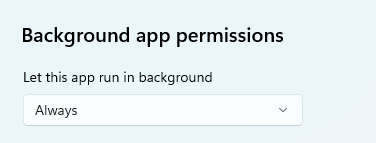
Please follow the below steps: Press Windows + i to open Settings. Go to Apps > Startup. In the list of apps, find Enpass. Toggle the switch on to allow Enpass to start automatically when Windows boots. Click the “>” (More Options) icon next to Enpass. Check Background app permissions and ensure it’s set to "Always" if the option is available
-
Thank you for sharing the details. I’ve passed the information along to our technical team and will get back to you as soon as we have an update.
-
In the Enpass app, please update the item's URL field to include "http" and check if the issue is resolved. If the issue persists, you can share the below details to our support team at support@enpass.io so they can investigate it further Your Enpass app version Your macOS version Browser version you are using

